

The premiere source of truth powering network automation. Open and extensible, trusted by thousands.

NetBox is now available as a managed cloud solution! Stop worrying about your tooling and get back to building networks.
Enabling an IGP on an Interface
By stretch | Wednesday, November 10, 2010 at 3:29 a.m. UTC
After reading my previous post, Configuring OSPFv2 Between Cisco and Force10, reader Paulkil suggested an article examining exactly what the network command under a routing process does. So here it is.
The network command under any IGP process configuration on IOS is generally described as being used to "turn on" a network within the routing protocol. But what does that entail? The command actually has two effects:
- Attempt to form adjacencies with neighbors attached to interfaces matched by the network statement
- Begin advertising directly-connected networks matched by the network statement.
For illustration, suppose an OSPFv2 router has three interfaces, each in a separate /24 subnet.
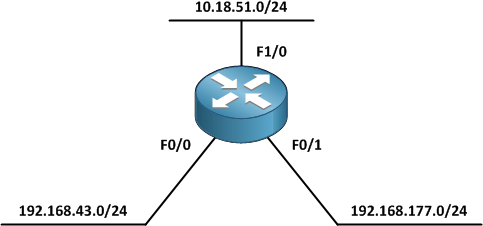
There are a few approaches we can take to enabling OSPF on these three interfaces.
One network statement per subnet
R1(config-router)# network 192.168.43.0 0.0.0.255 area 0
In the above example, you'll notice that the wildcard mask is the inverse of the subnet mask (255.255.255.0) for the interface. This is a common and fairly intuitive approach. We need a total of three network commands, one per subnet, to complete our configuration.
router ospf 1
 network 10.18.51.0 0.0.0.255 area 0
 network 192.168.43.0 0.0.0.255 area 0
 network 192.168.177.0 0.0.0.255 area 0
One network statement per interface
An extension of the prior approach, we could optionally implement interface-specific wildcard masks (0.0.0.0) instead of matching the entire subnet. This approach can be useful when you want to explicitly state which interface(s) are being enabled under the routing process.
router ospf 1
 network 10.18.51.1 0.0.0.0 area 0
 network 192.168.43.1 0.0.0.0 area 0
 network 192.168.177.1 0.0.0.0 area 0
Administrative summarization
There is no rule which requires a one-to-one mapping of network statements to actual networks; we are free to summarize. For example, we can summarize the two 192.168.x.x networks with a single network command.
router ospf 1
 network 10.18.51.0 0.0.0.255 area 0
 network 192.168.0.0 0.0.255.255 area 0
With regard to OSPF, you cannot summarize beyond the scope of an area; if using the network command, you will always need at least one statement per area.
Enable all interfaces by default
If all interfaces on our router are to participate in the IGP, we can simply use a single "default summarization" to enable all of them at once.
router ospf 1
 network 0.0.0.0 255.255.255.255 area 0
Use this with caution. Keep in mind that this will enable not only all currently configured interfaces, but new ones as well.
Enable OSPF under interface configuration
Lastly, we can sometimes opt not to use the network command at all. Certain protocols (RIPng, OSPFv2, OSPFv3, IS-IS) can be enabled under interface configuration mode.
R1(config-router)# interface f1/0
R1(config-if)# ip ospf 1 area 0
This happens to be my preferred approach, when supported, but your preference may differ. This method can also be combined with the network command:
R1(config)# router ospf 1
R1(config-router)# network 192.168.0.0 0.0.255.255 area 0
R1(config-router)#
R1# show ip protocols
Routing Protocol is "ospf 1"
  Outgoing update filter list for all interfaces is not set
  Incoming update filter list for all interfaces is not set
  Router ID 1.1.1.1
  Number of areas in this router is 1. 1 normal 0 stub 0 nssa
  Maximum path: 4
  Routing for Networks:
    192.168.0.0 0.0.255.255 area 0
  Routing on Interfaces Configured Explicitly (Area 0):
    FastEthernet1/0
 Reference bandwidth unit is 100 mbps
  Routing Information Sources:
    Gateway         Distance      Last Update
    2.2.2.2              110      00:00:22
    4.4.4.4              110      00:00:32
    3.3.3.3              110      00:00:22
    1.1.1.1              110      00:27:51
  Distance: (default is 110)
Passive Interfaces
There are instances where an IGP should advertise a network, but not attempt to form adjacencies on that interface. A common scenario is the access edge: exposing your routing protocols to untrusted end hosts is dangerous. In cases such as this, we can designate interfaces as passive. Passive interfaces will not form adjacencies with peers, but their attached networks will still be advertised via the routing protocol.
R1(config-router)# passive-interface f0/0
Alternatively, we could designate all interfaces as passive by default, allowing only those we explicitly designate to form adjacencies.
router ospf 1
 passive-interface default
 no passive-interface FastEthernet1/0
 network 10.18.51.0 0.0.0.255 area 0
 network 192.168.0.0 0.0.255.255 area 0
Here's an example which ties together a few of the approaches we've looked at in this article:
interface FastEthernet0/0
 ip address 192.168.43.1 255.255.255.0
!
interface FastEthernet0/1
 ip address 192.168.177.1 255.255.255.0
!
interface FastEthernet1/0
 ip address 10.18.51.1 255.255.255.0
 ip ospf 1 area 0
!
router ospf 1
 router-id 1.1.1.1
 log-adjacency-changes
 passive-interface FastEthernet0/0
 passive-interface FastEthernet0/1
 network 192.168.0.0 0.0.255.255 area 0
All three networks will be advertised, but the router will only form OSPF adjacencies on the 10.18.51.0/24 network. We can verify this behavior with show ip protocols.
R1# show ip protocols
Routing Protocol is "ospf 1"
  Outgoing update filter list for all interfaces is not set
  Incoming update filter list for all interfaces is not set
  Router ID 1.1.1.1
  Number of areas in this router is 1. 1 normal 0 stub 0 nssa
  Maximum path: 4
  Routing for Networks:
    192.168.0.0 0.0.255.255 area 0
  Routing on Interfaces Configured Explicitly (Area 0):
    FastEthernet1/0
 Reference bandwidth unit is 100 mbps
  Passive Interface(s):
    FastEthernet0/0
    FastEthernet0/1
  Routing Information Sources:
    Gateway         Distance      Last Update
    2.2.2.2              110      00:10:24
    4.4.4.4              110      00:10:34
    3.3.3.3              110      00:02:30
    1.1.1.1              110      00:02:30
  Distance: (default is 110)
Posted in Routing
Comments
November 10, 2010 at 3:33 a.m. UTC
Of course, a good best practice to follow is "passive-interface default", and then only enable it on the links you need it. This eliminates the possibility of unintended adjacencies.
November 10, 2010 at 11:56 a.m. UTC
Hey Stretch,
thanks a mill for the mention and putting together this great article so fast.
I've still one question regarding the network command.
So say we only enter the command:
router ospf 1
network 192.168.43.0 0.0.0.255 area 0
Will the other two subnets in your example still be advertised out the interface F0/0?
Thanks,
Paul
November 10, 2010 at 2:01 p.m. UTC
may u do a articles help me to mater Acl ???? plz :)
November 10, 2010 at 2:40 p.m. UTC
@paulkil: Nope, since you've only matched the one network.
November 10, 2010 at 4:30 p.m. UTC
Thanks Stretch,
got it now finally :-)
November 10, 2010 at 9:24 p.m. UTC
Stretch,
been thinking again,
what if I added the redistribute connected subnets to my config like so;
router ospf 1
network 192.168.43.0 0.0.0.255 area 0
redistribute connected subnets
Would that then advertise the other two subnets out int F0/0?
Thanks,
Paul
November 12, 2010 at 7:46 p.m. UTC
@Paul
Yes it would. Those routers would be External type-2 OSPF routes. However OSPF would still not be actually running on those other 2 interfaces
December 10, 2010 at 4:21 a.m. UTC
What are the name of this stencils you use in topology diagrams? They look awesome.
Thank you.
February 16, 2011 at 9:52 a.m. UTC
Thanks for the article! I have a question since I don't have lab equipment at hand to test it out at the moment.
Just to clear it out, does this rule apply to all other routing protocols? Say, I typed network 192.168.43.0 0.0.0.0.255 in EIGRP, can I assume that other two networks won't be advertised out of fa0/0?
October 3, 2011 at 10:11 a.m. UTC
Looking for passive interface details all over . .. . luckily found it here. Thanks mate !