

The premiere source of truth powering network automation. Open and extensible, trusted by thousands.

NetBox is now available as a managed cloud solution! Stop worrying about your tooling and get back to building networks.
IOS Zone-Based Firewall
By stretch | Monday, January 30, 2012 at 2:20 a.m. UTC
A common network implementation for branch offices and other small sites belonging to a larger entity is to have two WAN connections: One is an MPLS or otherwise private connection to the corporate network, and the other is an Internet circuit (often some flavor of broadband) which carries public Internet traffic as well as VPN tunnels which serve as a backup to the private WAN circuit. Typically, the WAN connection requires dynamic routing capability (e.g. BGP) but few security mechanisms given that it merely extends a private network. Conversely, the Internet connection requires strong policy enforcement but no dynamic routing; a default route toward the Internet generally suffices.
Some organizations thus opt to deploy a standalone device to handle each connection at a branch office. The MPLS connection terminates to a branch-level router which supports BGP and offers flexible physical interface options. The Internet connection is typically an Ethernet hand-off which terminates to a low-end firewall. Both the router and the firewall are then typically interfaced with the internal LAN through one or more layer three switches running an IGP. This design is certainly functional and very flexible, however the initial cost of deploying three relatively expensive infrastructure devices in this manner can be prohibitive.
The solution we'll look at today is to move the firewall functionality into the router, so that both circuits terminate into the same device. This removes the requirement for a standalone firewall and the layer three switch, as one device performs all routing for the site. To support security policy enforcement, we'll use Cisco IOS' zone-based firewall feature. Note: The zone-based firewall feature requires a security license and relatively recent code to function properly. IOS 15.0(1)M7 was used in the lab for this article.
Assigning Security Zones
A security zone is a group of routed interfaces which are intended to be treated similarly from a security perspective. For example, if you have two redundant Internet connections from an edge router, both could be placed into a shared "untrusted" zone: It is irrelevant from a security perspective which is the primary connection and which is for failover. A connection into the internal network, however, would be assigned to a separate, trusted zone. Additional zones can also be created with levels of trust which might fall in between the two; for example, a guest wireless network or corporate extranet.
The topology below illustrates a design applicable to what was discussed above, employing three distinct security zones comprising five logical connections.
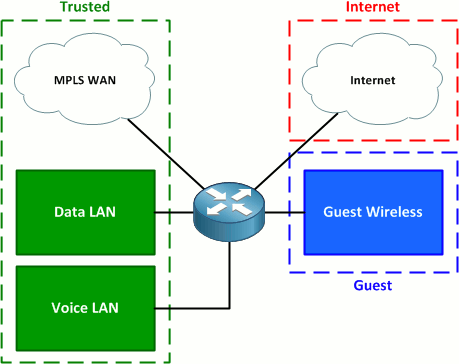
The three zones are:
- Trusted - MPLS and internal LAN connections
- Guest - Guest wireless
- Internet - Internet connection
Security zones are defined in global configuration mode. You have the option of including a description for each zone, but that's it.
Router(config)# zone security Trusted
Router(config-sec-zone)# zone security Guest
Router(config-sec-zone)# zone security Internet
(For those wishing to copy and paste, the complete configuration is available at the end of the article.)
There is also a special default zone named "self". This zone applies to traffic which originates from or is destined for the control plane of router itself (e.g. routing protocols, SSH, SNMP, etc.). By default, all traffic is allowed into the self zone.
Physical and logical interfaces are assigned to security zones in a manner similar to how they may be designated NAT inside and outside interfaces, with the command zone-member security. In our lab, FastEthernet0/0 is an IEEE 802.1Q trunk to the core LAN switch carrying the data (1), voice (10), and guest wireless (99) VLANs. FastEthernet0/1 connects to the MPLS WAN and FastEthernet0/2/0 connects to a broadband Internet circuit.
Router(config)# interface f0/0.1
Router(config-subif)# zone-member security Trusted
Router(config-subif)# interface f0/0.10
Router(config-subif)# zone-member security Trusted
Router(config-subif)# interface f0/0.99
Router(config-subif)# zone-member security Guest
Router(config-subif)# interface f0/1
Router(config-if)# zone-member security Trusted
Router(config-if)# interface f0/2/0
Router(config-if)# zone-member security Internet
Router# show zone security
zone self
  Description: System defined zone

zone Trusted
  Member Interfaces:
    FastEthernet0/0.1
    FastEthernet0/1
    FastEthernet0/0.10

zone Guest
  Member Interfaces:
    FastEthernet0/0.99

zone Internet
  Member Interfaces:
    FastEthernet0/2/0
Creating Zone Pairs
Zone pairs apply policy enforcement to traffic flowing from one security zone to another. A zone pair must be defined for each direction in which traffic is allowed to be initiated. For example, a common simple policy is that the internal network can initiate any sort of traffic to the Internet, but no traffic may be initiated from the Internet to the internal network. This policy requires only a single zone pair, from the internal zone to the Internet zone. If there exists a requirement for traffic to be initiated from the Internet zone to the internal zone, a second zone pair (in the opposite direction) must also be created.
In early versions of IOS zone-based firewall, traffic flowing from one interface to another within the same security zone was allowed to pass by default. In recent versions, however, even intra-zone traffic requires a zone pair definition (with a single zone as both the source and destination).
We'll create three zone pairs to meet our requirements:
- Trusted to Internet - Allows Internet access from the internal network
- Guest to Internet - Allows Internet access from the guest wireless network
- Trusted to Trusted - Allows routing of traffic among the data, voice, and MPLS interfaces
The command to configure a zone pair uses the following syntax:
zone-pair security NAME source FROM-ZONE destination TO-ZONE
Here are our zone pairs definitions:
Router(config)# zone-pair security Trusted->Internet source Trusted destination Internet
Router(config-sec-zone-pair)# zone-pair security Guest->Internet source Guest destination Internet
Router(config-sec-zone-pair)# zone-pair security Trusted source Trusted destination Trusted
Creating and Applying Security Policies
Finally, we'll define and apply our security policies to the zone pairs. Policies are defined as inspection policy maps, which are very similar in construct to policy maps used for quality of service (QoS) classification and marking. Policy maps reference class maps, which in turn reference access lists or NBAR definitions to classify traffic.
One of three security actions can be taken on traffic matched by a class map:
- Drop - The traffic is dropped.
- Pass - The traffic is permitted.
- Inspect - The traffic is permitted and inspected statefully so that return traffic in the opposite direction is also permitted.
First, we'll create a class map to match all of the traffic we want to allow from the Trusted zone out to the Internet. We want to inspect all traffic outbound to the Internet so that return traffic is allowed statefully. Unfortunately, we can't use the inspect action with the default class map, so we'll need to create a custom class map to match the base protocols TCP, UDP, and ICMP. (This doesn't allow non-TCP/UDP protocols such as IPsec, but meets our needs.)
Router(config)# class-map type inspect match-any All_Protocols
Router(config-cmap)# match protocol tcp
Router(config-cmap)# match protocol udp
Router(config-cmap)# match protocol icmp
We could use this class map for the Guest-to-Internet zone pair as well, but since we don't trust our guests as much as internal users, we want to limit what they can do on the Internet. For example, we don't want to risk a guest bringing in a laptop infected with a spambot, sending out spam from our Internet connection, and getting our organization's IP space blacklisted. We'll limit guests to basic web access.
Router(config)# class-map type inspect match-any Guest_Protocols
Router(config-cmap)# match protocol http
Router(config-cmap)# match protocol https
Router(config-cmap)# match protocol dns
Our class maps need to be wrapped into service policies so that they can be associated with security actions. We do this by creating inspection policy maps.
Router(config)# policy-map type inspect Trusted_to_Internet
Router(config-pmap)# class type inspect All_Protocols
Router(config-pmap-c)# inspect
Router(config-pmap-c)# policy-map type inspect Guest_to_Internet
Router(config-pmap)# class type inspect Guest_Protocols
Router(config-pmap-c)# inspect
We can't forget our intra-zone policy to allow traffic from one trusted interface to another. Since we want to allow all intra-zone traffic, we can use the pass action on the default class map; there is no need to inspect and allow return traffic since the intra-zone pair applies in both directions.
Router(config)# policy-map type inspect Trusted
Router(config-pmap)# class class-default
Router(config-pmap-c)# pass
Lastly, we'll apply the three policy maps to their appropriate zone pairs.
Router(config)# zone-pair security Trusted->Internet
Router(config-sec-zone-pair)# service-policy type inspect Trusted_to_Internet
Router(config-sec-zone-pair)# zone-pair security Guest->Internet
Router(config-sec-zone-pair)# service-policy type inspect Guest_to_Internet
Router(config-sec-zone-pair)# zone-pair security Trusted
Router(config-sec-zone-pair)# service-policy type inspect Trusted
We can verify our configuration using the command show zone-pair security:
Router# show zone-pair security
Zone-pair name Trusted
    Source-Zone Trusted  Destination-Zone Trusted
    service-policy Trusted
Zone-pair name Trusted->Internet
    Source-Zone Trusted  Destination-Zone Internet
    service-policy Trusted_to_Internet
Zone-pair name Guest->Internet
    Source-Zone Guest  Destination-Zone Internet
    service-policy Guest_to_Internet
More detail regarding the entire firewall policy hierarchy can be achieved with the command show policy-map type inspect zone-pair:
Router# show policy-map type inspect zone-pair

policy exists on zp Trusted
 Zone-pair: Trusted

Service-policy inspect : Trusted

Class-map: class-default (match-any)
      Match: any
      Pass
        10 packets, 800 bytes

policy exists on zp Trusted->Internet
 Zone-pair: Trusted->Internet

Service-policy inspect : Trusted_to_Internet

Class-map: All_Protocols (match-any)
      Match: protocol tcp
        0 packets, 0 bytes
        30 second rate 0 bps
      Match: protocol udp
        0 packets, 0 bytes
        30 second rate 0 bps
      Match: protocol icmp
        1 packets, 80 bytes
        30 second rate 0 bps
...
Our zone-based firewall configuration is now complete! At this point we can verify that, for example, a host on the LAN can reach destinations on the MPLS network and on the Internet, but not on the guest network. A host on the guest network has limited web access to the Internet and no access to the corporate LAN. And of course, no one on the Internet has access to either the corporate LAN or the guest network.
Please keep in mind that the configuration scenario presented here is quite simplistic. It was designed solely as an instrument for teaching the fundamentals of IOS zone-based firewall and is not intended to provide guidance on defining a real-world security policy.
Final Configuration
class-map type inspect match-any Guest_Protocols
 match protocol http
 match protocol https
 match protocol dns
class-map type inspect match-any All_Protocols
 match protocol tcp
 match protocol udp
 match protocol icmp
!
policy-map type inspect Trusted
 class class-default
  pass
policy-map type inspect Guest_to_Internet
 class type inspect Guest_Protocols
  inspect
 class class-default
  drop
policy-map type inspect Trusted_to_Internet
 class type inspect All_Protocols
  inspect
 class class-default
  drop
!
zone security Trusted
zone security Guest
zone security Internet
zone-pair security Trusted source Trusted destination Trusted
 service-policy type inspect Trusted
zone-pair security Trusted->Internet source Trusted destination Internet
 service-policy type inspect Trusted_to_Internet
zone-pair security Guest->Internet source Guest destination Internet
 service-policy type inspect Guest_to_Internet
Posted in Security
Comments
January 30, 2012 at 3:33 a.m. UTC
Great example and write up. For some reason, I still use CBAC in practice. I was a bit surprised to see that ZFW was listed on the R&S Blueprint, so thanks for the review.
January 30, 2012 at 5:30 a.m. UTC
ZBFW is really cool, however it has some limitations. For example, when you simply enable (without even configuring it) zone based firewall in IOS, it activates anti spoofing mechanisms. So for instance, having two routers, each with it's own BGP session to corresponding ISP is very well working configuration unless you enable ZBFW. After enabling it half of the traffic is dropped, because asymmetric routing is very likely in multiple ISPs setup but no acceptable for ZBFW's anti spoofing engine.
Note: everything is fine, when you have ONE router with multiple BGP sessions to ISPs.
And configuring ZBFW from CLI is real pain, CCP is more suitable for maintaining FW rules and zones in condition.
January 30, 2012 at 7:42 a.m. UTC
Hello,
Great article!
But
policy-map type inspect Trusted
class class-default
pass
is useless, because all traffic between two interfaces in the same security zone is allowed by default!
And don't forget that you can only use match protocol {tcp|udp|icmp|h323} for the self zone. If you want classify snmp query for the router you have to use
access-list 100 permit udp any any eq snmp
class-map type inspect SNMP_SELF
match protocol udp
match access-group 100
exit
Regards,
January 30, 2012 at 9:49 a.m. UTC
Thanks for the great, easy to read article
alexis
January 30, 2012 at 11:24 a.m. UTC
Jeremy,
You mentioned on twitter that you had problems when using 12.4T. May I know what they were? I also have IOS 12.4T and I want to know if it is really mandatory to upgrade.
Thanks!
January 30, 2012 at 1:28 p.m. UTC
@Sebastien: As noted in the article:
In early versions of IOS zone-based firewall, traffic flowing from one interface to another within the same security zone was allowed to pass by default. In recent versions, however, even intra-zone traffic requires a zone pair definition (with a single zone as both the source and destination).
From experience, I can say that at least IOS 15.0(1)M6 and M7 require an explicit intra-zone pair.
@zox: During testing on 12.4(24)T and T4, intra-zone traffic simply was not passed from interface to the other. And attempting to create an explicit intra-zone pair (with one zone as both source and destination) yielded an error.
January 30, 2012 at 3:12 p.m. UTC
Great article. For people who've configured this on a device in a production network, have you used the self-zone for protecting the router or gone with control plane security?
February 1, 2012 at 5:59 p.m. UTC
Very similar to how Juniper SSG's operate.
February 1, 2012 at 8:25 p.m. UTC
Hey.
This is one of my favourite blog sites. I always wondered how a customer could connect to the internet, but also use an mpls vpn to communicate between sites.
Can I ask what the physical infrastructure looks like when connecting from the branch router to the mpls PE router at the ISP? I don't get how you can take a layer 3 feed from PE to the branch router?
Regards,
Stephen
February 3, 2012 at 3:16 p.m. UTC
Great Blog!!!!
Cheers for the info. Its always a pleasure to learn a new method of doing something which I have been doing a different way in the past.
Keep up the good work Stretch!
February 4, 2012 at 1:37 a.m. UTC
Coming from the Juniper side of things, this sounds very similar to the way JUNOS for Security platforms (SRX) treats zones/interfaces/policies, though it looks like slightly more work to configure via IOS. Thanks for the helpful example!
February 5, 2012 at 3:28 a.m. UTC
gotta watch out for out of order packets in 12.4 though... I've tried four implementations of ZBPF on 12.4 and each one had issues with out of order packets (downloading mostly... the downloads would mysteriously slow to a crawl and then stop completely). I tried tons of different configs to try to fix it but the only way I was able to was by updating the IOS to 15. After that, the issue went away completely. Just some strange bug in 12.4 I suspect.
February 6, 2012 at 6:40 p.m. UTC
Thank you for this article.
February 12, 2012 at 1:03 p.m. UTC
Really helpful article. as a basic level firewall function on a router
Thank you for great articles .
February 26, 2012 at 5:12 p.m. UTC
Hello Jeremy,
Everyone respects you as your earn your name through years of work and professionalism.
ZBF, except CCIE track it is a pain to use for everyday work.
I am using it for about two years now, I believe you know what I mean.
I will (hope it is allowed) a link for webfiltering with ZBF: https://supportforums.cisco.com/docs/DOC-8028
June 2, 2012 at 9:08 a.m. UTC
Hello Jeremy,
Great Article!!
June 28, 2012 at 9:17 a.m. UTC
Nice article,
I have a question related to ZBF :
In our setup we are using 2 router with 2 communication lines from the same ISP,
i dong have any trouble with the traffic drop as we are only using one router always as the active router, what im facing is that when a communicaion line discconect from the ISP (communicaion down) and came back up there is certin application that hang and stoped working, and i had to reset the sessions on the router manulally as below command:
clear zone-pair inspect session class-map Out-To-whatever-Class
is there any way to overcome his issue?
i will be very thankfull for your suggestions
September 30, 2012 at 11:51 p.m. UTC
For anyone who stumbles upon this article in the future, I can confirm that IOS 15.1(4)M4 does pass traffic between interfaces within the same zone without you having to explicitly define an intra-zone pair.
December 20, 2012 at 4:45 p.m. UTC
Hi,,
Not only the article is good, the language used is very easy to understand in the first attempt...
Keep up the good work.
:)
February 5, 2013 at 1:19 p.m. UTC
Excellent!
Thanks for such a nice, brief and comprehensive explanation. :)
It was excellent.
February 8, 2013 at 5:05 p.m. UTC
Really great article! I started using this on customer routers, but I ran into a problem. How do I exclude FTP with the "match protocol tcp" line? I found that passive FTP fails when I use this configuration. If I could exclude just this one protocol, it would be perfect. I typically have to exclude FTP from the global policy on an ASA and I would like to be able to do the same on IOS. Thanks!!!!!
March 27, 2013 at 11:03 p.m. UTC
This really is a fantastic introduction article for setting up a ZBF framework. It is very easy to understand. It now gives me a starting point for creating my own firewall, rather than having to rely on CCP to create it. (I tried that, the results were not good). Thank you!
June 10, 2013 at 11:16 a.m. UTC
This has to be one of the best sites i come to get real study information from...currently studying for the CCIE and this blog has been a real reference tool for me...The way you keep the language simple while hitting the points is something worth commending. Thanks alot
June 14, 2013 at 2:05 p.m. UTC
It's really nice; I've just learned something new today. I'll do some test in a lab before I go in production to see if it'll work with DMVPN, mpls, IP inspect in one router before I add ZBF for better security.
Thanks a lot!
July 3, 2013 at 11:01 a.m. UTC
Recently I won the battle with asymmetric routing (two routers + two ISPs+ ZBF). Everything works fine now. If you are interested - drop me an email
August 15, 2013 at 5:10 p.m. UTC
Jenya,
You notate that you won the battle. how so? i am experiencing issue now with vti tunnel drops with the isp. the tunnel will drop the bgp will renegotiate causing sporadic outages that last a couple mins. The tunnel in down/up in about 20 seconds but bgp takes longer. still trying to pinpoint the cause. may be related to spoof attack mechanisms with zbf but don't have the logs to back this up yet.
October 29, 2013 at 11:25 p.m. UTC
Currently studying for my ccnp security - great help thanks!!
December 24, 2013 at 9:59 a.m. UTC
Precise, graphical and easy to understand.
I have been visiting your site more often now. I think Cisco need to learn lesson from this site and simply their articles.
Good work Jeremy.
Thank YOU
February 9, 2014 at 4:36 p.m. UTC
Hi,
I'm wondering if this feature can be used on PE router's also.
I.E.: We have a PE router, and I would like to implement ZFW for the internet VPN only.
Upstream communication is handled by an interface, which is part of the INTERNET VRF. (BGP peering towards the upstream ISP's in this VRF).
We have an MPLS interface toward the core. In this situation, can we use ZFW? (I.e.: what happens, if you assign an MPLS interface to a zone?).
Obviously we have a lot of non-internet based VPN's on this PE also.
Gabor
May 20, 2015 at 8:43 a.m. UTC
Awesome explanation! helped me quickly configure & test it out.
June 21, 2015 at 10:03 a.m. UTC
Thank you for this post very slight for understand the concept of zone-based firewall
August 9, 2015 at 3:16 p.m. UTC
Great post. Would it be possible to add to the configuration how to open a port for an application ? (say port 9000 for example) Thanks
November 21, 2015 at 5:30 a.m. UTC
I wish there was a like button :)
March 9, 2016 at 4:09 p.m. UTC
Great Info..Thanks Mate!!!
June 20, 2016 at 12:00 a.m. UTC
Awesome article.
One question:
If you want to allow guest users to connect to their own company vpn. What will be required to configure on the ZBF
September 8, 2016 at 8:33 p.m. UTC
Thank you,
Out of interest, do you also use extended ACLs method in Cisco IOS f/w?
Thanks