

The premiere source of truth powering network automation. Open and extensible, trusted by thousands.

NetBox is now available as a managed cloud solution! Stop worrying about your tooling and get back to building networks.
Aironet APs: Bridge Groups and BVI
By stretch | Monday, February 20, 2012 at 1:10 a.m. UTC
The command line configuration of Cisco Aironet access points can be confusing to someone who doesn't understand what's going on behind the scenes. "What's a bridge group? How is it different from a VLAN? Why do I have subinterfaces and a BVI?" In this article, we'll walk through a basic multiple SSID configuration on an Aironet one section at a time and shed some light on how bridge groups are used to tie everything together.
Our example will make use of two SSIDs:
- VLAN 10: Corporate
- VLAN 20: Guest
Configuration
Global Configuration
dot11 ssid Corporate
   vlan 10
!
dot11 ssid Guest
   vlan 20
!
bridge irb
Two relevant functions are performed in the snippet above. First, our two SSIDs (Corporate and Guest) are defined and associated with VLANs. Second, integrated routing and bridging (IRB) is enabled with the command bridge irb. This allows to define bridge groups and a BVI.
Radio Interface Configuration
Our access point has two physical radio (wireless) interfaces: Dot11Radio0 (2.4 GHz) and Dot11Radio1 (5 GHz). Since we want to enable both SSIDs on both radios, the interfaces are configured identically.
interface Dot11Radio0
 no ip address
 !
 ssid Corporate
 !
 ssid Guest
 !
 mbssid
!
interface Dot11Radio0.10
 encapsulation dot1Q 10
 bridge-group 1
!
interface Dot11Radio0.20
 encapsulation dot1Q 20
 bridge-group 2
interface Dot11Radio1
 no ip address
 !
 ssid Corporate
 !
 ssid Guest
 !
 mbssid
!
interface Dot11Radio1.10
 encapsulation dot1Q 10
 bridge-group 1
!
interface Dot11Radio1.20
 encapsulation dot1Q 20
 bridge-group 2
First, we assign both SSIDs to the physical radio interfaces. We also include the command mbssid to ensure that each SSID receives a unique BSSID (which is analogous to a MAC address).
Next, we create a subinterface for each SSID, .10 and .20. Each subinterface is mapped to both a VLAN and a bridge group. We'll talk more about bridge groups shortly.
Ethernet Interface Configuration
interface FastEthernet0
 no ip address
!
interface FastEthernet0.10
 encapsulation dot1Q 10
 bridge-group 1
!
interface FastEthernet0.20
 encapsulation dot1Q 20
 bridge-group 2
The configuration of our FastEthernet interface should look similar to that of our radio interfaces. Two subinterfaces are attached to the physical interface, with each tied to its respective VLAN and bridge group.
BVI Configuration
interface BVI1
 ip address 192.168.10.123 255.255.255.0
 no ip route-cache
Finally, we configure the bridge virtual interface (BVI) for management. A BVI interface is mapped to a bridge group by its numeric identifier (in this case, 1), similar to how a VLAN interface is mapped to a VLAN. It may help to refer to VLAN interfaces as switch virtual interfaces (SVIs); BVIs are the same concept but applied to bridge groups instead of VLANs.
BVI1 is the default BVI on Aironet access points and cannot be deleted:
ap(config)# no interface bvi1
%command not allowed, cannot remove BVI 1
While you can create BVIs for other bridge groups, only one of them can be assigned an IP address for management (similar to how a layer two-only Catalyst switch can only have one active VLAN interface). And since BVI1 is going to be there anyway, we might as well use it.
Note that the IP address assigned to BVI1 must be in the same subnet as any SSID assigned to the bridge group (in this case, the Corporate SSID).
Putting it all Together
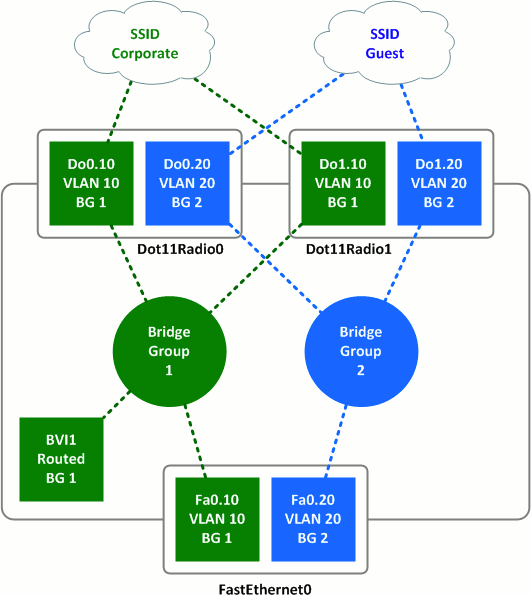
Working from top to bottom, we can see that:
- SSIDs are mapped to VLANs.
- VLANs are mapped to radio subinterfaces.
- Radio subinterfaces are mapped to bridge groups.
- Ethernet subinterfaces are also mapped to bridge groups.
- BVI1 is assigned an IP address tied to bridge group 1.
This configuration keeps wireless traffic belonging to one SSID isolated from traffic belonging to the other as it transits the access point from the wired interface to the wireless interface and vice versa. Note that because there is no BVI2 interface, the access point has no IP address reachable directly from the Guest SSID.
What About Those Other Bridge Group Commands?
You may have noticed that, when assigning a radio interface to a bridge group with the bridge-group command, four or five additional commands also appear out of nowhere. For example, here's the full configuration of interface Dot11Radio0.10 from our lab as it appears in the running configuration:
interface Dot11Radio0.10
 encapsulation dot1Q 10
 no ip route-cache
 bridge-group 1
 bridge-group 1 subscriber-loop-control
 bridge-group 1 block-unknown-source
 no bridge-group 1 source-learning
 no bridge-group 1 unicast-flooding
 bridge-group 1 spanning-disabled
These are default commands which tweak the behavior of bridge groups on the access point, primarily by disabling spanning tree and compensating for its absence. Unless you have a specific reason to modify them, just let these commands be.
Posted in Wireless
Comments
February 20, 2012 at 1:57 a.m. UTC
Great article, Jeremy! Thanks.
February 20, 2012 at 2:01 a.m. UTC
So is there a difference between bridge group and vlan?
February 20, 2012 at 2:25 a.m. UTC
@Michael: Bridge groups are used internally to the device to bridge traffic from one routed interface to another. They can be used similar to VLANs internally, but don't provide any traffic isolation outside of the device as VLANs do with tagging.
February 20, 2012 at 9:29 a.m. UTC
Great article, Jeremy, many thanks! I'm not too familiar with the WAP products, but the C877 integrated service router seems to work in a pretty similar way, so my question is, why would you use bridge groups, why not just use those subinterfaces (both radio and LAN) as routed interfaces?
Incidentally, any suggestion for how to enable multicast across the readio interface (i.e. between two devices attached to the same SSID)? I've been scratching my head over this for weeks.
February 20, 2012 at 11:48 a.m. UTC
What if you want your management traffic to be in a separate vlan that is not broadcasted in a SSID.
Would you still need any Bvi?
Or could you just create a Vlan interface with an ip address?
February 20, 2012 at 8:34 p.m. UTC
Great post Jeremy! Great site by the way!
February 21, 2012 at 12:54 a.m. UTC
Very good information ! Thank you very much Jeremy ! :)
February 22, 2012 at 4:23 a.m. UTC
Pim (and Stretch),
On Aironet APs, you can't assign an IP to anything other than a bridged virtual interface. And the only BVI you can use for IP is 1. This is because you have to enable 'route IP' for the bridge, and on the Aironets I've configured, it only allows you to use bridge group 1...
zoran-1131ag#show ver | inc ^Cisco
Cisco IOS Software, C1130 Software (C1130-K9W7-M), Version 12.4(21a)JA1, RELEASE SOFTWARE (fc1)
zoran-1131ag#conf t
Enter configuration commands, one per line.  End with CNTL/Z.
zoran-1131ag(config)#no bridge 1 route ip
%command not allowed, cannot remove bridge 1 route ip
zoran-1131ag(config)#bridge 20 route ip
%command not allowed, route ip only allowed on bridge group 1
I include my hardware & IOS version in case it's changed, but in the past I've tried to use a different bridge group number for management routing & I couldn't make it work.... :(
Chris
February 24, 2012 at 11:40 a.m. UTC
Ok. So then solution would be ( to separate management traffic to be in a vlan that is not broadcasted in a SSID) to use BVI 1 with IP address and map it with FastEthernet subinterface, and create two different bridge groups. For example:
interface Dot11Radio0 ! ssid Corporate ! ssid Guest ! mbssid bridge-group 1 (This is by default, and we can't turn this off) ! interface Dot11Radio0.20 encapsulation dot1Q 20 bridge-group 2 ! interface Dot11Radio0.30 encapsulation dot1Q 30 bridge-group 3
!
March 4, 2012 at 3:53 a.m. UTC
Excellent post! Perfect timing since I was about to roll-out a second SSID on my Aironets next week, and this solidifies my understanding of the radio-vlan-bridgegroup-interface relationships.
P.S. Love the networking challenges required for posting.
March 28, 2012 at 9:20 a.m. UTC
Regarding bridge-group 1, I've ran into some issues with AP's telling me I cannot remove this group from the radio physical interfaces. For ease of use, management or using a basic configuration template type to configure many APs for different sites, I've configured a text file offline and uploaded which works perfect like in the example above. In some cases I've modified an existing AP running config and found the AP gives errors when you try to remove the bridge group 1 from the physical radio interfaces.
It is possible to configure a management IP on the fa0 interface and subinterface.
May 6, 2012 at 12:18 p.m. UTC
Great article. And very timely for me.
The problem I'm having is I can authenticate to my WAPs but not getting any IP address. I'm pretty sure this is related to the crappy Netgear switch that the WAP connects to.
Normally nn the switch the WAP connects to you would need to have that port set as a trunk port to allow traffic from both the guest and private VLANs correct?
July 3, 2012 at 8:41 p.m. UTC
Akos -
You wouldn't use the radio interfaces and sub-interfaces as routed interfaces because an AP is a Layer 2 device and does not have any protocols or ability to route. The command 'bridge 1 route ip' is actually a bit of a mis-nomer. In order to accomplish this, it wraps packets leaving the AP in appropriate additional frames with the MAC address of bridge-group 1. It then trunks across to the switch, and the routing is performed down stream at the appropriate Layer 3 device.
Regards,
Scott
July 3, 2012 at 8:51 p.m. UTC
revbob -
Yes, in order to have traffic from the AP cross a switch when you have multiple SSIDs and VLANs configured you need a trunk. When you use the encapsulation command on your subinterfaces, you are tagging the traffic that traverses those ports. Without a trunk configured on the switch with the same VLAN setup, the traffic cannot flow. If you plug an AP with multiple SSIDs and VLANs configured and you place one of those SSIDs on the native VLAN, then your switch in access mode would permit that one SSID through (assuming the switch defaults its port to an untagged VLAN in access mode). If, however, you only want a single SSID but you wish to carry it over an access port that is a tagged interface, then you still need the subinterfaces and encapsulation statements to ensure your traffic on that SSID is able to go through the switch because the tags would match.
Regards,
Scott
July 16, 2012 at 8:52 p.m. UTC
I'm curious as to what hardware this was configured on. I'm trying replicate these steps on my Aironet 1141n but cannot setup the bridge groups the same way. The Dot11Radio0 is in bridge-group 1 by default and cannot be removed. This means when I go to configure Dot11Radio0.10, I cannot add the bridge group 1 like you did in the example. Should I just move to the next bridge group?
October 29, 2012 at 2:05 p.m. UTC
I ran into the same problem trying to remove bridge group 1 from my 1141N. You need to add the physical interfaces to another bridge group (i.e. overwrite the bridge group on the physical interfaces) and then you are free to use bridge-group 1 on a subinterface which you will need to do if one of your sub-interfaces is going to be your management interface (and int BVI1 having a IP address in this network)
"Next we need to remove initially configured “bridge-group 1” on physical interfaces FastEthernet0 dot11Radio0 and dot11Radio1 because we will use their subinterfaces. We cannot remove “bridge-group 1” directly. It does not allow us to do this. It likes “bridge-group 1” probably because it is necessary to existence of BVI1-interface. But we can assign “bridge-group 2” to interface and then remove it yet. Just look at that:
ap-1131.sokol.msk#configure terminal
Enter configuration commands, one per line. End with CNTL/Z.
ap-1131.sokol.msk(config)#interface FastEthernet0
ap-1131.sokol.msk(config-if)#no bridge-group 1
%command not allowed, cannot remove bridge-group 1
ap-1131.sokol.msk(config-if)#bridge-group 2
ap-1131.sokol.msk(config-if)#no bridge-group 2
Feb 13 19:14:29: %LINK-3-UPDOWN: Interface BVI1, changed state to down
Feb 13 19:14:30: %LINEPROTO-5-UPDOWN: Line protocol on Interface BVI1, changed state to down
ap-1131.sokol.msk(config-if)#do show running-config interface FastEthernet 0
Building configuration...
Current configuration : 90 bytes
!
interface FastEthernet0
no ip address
no ip route-cache
duplex auto
speed auto
end
ap-1131.sokol.msk(config-if)#interface dot11Radio0
ap-1131.sokol.msk(config-if)#bridge-group 2
ap-1131.sokol.msk(config-if)#no bridge-group 2
ap-1131.sokol.msk(config-if)#interface dot11Radio1
ap-1131.sokol.msk(config-if)#bridge-group 2
ap-1131.sokol.msk(config-if)#no bridge-group 2
ap-1131.sokol.msk(config-if)#end
October 31, 2012 at 8:26 a.m. UTC
I forgot to add that you could not delete bridge-group 2 without having first assigned bridge-group 1 to your sub interface otherwise the 1141N will automatically assign the parent physical interfaces (both Radio and Ethernet) back into bridge-group 1 - Annoying!
So the correct order of events is:
Overwrite bridge-group 1 with another bridge-group number (2 for example) on both the Radio and Ethernet interfaces
Create your sub-interfaces that you wish to use bridge-group 1 on and assign both of these to bridge-group 1
Remove bridge-group 2 (or whatever place holder number you have used) from both parent physical interfaces.
June 8, 2013 at 4:49 a.m. UTC
Great article....
Do you know why I can't do, "no bridge group 1 block-unknown-source?
It says command not allowed on dot11 0 interface.... What gives?
October 3, 2013 at 2:40 p.m. UTC
I've used the above trick successfully on 1141 APs, but seem to have a new challenge witha 1602 IOS Software, C1600 Software (AP1G2-K9W7-M), Version 15.2(2)JB2, RELEASE SOFTWARE (fc1).
I want the first subinterface for both radio and ethernet to be in bridge-group 1, and I don't want to set the native VLAN (as AFAIK, if I set a native it ignores tagged traffic), but the AP complains that bridge-group 1 cannot be removed, and if I try to change the bridge-group on the parent it says
Interface already configured within Bridge Group 1.
You can make bridge-group 1 move my specifying a native vlan on a sub-interface, but when you remove the native, it promptly puts the bridge-group back where it was on the parent. Any ideas?
January 10, 2014 at 9:12 a.m. UTC
Answering my own post, I think it's just plain impossible. I think Cisco want to force manamgment on VLAN1, so I ended up assigning a managment address on VLAN1, and assigning bridge-group 1 to that.
March 29, 2014 at 6:06 p.m. UTC
In reply to "cjbartram," you can use a different management VLAN if you change the native VLAN on the switch port, e.g.
int g0/30
switchport mode trunk
switchport trunk encap dot1q
switchport trunk native vlan 40
This means that untagged packets from the AP BVI1 will now be in VLAN 40 on your network.
March 31, 2014 at 10:09 p.m. UTC
Thank You!
August 29, 2014 at 9:52 p.m. UTC
I work with lightweight APs and controllers all the time but autonomous APs are rather mysterious. I've been struggling to setup autonomous APs with roaming, realizing that just having the same SSID does not mean you can "roam" from AP to AP. Do you have any hints for setting up a couple of Cisco 1231 APs (for example) so that ordinary wireless users - phones, tablets, etc. - can roam from AP to AP without having to turn wireless off/on to connect to the "other" AP?
September 23, 2015 at 4:50 p.m. UTC
Whenever I google something network related, I get pointed to packetlife.net.
As always pretty straightforward explained :-)
November 11, 2015 at 7:27 p.m. UTC
I'm still not understanding.. So what would happen if there were no bridge groups? Or is it even possible to have this configuration without bridge groups? Thank you.
February 23, 2016 at 6:48 p.m. UTC
For those who are looking to solve the issue of managing the Cisco AP through a seperate management VLAN, I think I may have found a way.
---- Cisco AP ---- interface GigabitEthernet0.xx (xx = VLAN number) encapsulation dot1Q xx native
---- Cisco Switch ---- interface <> switchport trunk native vlan xx switchport mode trunk switchport trunk allowed vlan xx,yy,zz,etc
It seems to work, however I don't know if there are or may be some security issues with this setup.
Looking forward to your comments.
Cheers!
April 18, 2016 at 9:27 p.m. UTC
What if you want to put the bvi on a different VLAN? I get a "bvi does not support bridging" if I try and use the bridge-group command.
August 9, 2016 at 4:45 p.m. UTC
I am planning to create a loopback interface on AP and will assign IP address of other subnet than BVI so that I can have managment IPs.
Will it work?