

The premiere source of truth powering network automation. Open and extensible, trusted by thousands.

NetBox is now available as a managed cloud solution! Stop worrying about your tooling and get back to building networks.
Review of the Opengear CM4116
By stretch | Thursday, January 14, 2010 at 5:36 a.m. UTC
For years, I've wanted to put together a collection of lab hardware for public use, but had many technical obstacles to overcome. Many people starting out in networking have grown accustomed to deploying old Cisco 2511 routers as access servers for labs. While these might suffice for an individual, they're hardly a robust solution and simply unfit for a managed lab. For serious console access over IP, I needed something more.
It wasn't until I came across a line of console servers produced by Opengear that a free community lab became a real possibility. With Opengear's help, the community lab I had envisioned quickly became a reality. Many readers have asked for a more in-depth explanation of how access to the lab is managed, so here it is.
The Opengear CM4116
The heart of the lab is an Opengear CM4116.

This is a solid-state, ultra-low-power 1U box with 16 RS-232 serial ports (the CM4000 line also offers port densities of 1, 8, and 48). Each port can be connected to an out-of-band console interface of various hardware, such as the console or auxiliary ports on most Cisco hardware. The box itself is attached to an Ethernet LAN and provides connectivity to the serial ports through a variety of means, such as Telnet or SSH.
The box runs a custom-built lightweight Linux operating system, which is available without a software license and even customizable through Opengear's custom development kit (CDK). It can be managed both through console and an HTTPS interface as pictured below.
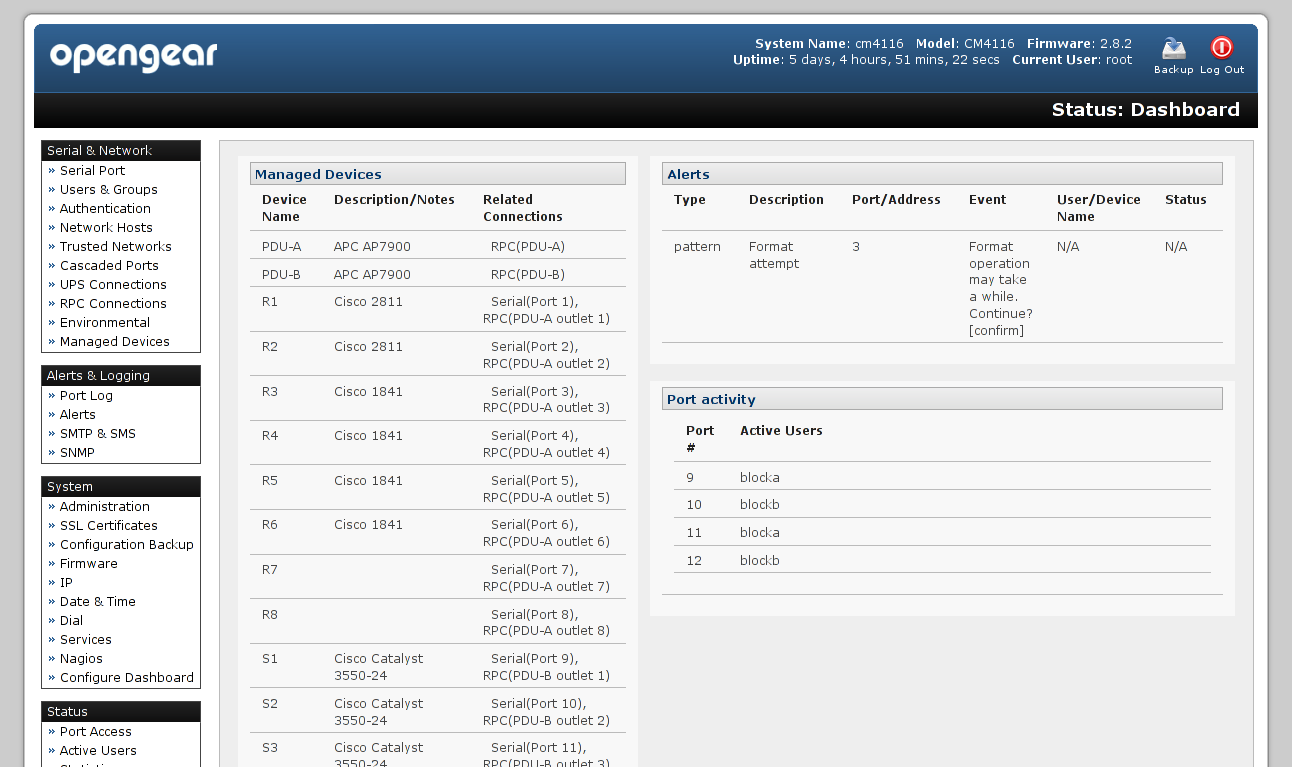
Serial Port Configuration
Anyone who has used HyperTerminal or a similar terminal emulator before will find console port configuration very familiar.
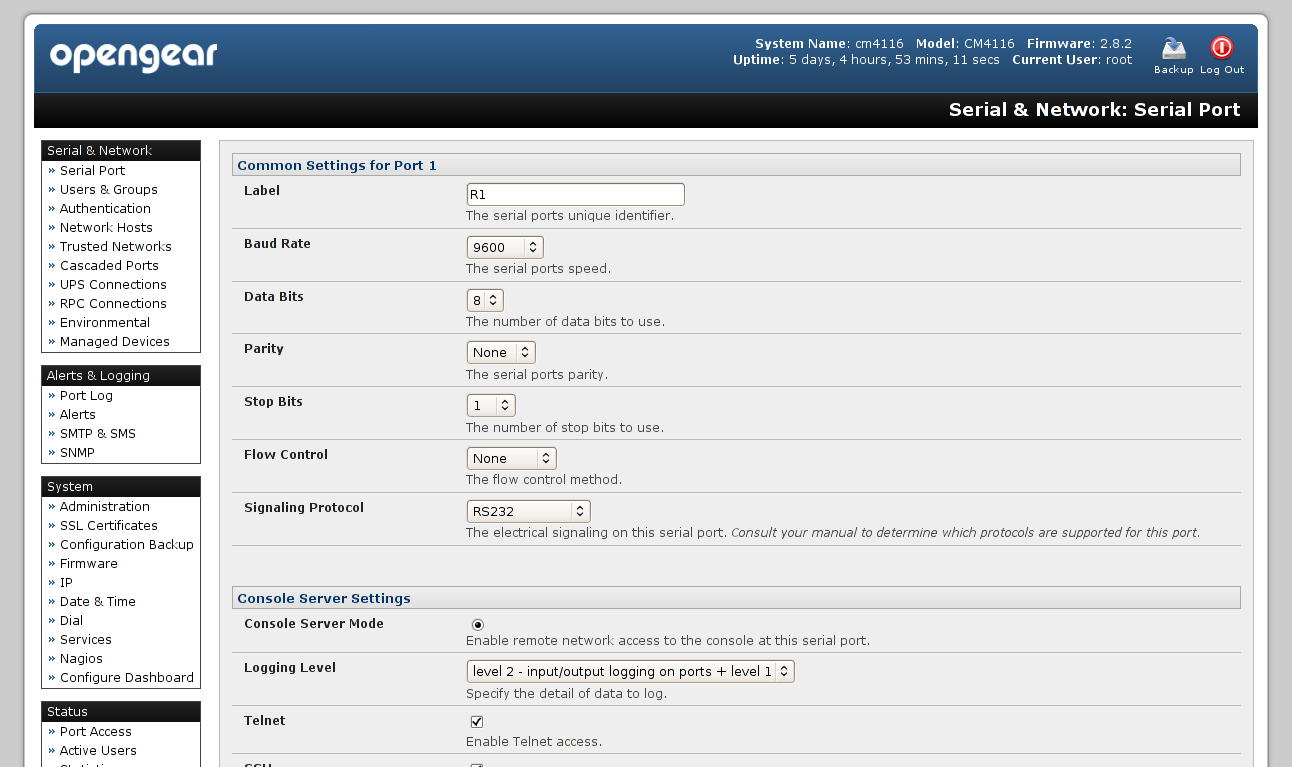
Beside typical settings like baud rate and flow control, each port can be configured independently to function in one of several modes:
- Console Server - Provides access to the serial port over IP via Telnet, SSH, raw TCP, and/or RFC 2217 bridging
- SDT - Secure tunneling through Opengear's SDT Connector software (Java-based)
- Terminal Server - Enables TTY login for a local terminal
- Serial Bridge - Connect two serial endpoints over IP using RFC 2217
In console server mode, ports can be independently configured for allowed protocol, logging level, syslog facility, and other parameters. Optionally, the entire serial stream of a port can be exported to a remote server via syslog.
Console access is achieved by connecting via Telnet or SSH on the TCP port for a given serial port. User authentication is provided either locally, by a centralized RADIUS, TACACS+, or LDAP server, or by a combination thereof.
$ telnet 192.168.20.2 2003
Trying 192.168.20.2...
Connected to 192.168.20.2.
Escape character is '^]'.
login: root
Password:

R3#
R3#
Power Management
One especially handy feature is inline power management utilizing SNMP-controlled UPS or RPC devices. First, an UPS or RPC device is configured and its available outlets automatically discovered.
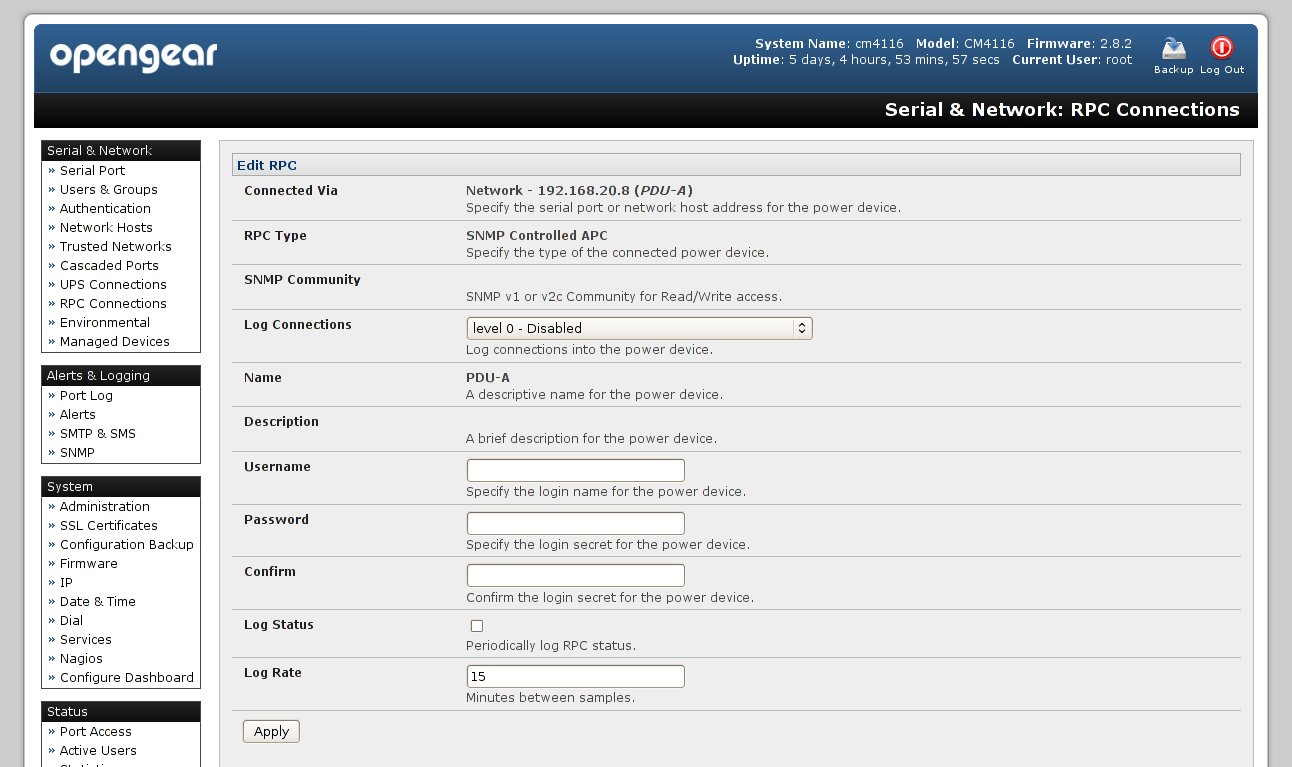
Next, the administrator creates a managed device, which is essentially a mapping of serial port to UPS/RPC outlet.
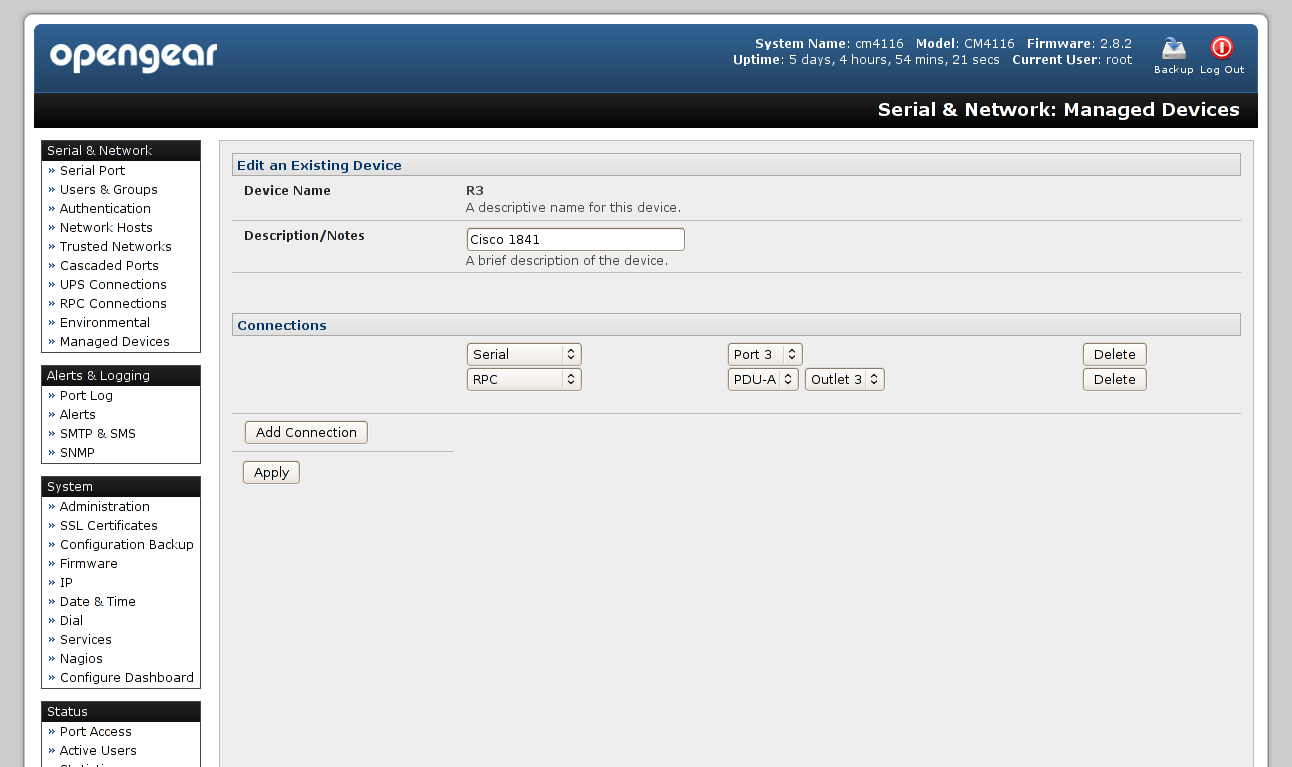
When power control is enabled under the serial port configuration, a logged-in user can then manipulate the power outlet of the device he's consoled into directly from the console:
R3# ~p
Power Commands:

O - Power ON
 P - Power OFF
 R - Power cycle off then on again
 s - Show current power status
 . - Exit power menu
 ? - Show this message

[R3] Power > R
Cycling power ...
Connection 1:   Unknown
[R3] Power > .

System Bootstrap, Version 12.3(8r)T9, RELEASE SOFTWARE (fc1)
Technical Support: http://www.cisco.com/techsupport
Copyright (c) 2004 by cisco Systems, Inc.
PLD version 0x10
GIO ASIC version 0x127
c1841 processor with 262144 Kbytes of main memory
Main memory is configured to 64 bit mode with parity disabled
...
This is a critical feature, allowing remote users to perform hard reboots for tasks like password recovery.
Console Pattern Matching and Alerts
Opengear provides a very elegant solution for what is, in my opinion, the most daunting concern for anyone running a multi-user lab: How do you grant a newbie full control over a device, yet protect the device from accidental software erasures and the like?
The CM4116 software allows for pattern matching against the input and output serial streams of each port. With just a rudimentary understanding of regular expressions, an administrator can define an alert to look for certain strings and perform a variety of actions.
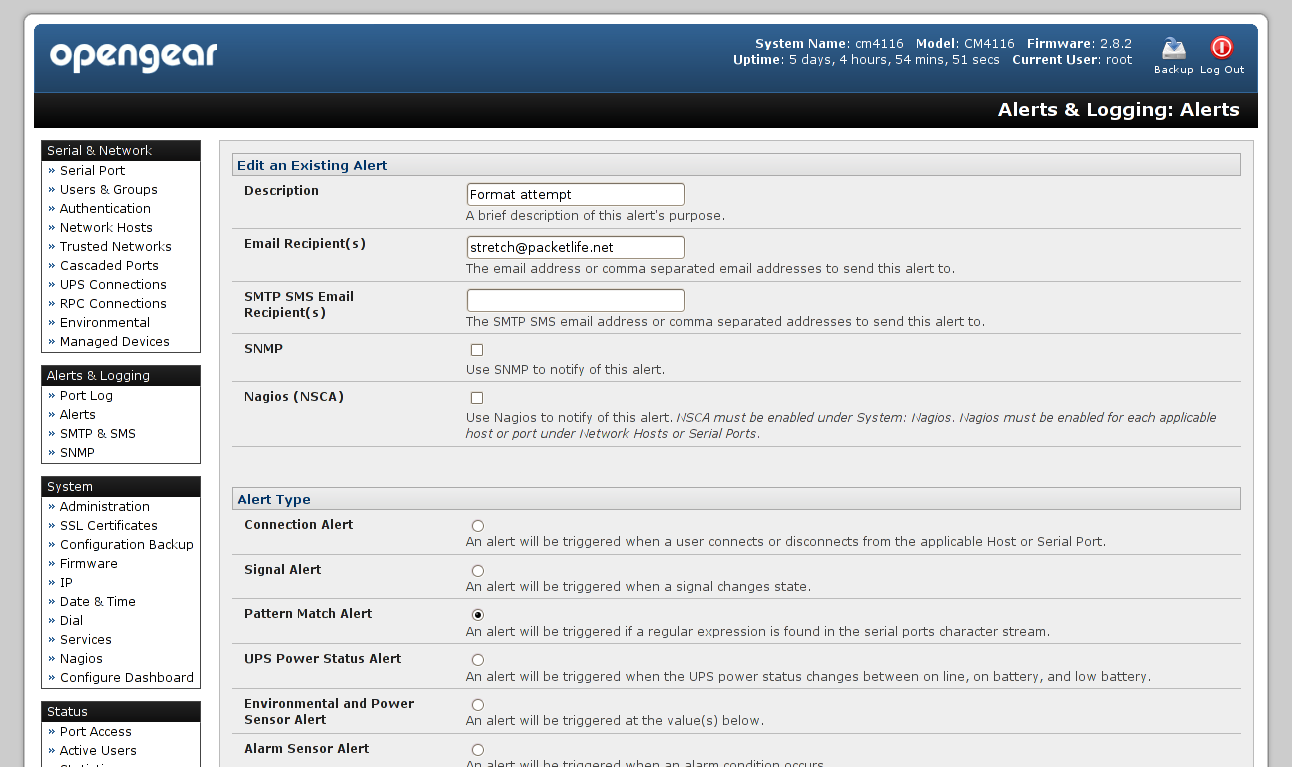
For example, I have defined a number of alerts on the lab's CM4116 to protect against corruption or deletion of the IOS and ASA software images, or formatting of the Flash filesystems. These simple alerts have already saved me hours of having to xmodem a new software image onto corrupted devices.
Here is an example of such an alert in action:
R3# format flash:
Format operation may take a while. Continue? [confirm]^C
R3#
R3#
R3#  ABUSIVE COMMAND DETECTED on port03
R3#
R3#Connection closed by foreign host.
$
When a specific output from the device is detected, the alert fires and executes a custom script. In this case, the script has injected a control character (ctrl-c) to cancel the command, printed an error message, and kicked off the user. Additionally, it has notified the administrator of the event by email. Note that this is simply what I've chosen to do; with a little knowledge of bash scripting, you can make an alert do just about anything.
Management via Console
Hardcore engineers know never to rely solely on a graphical interface for systems management, and the folks at Opengear are well aware of this maxim. Unmitigated root access to the console server is available via Telnet or SSH. The config utility is provided for easy inspection and manipulation of configuration parameters.
# config -g config.ports.port5.speed
config.ports.port5.speed 9600
# config -s config.ports.port5.parity=None
# config -g config.ports.port5.parity
config.ports.port5.parity None
Coupled with remote command execution via SSH, config makes automated changes a snap.
Final Thoughts
I have been thoroughly pleased with the capabilities of this console server. I have no doubt that without it, I would still be searching for a lab access solution. Opengear's CM4000 series is an ideal solution for both critical out-of-band console access and robust lab management.
Posted in Reviews
Comments
January 14, 2010 at 1:44 p.m. UTC
How much are they?
January 14, 2010 at 5:32 p.m. UTC
Excuse my ignorance, but what type of cables do devices such as this one use?
January 14, 2010 at 5:36 p.m. UTC
@Robert: Normal CAT5/6 with 8P8C terminations. The pinout varies depending on the device used, of course; you can either terminate cables based on the pinouts provided by Opengear or buy their little dongles.
January 14, 2010 at 8:26 p.m. UTC
Can you alias the ports as IP addresses like in IOS, so you can just telnet/ssh directly to an IP? (and thereby setup your consoles in DNS)
January 14, 2010 at 8:31 p.m. UTC
@Andrew: You might be able to work that out by modifying the underlying OS, but to be honest I don't know why you'd want to. Why burn up so many IPs for a single device?
January 14, 2010 at 9:09 p.m. UTC
I'd like to know how much they are as well, as I see no prices on the site.
Wonder if they deliver to England. Wonder if I can convince my boss as the current terminal router works just fine
January 15, 2010 at 1:11 a.m. UTC
There's prices listed on the ordering details page:
January 15, 2010 at 10:28 a.m. UTC
A viable and possibly more affordable alternative would be to use the Avocent line of products. I use them to access my home based Service Provider Cisco lab from work or from anywhere else on the planet if I really wanted to.
Like Jeremy's setup I use an ACS Advanced Console Server to perform reverse telnet to all the Cisco devices in my lab via the RJ45 serial connection. Power is controlled using a PDU Power Distribution Unit which is used to apply power or reboot the devices remotely. Handy if you want to keep an eye on your electric bill!
January 15, 2010 at 5:37 p.m. UTC
@Evan: From browsing the manual, Avocent's alerting capabilities seem rather limited; that is, they don't seem to support custom scripting on alert triggers, which is critical for a public lab. Also, a model similar to the CM4116 seems to cost roughly twice as much. =\
The lab uses SNMP-controlled APC AP7900s for PDUs, which work out very well for power management. There's a rough amperage readout on the devices themselves, and the web interface shows more granular statistics. For anyone interested, the current lab hardware draws a total of 3.1A under normal load.
January 15, 2010 at 6:56 p.m. UTC
Great post, as usual. I use the CM4008 and have been very pleased with it.
January 16, 2010 at 12:24 a.m. UTC
@mellowd - there are suppliers in the UK - I've got a couple of OpenGears - great pieces of kit.
February 3, 2010 at 4:50 p.m. UTC
@stretch why Opengear don't send his products in france???
I can't find any reseller of opengear here..
May 3, 2010 at 8:26 p.m. UTC
Anyone else have issues trying to configure SNMP on one of these?
August 10, 2010 at 10:55 a.m. UTC
Good post and a very nice product . I'm thinking of purchasing an CM4148 , but apart from the console server functionally which is clearly fine , i need to launch ssh sessions from it to different networking equipments . It's IP address will be in my equipments management ACL . Right now i accomplish this with an 2611 with lots of serial cables :) . So in short do you know if you can start ssh sessions from it .
November 22, 2010 at 8:57 a.m. UTC
Hi Jeremy, Is it possible for you to provide the custom script executed when an alert append? I have the CM4008 and need to implement the same security ;) Thanks!
August 5, 2011 at 11:04 p.m. UTC
Is there a way to switch from one terminal server port to another. Something similar to bringing up the power menu (~p)?
January 13, 2012 at 5:02 p.m. UTC
dlw1001
if you login as a user then execute pmshell then you can pick the port.. then issue and escape by typing ~. you can then launch pmshell again.
as for the other users, you dont need an individual ip, if you ssh to the device on port 3001 thats port 1, 3048 is port 48.
and yes you can ssh to other devices from the box.
I have four cm4148's / 4248's and am very impressed with them.
David
February 23, 2012 at 10:11 a.m. UTC
I gonna build a company-lab with scheduled access and i have two questions:
1) Can Opengear Console Servers schedule commands to routers/switches at a given time? For example: Issue the command "write erase" at 11:58pm and "reload" at 11:59pm to get a clean lab every day.
2) Can users trying to access routers/switches be authenticated against Active Directory?
March 2, 2012 at 6:27 a.m. UTC
can opengear be connected to a broadband modem and access serial device from a remote location?
February 25, 2013 at 11:31 p.m. UTC
We recently purchased this device and I wanted to see if there is a way to set the admin authentication via MS NPS 2008 server? I tried and I can log in but get redirected to an error message telling me that the "user" does not have access