

The premiere source of truth powering network automation. Open and extensible, trusted by thousands.

NetBox is now available as a managed cloud solution! Stop worrying about your tooling and get back to building networks.
Understanding BGP TTL Security
By stretch | Monday, November 23, 2009 at 8:08 a.m. UTC
By default, IOS sends BGP messages to EBGP neighbors with an IP time-to-live (TTL) of 1. (This can be adjusted with ebgp-multihop attached to the desired neighbor or peer group under BGP configuration.) Sending BGP messages with a TTL of one requires that the peer be directly connected, or the packets will expire in transit. Likewise, a BGP router will only accept incoming BGP messages with a TTL of 1 (or whatever value is specified by ebgp-multihop), which can help mitigate spoofing attacks.
However, there is an inherent vulnerability to this approach: it is trivial for a remote attacker to adjust the TTL of sent packets so that they appear to originating from a directly-connected peer.
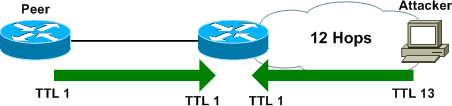
By spoofing legitimate-looking packets toward a BGP router at high volume, a denial of service (DoS) attack may be accomplished.
A very simple solution to this, as discussed in RFC 5082, is to invert the direction in which the TTL is counted. The maximum value of the 8-bit TTL field in an IP packet is 255; instead of accepting only packets with a TTL set to 1, we can accept only packets with a TTL of 255 to ensure the originator really is exactly one hop away. This is accomplished on IOS with the TTL security feature, by appending ttl-security hops <count> to the BGP peer statement.
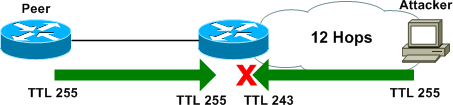
Only BGP messages with an IP TTL greater than or equal to 255 minus the specified hop count will be accepted. TTL security and EBGP multihop are mutually exclusive; ebgp-multihop is no longer needed when TTL security is in use.
Comments
November 23, 2009 at 8:49 a.m. UTC
Nice tips !! Did not know that it was possible :)
thanks Jeremy
November 23, 2009 at 12:57 p.m. UTC
I've got to give this a try
November 23, 2009 at 3:12 p.m. UTC
Its a shame this is a Cisco proprietary command since its such a wonderful security feature. And FYI For everyone, it does require IOS Version >= 12.3(7)T
November 23, 2009 at 4:39 p.m. UTC
In fact you should use ttl = 2 when your source of bgp update is a loopback interface.
November 23, 2009 at 5:59 p.m. UTC
It is a very nice explanation. I never understood the difference between ebgp-multihop and ttl-security featues...Thanks
November 23, 2009 at 8:17 p.m. UTC
I'd like to implement this today as well!
November 24, 2009 at 8:24 p.m. UTC
Should this "whatever value is specified by ebgp-multihop" read "whatever value is specified by ebgp-multihop or lower"?
November 25, 2009 at 12:18 a.m. UTC
Just to make sure I understand this... and I've never used or read about ttl security hop but understand and use ebgp-multihop.
Formula would be: TTL ≤ 255-h
h = actual hops
November 25, 2009 at 5:41 a.m. UTC
cool post, I didn't know what this feature is for. Simple and very nice explanation.
November 25, 2009 at 2:22 p.m. UTC
spot on, thanks for all this useful info that you give away with each of your posts.
you blog has really made me a better administrator.
thanks a ton!
September 12, 2010 at 4:30 p.m. UTC
As of 2007, there is new RFC 5082 describing the TTL-Security feature. The RFC You mentioned is obsolete although the idea stays the same. Just thought it would be a good idea to correct this because at the time you wrote the article, new RFC was already out ;)
September 13, 2010 at 4:41 p.m. UTC
Presumably this has to be configured on both peers to work, correct? Otherwise one side would still try to set the TTL to 1?
February 14, 2011 at 2:53 p.m. UTC
Why it would be more difficult for an attacker to craft a BGP packet to have 255 of ttl than to have a TTL of 1?
February 14, 2011 at 2:57 p.m. UTC
255 is the highest possible value for the TTL field, which is eight bits in length. It is illegal for a router to forward an IP packet to a new hop without decrementing the TTL value by one. Therefore, it can be deduced that any packet with a TTL of 255 was originated on the local segment.
November 4, 2011 at 5:02 a.m. UTC
Is there a debug cmd to verify the received TTL on a packet?
April 5, 2012 at 8:52 p.m. UTC
There are so many people that are confused on this subject. This helped me diagnose but was a little hard to put together (or just the way it read to me). In using his example...I would put the command "neighbor x.x.x.x ttl-security hops 254" presuming that I wanted the router to drop anything less than 254. This is NOT the case and can be proven with "show ip bgp nei | inc TTL" after the adjacency comes up. It actually states the expected hop count.
If the neighbor is directly connected...the right command is "neighbor x.x.x.x ttl-security hops 1" <--indicating that starting from 255...you expect that the TTL at your router will be 254 or greater. So I have grown to think of the command as the hops number is the distance away from the neighbor...not the TTL you expect to enter the router.
Awesome diagramming and explanation. After testing...it made more sense to me. Appreciate what you do.
May 8, 2012 at 12:48 a.m. UTC
I read the official documentation on Cisco:
http://www.cisco.com/en/US/docs/ios/12_3t/12_3t7/feature/guide/gt_btsh.html
After reading it I was still a little confused. I read Jeremy's description and it made perfect sense. Thank you
November 25, 2013 at 11:35 p.m. UTC
@Aves, yes, you need to configure it on both peers.
March 12, 2014 at 2:20 a.m. UTC
Thank you for sharing, that is really cool. Both can be used to calculate the number of hops, but also can limit connections.
November 12, 2014 at 11:09 p.m. UTC
Very nice explanation..
July 28, 2016 at 12:40 p.m. UTC
We need to configure it on both peers, right? I have one case like this:configure ebgp-multihop on one peer and configure ttl_security hops on another peer, can these two peers be established? If not ,why?
September 17, 2016 at 4:01 a.m. UTC
""Only BGP messages with an IP TTL greater than or equal to 255 minus the specified hop count will be accepted""
My lab does not corroborate that. This is what I see:
R1(12.12.12.1)----EBGP--(12.12.12.2) R2 R1: router bgp 1 neighbor 12.12.12.2 remote-as 2 neighbor 12.12.12.2 ttl-security 1
R2: router bgp 1 neighbor 12.12.12.1 remote-as 1 neighbor 12.12.12.2 ebgp-multihop 254
BGP session comes up only if TTL in PACKET from R2 is
TTL equal or> 255-HOPCOUNT+1
If TTL=255-HOPCOUNT, BGP does not come up,
You guys can lab it up. But in real life we will never want to use ebgp on one peer and ttl-secuity on other peer, i used it to illustrate the check router performs when configured with TTL-security feature, which is TTL in Packet received should be equal or greater than 255-HOPCOUNT+1.
But it is a great post!!