

The premiere source of truth powering network automation. Open and extensible, trusted by thousands.

NetBox is now available as a managed cloud solution! Stop worrying about your tooling and get back to building networks.
Generic Compact Flash cards and Cisco
By stretch | Monday, November 2, 2009 at 2:27 a.m. UTC
Cisco typically lists Compact Flash memory cards at several hundred dollars a piece, even for sizes deemed obsolete by the current market. For example, compare around $300 for an official Cisco-branded Compact Flash card sporting a mere 64MB to $30 for a generic 8GB card. That's an obscene difference in price per MB.
Fortunately, generic CF cards will work just as well in your routers as the ones with the Cisco sticker. Some people will argue that the Cisco sticker somehow offers better reliability, but these cards contain the exact same technology inside. I tested this theory while constructing a rather large lab, after securing fifteen 256MB STEC-brand CF cards for a whopping $7 each (currently sold on eBay in lots of 2, 5, or 10).
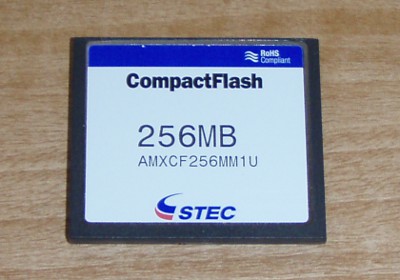
These cards work perfectly out of the box, but it may be desirable to format and copy files from a workstation prior to loading the card into a production device. The following steps illustrate how to accomplish this on a Linux workstation with a USB Compact Flash adapter:
Step 1: Create a new partition
This isn't strictly necessary, but factory-new cards often have an odd default partition table, with extra space before and/or after the primary partition. fdisk or cfdisk are used to create a new FAT16 primary partition.
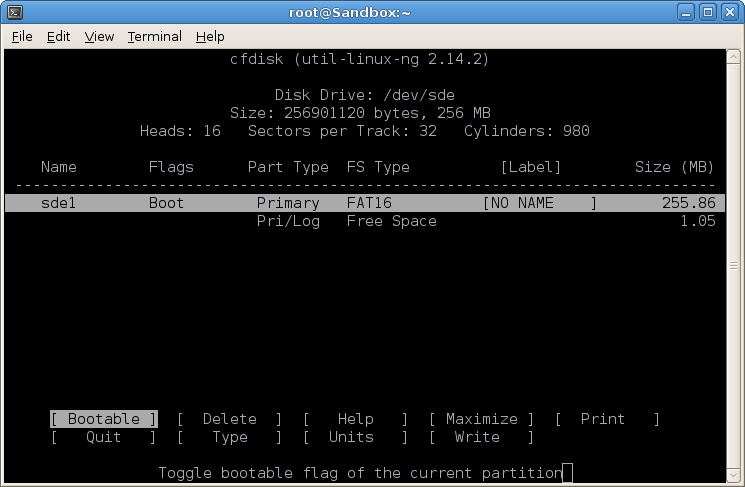
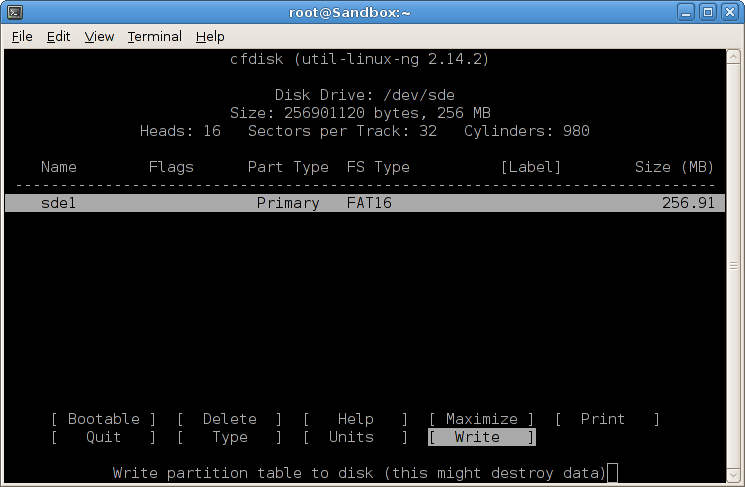
Note: Certain older routers, such as the 3700 series, may not accept "newer" partition formats. For example, my 3725 won't recognize type 06 (FAT16); it uses type 04 (FAT16 <32MB):
%PCMCIAFS-5-DIBERR: PCMCIA disk 1 is formatted from a different router or PC. A format
 in this router is required before an image can be booted from this device
Step 2: Create a FAT16 filesystem
All the Cisco gear I've tested (limited to the 3700 series, x800 series ISRs, and ASAs) have used FAT16. Other device families, especially newer equipment, might make use of a different filesystem. If in doubt, you can always check what the stock Cisco card is formatted as.
The mkfsdos Linux utility (often referenced as mkfs.vfat for standardization) is used to create FAT16 and FAT32 filesystems. Make sure to include the FAT size argument (-F 16) to specify FAT16 creation.
~ # mkfs.vfat -F 16 /dev/sde1
mkfs.vfat 3.0.1 (23 Nov 2008)
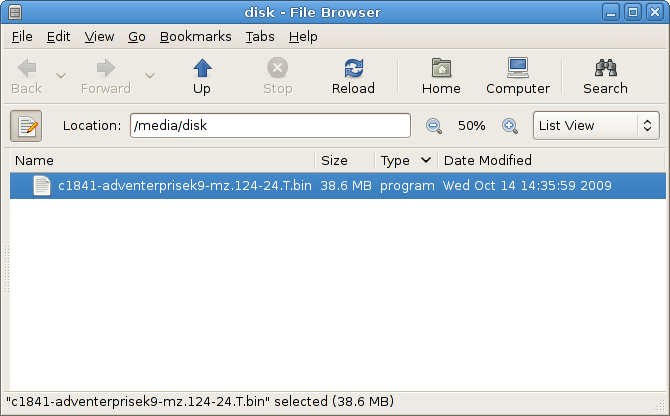
The CF card can now be mounted and written to. A valid IOS image copied to the root of the disk will be bootable.
Also remember that if either of these steps seems to fail, you can always format your generic CF card directly from a Cisco device with the format command.
Posted in Hardware
Comments
November 2, 2009 at 3:02 a.m. UTC
Good tip to release to the masses! Same goes for Juniper devices as well. Many companies will sell Cisco and/or Juniper equipment, and when the customer returns for CF cards the sales staff sells them the branded cards with an astounding markup!
People! You can buy these cards at Walgreens, Wal-Mart, or Batteries Plus if you need one in a pinch! No reason not to have a few in your crash cart when it really matters ;)
November 2, 2009 at 3:10 a.m. UTC
Great tip! I was just pondering this a few weeks ago.
Do you happen to know how to format CatOS flash cards? I seem to frequently run into issues with my sup720's where I always have the wrong format (IOS when I need cat and vice versa). Unfortunately I dont have a pre-formatted one handy to check.
November 2, 2009 at 3:15 a.m. UTC
I've been wondering for some time whether the same applies for RAM in the MSR/ISR series but I've never spent the time finding out. Surely it wouldn't be very different from PC100/133 SDR SDRAM? ECC maybe? The price difference isn't quite as absurd as flash memory, but its still at least a factor of 10x.
November 2, 2009 at 10:24 a.m. UTC
i've been using kingston cf cards in my 2821 and 3845 routers for more than two years now and had no problem so far.
i only ran into troubles, when i inserted 1gb kingston cf-cards into my sup720s of my cat6500s. the insertion of the cards were logged, but the switches were not able to access them ("no such device"). i stopped testing afterwards, but heard, that there are non-cisco cf-cards available, which work in cat6500s. the funny thing is, that the same cards work in my sup32 within other cat6500s.
November 2, 2009 at 1:46 p.m. UTC
The only problem with using generic CF cards in the Cisco devices is that not all of them work. And it can even be hardware version dependent.
For instance, we have been using Axiom 512MB cards in the bulk of our switches just fine. All of a sudden, a new version of the Sup720-10GE came out (went from HW version 2.x to 3.x) and the Axioms stopped working. But wouldn't you know... The Cisco branded cards work just fine.
So the non-Cisco cards can be a little bit of a hassle at times. But it's definitely worth going through a few different models of cards to find ones that work.
On a related note, if anyone knows of a 3rd party card that works in the new Sup720-10GEs, let me know. =)
November 2, 2009 at 2:55 p.m. UTC
Don't forget that using 3rd party flash cards could invalidate your maintenance support?
November 2, 2009 at 5:23 p.m. UTC
frigin cisco..$$$$$$$$$$$$$$$$$$$$$
November 2, 2009 at 5:39 p.m. UTC
Ive seen a lot of linux/windows based format's of CF cards fail on higher end Cisco devices (e.g. 6500/7600/7200/GSR etc)
Its best if you format the CF from the device where it is intended to be used :-)
The CF might show up correctly in IOS but the ROMMON code might not be able to read the CF card in many cases. Unfortunately this is seen only when the device reloads, which is usually a sign of trouble and the last thing you want is a CF card giving you trouble when there is already enough to think about and deal with :-)
Just my 2c.
November 2, 2009 at 6:54 p.m. UTC
Next topic... WAAS hard drives! Go for it.
November 3, 2009 at 11:44 p.m. UTC
I had one problem with a "linear" flash card, I had to buy exacly a linear one, I've never heard about them it was for a cisco 3640, I bouthg an "acme" one, and it works fine, just like a cisco one would do.
I do the same with ram memmory I don't buy the certified one for personal use. I buy cisco one just for customers.
Cheers
November 6, 2009 at 4:18 p.m. UTC
So Stretch, have you tested the "format" command on the router to do this? This way you would be guaranteed to have a correct format.
November 8, 2009 at 7:21 a.m. UTC
To the same accord but slightly off topic, the RAM which Cisco sell for their WAE appliances (WAAS) can be compared to to other cheaper options.
Compare the price of around $125/GB aftermarket RAM, to around $800/GB of Cisco branded RAM.
Taking into account that the appliance is merely an IBM server with a Cisco badge, buying aftermarket RAM works just as well. if you want reliability, there's that option too - it will certainly still beat Cisco's price
After upgrading your WAE's RAM, remember to rebuild your DRE cache since the size of it's stucture is entirely based on the amount of RAM in the server
November 11, 2009 at 3:37 p.m. UTC
Cisco has multiple file systems that are in use on the flash cards. They call them Class A, B, C.
Class A&C file systems allow you to use the FORMAT command.
Class B file systems require the ERASE command.
Class filesystems: https://supportforums.cisco.com/docs/DOC-4250;jsessionid=B59863B923288EFC45BB9239D6F541E5.node0
Here is a link to the new ISR-G2's that explains this in more detail:
http://www.cisco.mn/en/US/docs/routers/access/1900/software/configuration/guide/appendixBcflash.html#wp1014774
I agree with "that_dude". I have had zero issues reading/formatting CF cards using Windows XP and just copying files when working with ISR models of routers. However, when I tried to apply this technique to a 7206VXR with a NPE-G2 it flat out DID NOT WORK.
As far as aftermarket RAM, that works fine as listed above (with servers etc.). It also works great for routers. Simpletech sells Cisco RAM modules:
http://www.simpletech.com/products/memory/cisco-memory-upgrades
I used these to bump my 2801 to 384MB.
May 11, 2010 at 6:28 p.m. UTC
My 2 cents
Tried for 2800 series routers and had to change the file format to FAT (0x04) for less than 32 characters. I tried with windows XP and it did not work because the FAT was 0x06. Had to use the disk utility in ubuntu to change a fat partition to fat 0x04. After that, it worked perfect. Thanks for the info. I called my supplier after doing this, and the 10 2GB ComptactFlash cards i got for 250$ would have cost 10,000$ if it was from Cisco. What a saving !
June 22, 2010 at 1:14 p.m. UTC
On my 1812 I've tried to use FAT 06 and 04 type with fdisk in ubuntu. Didn't work. And when I try to format the card with the router, it says:
Primary Partition created...Size 133334 MB
Drive communication & 1st Sector Write OK...
%Error formatting flash: (Didn't find 55AA signature in System Sector)
Any suggestions?
TIA
/JZN
June 23, 2010 at 2:53 p.m. UTC
@JZN often it's easier to format the CF cards in the router itself, then copy images over from a workstation.
August 16, 2010 at 12:17 a.m. UTC
Hello What would be the steps to format using the same 1800 What would be the steps to get through HyperTerminal
And do not e able to find the IOS of 1812
Thank you very much in advance greetings from chile Too bad my English
December 11, 2010 at 3:03 p.m. UTC
@JZN I have the same problem. I bought a brand-new 128mb Transcend for my c1801 and cannot format the flash. I'm using c180x-adventerprisek9-mz.151-2.T2.bin
I think the problem is that the card doesn't have a partition table. When I get a CF reader for my PC, I'll try to create one and check again.
December 30, 2010 at 12:22 a.m. UTC
Hi, I have the same issue as JZN and kayaman with "Didn't find 55AA signature in System Sector".. I have tried all possible ways to accomplish this but still no go... format with debian/ubuntu: FAT 06 or 04, format from windows FAT32, done partitioning (on the c1801) to reduce dimension, updated ATA monlib also...nothing helped. Tried with a SanDisk and a Transcend, both 128Mb. Received c1801 with original CF 32Mb with Cisco sticker on it. And now what drive me crazy and block me passing to newer IOS'es as my flash is near full (ios,anyconnect svc and a bunch of conf files)
c1801#partition flash: 1 Partitioning will destroy all data in "flash:". Continue? [confirm]
Primary Partition created...Size 124 MB
Drive communication & 1st Sector Write OK...
Partition of flash: complete
c1801#format flash: Format operation may take a while. Continue? [confirm] Format operation will destroy all data in "flash:". Continue? [confirm]
Primary Partition created...Size 124 MB
Drive communication & 1st Sector Write OK... Writing Monlib sectors... Monlib write complete
Format: All system sectors written. OK...
Format: Total sectors in formatted partition: 253920 Format: Total bytes in formatted partition: 130007040 Format: Operation completed successfully.
Format of flash: complete
c1801#fsck flash: Starting File System integrity check NOTE: File System will be deinited and later rebuilt
Starting partition 0 Analysis Signature not found in boot sector Boot Sector/Boot Parameter Block check ...[Failed] %Error checking flash: (Didn't find 55AA signature in System Sector) c1801#show flash: No files on device
25157632 bytes available (104648704 bytes used) c1801#copy tftp:c180x-adventerprisek9-mz.150-1.M.bin flash: Address or name of remote host [192.168.30.1]? Source filename [c180x-adventerprisek9-mz.150-1.M.bin]? Destination filename [c180x-adventerprisek9-mz.150-1.M.bin]? Accessing tftp://192.168.30.1/c180x-adventerprisek9-mz.150-1.M.bin... Loading c180x-adventerprisek9-mz.150-1.M.bin from 192.168.30.1 (via Vlan1): ! %Error copying tftp://192.168.30.1/c180x-adventerprisek9-mz.150-1.M.bin (Not enough space on device)
what drives me crazy is that "25157632 bytes available (104648704 bytes used)" ... and if i try to copy a file smaller than 25Mb...this old IOS is about 17Mb big
Loading c180x-adventerprisk9-mz.124-4.T.bin from 192.168.30.1 (via Vlan1): ! %Error writing flash:/c180x-adventerprisk9-mz.124-4.T.bin (No space left on device)
Oh yeah, all clear......
c1801#show flash: all -#- --length-- -----date/time------ path 1 0 Dec 28 2010 23:05:34 c180x-adventerprisek9-mz.124-24.T2.bin
25157632 bytes available (104648704 bytes used)
* ATA Flash Card Geometry/Format Info *
ATA CARD GEOMETRY Manufacturer Name Model Number SAMSUNG CF/ATA Serial Number Firmware Revision S1.18.4 Number of Heads 16 Number of Cylinders 496 Sectors per Cylinder 32 Sector Size 512 Total Sectors 253952
ATA PARTITION 1 INFO Start Sector 32 Number of Sectors 253920 Size in Bytes 130007040 File System Type FAT16 Number of FAT Sectors 124 Sectors Per Cluster 8 Number of Clusters 31691 Number of Data Sectors 253528 Base FAT Sector 105 Base Root Sector 353 Base Data Sector 385
ATA MONLIB INFO Image Monlib size 49240 Disk Monlib Size 49240 Disk Space Available 32345088 Name c1800-atafslib-m Start sector 2 End sector 98 Updated By C180Xc-ADVENTERPRISEK9-M12.4(24)T2 Version 2
then i retry partitioning flash into a 120Mb volume instead of full capacity...
c1801#partition flash: 1 120 Partitioning will destroy all data in "flash:". Continue? [confirm]
Primary Partition created...Size 120 MB Extended Partition created...Size 4 MB
Drive communication & 1st Sector Write OK...
Extended Partition entry 1 created...Size 4 MB Extended Partition Table 1 Write OK...
Partition of flash: complete
but still no go, then i retry with a first partition of 63Mb, still the same.... and i'm just too far from best practices from cisco....
August 25, 2012 at 12:36 p.m. UTC
Everyone with problems like "55AA signature not found" etc:
You can write the 55aa signature to your flash by connecting it to a linux box and issuing the following command (replace /dev/sdx with your flash device):
echo -ne "\x55\xaa" | dd of=/dev/sdx bs=1 seek=510 conv=notrunc
If its still not working, you can backup the full MBR of a Cisco-branded Flash to the file mbrfile:
dd if=/dev/sdx of=mbrfile bs=512 count=1
wipe the partition table from this file (but maintain everything else, including bootloader and MBR signature):
dd if=/dev/zero of=mbrfile bs=1 count=64 seek=446 conv=notrunc
Restore the mbr to your generic flash so you can repartition and format (directly from linux or better directly from IOS):
dd if=mbrfile of=/dev/sdx bs=512 count=1 conv=notrunc
Of course you need to replace /dev/sdx with your flash device in every command above. This should help by maintaining the bootloader and the mbr signatur. The partition table needs to be wiped, because the flash device is most likely of a different size then your original Cisco-branded flash. This is untested but I believe it works.
August 31, 2012 at 8:36 p.m. UTC
Today I got my 2GB Transcend CF card (TS2GCF133), works without problems. I do have an up-to-date ROMMON and IOS release however.
c1801#show ver | inc image|proc|Bootstrap
ROM: System Bootstrap, Version 12.3(8r)YH13, RELEASE SOFTWARE (fc1)
System image file is "flash:c180x-advipservicesk9-mz.151-4.M4.bin"
Cisco 1801 (MPC8500) processor (revision 0x400) with 236544K/25600K bytes of memory.
c1801#show flash: all
-#- --length-- -----date/time------ path
1     29575360 Aug 31 2012 20:02:12 +02:00 c180x-advipservicesk9-mz.151-4.M4.bin
2     30606372 Aug 31 2012 20:04:00 +02:00 c180x-adventerprisek9-mz.151-4.M4.bin
3     29560760 Aug 31 2012 22:22:46 +02:00 c180x-advipservicesk9-mz.151-4.M3.bin
4     21461728 Aug 31 2012 22:28:00 +02:00 c180x-advipservicesk9-mz.124-15.T15.bin
5      1333268 Aug 31 2012 22:28:10 +02:00 C1800_RM2.srec.123-8r.YH13
6     23700004 Aug 31 2012 22:29:28 +02:00 c180x-advipservicesk9-mz.124-24.T5.bin

1864249344 bytes available (136253440 bytes used)

******** ATA Flash Card Geometry/Format Info ********

ATA CARD GEOMETRY
   Manufacturer Name
   Model Number           TS2GCF133
   Serial Number          611903DA0541F00001A4
   Firmware Revision      20110407
   Number of Heads        16
   Number of Cylinders    3884
   Sectors per Cylinder   63
   Sector Size            512
   Total Sectors          3915072

ATA PARTITION 1 INFO
   Start Sector           63
   Number of Sectors      3915009
   Size in Bytes          2004484608
   File System Type       FAT32
   Number of FAT Sectors  3824
   Sectors Per Cluster    8
   Number of Clusters     488404
   Number of Data Sectors 3907232
   Base FAT Sector        128
   Base Root Sector       NA
   Base Data Sector       7776
   Root Cluster           2
   Backup Boot Sector     0
   FS Info Sector         117

ATA MONLIB INFO
   Image Monlib size      55128
   Disk Monlib Size       55128
   Disk Space Available   58880
   Name                   c1800-atafslib-m
   Start sector           2
   End sector             109
   Updated By             C180X-ADVIPSERVICESK9-M15.1(4)M4
   Version                2

c1801#
No dd hacks from linux needed, it worked out of the box. Finally I can write coredumps directly to the flash.
October 13, 2012 at 1:02 p.m. UTC
Actually, if you want to be able to boot from the 2GB CF card, you need to format the 2GB CF card in a IOS <= 12.4(9)T7. At least for the ISR G1 routers (like 18xx, 28xx, etc), the bootloader can't properly boot from CF cards formatted with newer IOSes.
So get 12.4(9)T7 from CCO, put it on your old CF cards, boot from it, switch to the new 2GB CF cards and format them in 12.4(9)T7. Then you can boot from the CF cards and everything works fine.
Remember not to format them again with the newer releases, otherwise the box will not boot.
It doesn't seem to be a FAT32/16 issue, must be something else. I'm still looking into this.
August 17, 2013 at 7:30 p.m. UTC
Any IOS train less than the 15.x series will not boot from a 2GB CF formatted on a router running the 15.x train because a 2GB CF card is formatted with a FAT32 file system under the 15.x train. A router running the 12.4 train only understands normal FAT aka FAT16.
You can format a 2GB CF under a router running the 12.4 train and it will boot as well as booting under a 15.x train because both trains can read FAT. The FAT file system supports 2GB or less.
February 21, 2014 at 2:16 p.m. UTC
Hi,
I had the same problem on my Cisco 7200 router. I used a Windows computer and formatted the disk as exFAT with 512 byte sector size. That worked for me.
Best regards,
/B
June 7, 2014 at 12:48 p.m. UTC
I bought a memory card MEM2800-128CF Axiom and MEM2800-256CF Gtech. Everything works.
July 15, 2014 at 2:46 p.m. UTC
Hi does anyone know which 3rd party CF's are compatible with the ISR G2's
April 3, 2015 at 1:08 p.m. UTC
So I just setup my homelab and somehow lost the compact flash card for my 2800 series router. Now it will only boot in "rommon" mode. new to networking so a google search indicated that i needed to have the flash card it came with because the ios is on there. I got my hands on ios15 on a CD but i'm guessing i still need a flashcard to be able to load that IOS. Will a 32gb generic one off amazon be enough space? not sure how to determine if it will.
August 17, 2016 at 4:00 a.m. UTC
We frequently order 1gb off brands (MEM-C6K-CPTFL1GB-EQV) to be specific and have no problems formatting or booting from them with 65xx platform. However, I have a pile of cisco's from 256 to 2gb that will read fine, pass a verification before reload, and then fail to boot. Some are bad crcs, others say bad magic number. These have been formatted directly in the 6509(/4) they were to be booted from. Any idea why off brand works flawlessly and name brand gives us so much trouble?
ROM: System Bootstrap, Version 12.2(17r)SX5, RELEASE SOFTWARE (fc1) System image file is "disk0:s72033-advipservicesk9_wan-mz.122-33.SXH8.bin"