

The premiere source of truth powering network automation. Open and extensible, trusted by thousands.

NetBox is now available as a managed cloud solution! Stop worrying about your tooling and get back to building networks.
EUI-64 in IPv6
By stretch | Monday, August 4, 2008 at 2:13 a.m. UTC
One of IPv6's key benefits over IPv4 is its capability for automatic interface addressing. By implementing the IEEE's 64-bit Extended Unique Identifier (EUI-64) format, a host can automatically assign itself a unique 64-bit IPv6 interface identifier without the need for manual configuration or DHCP. This is accomplished on Ethernet interfaces by referencing the already unique 48-bit MAC address, and reformatting that value to match the EUI-64 specification.
RFC 2373 dictates the conversion process, which can be described as having two steps. The first step is to convert the 48-bit MAC address to a 64-bit value. To do this, we break the MAC address into its two 24-bit halves: the Organizationally Unique Identifier (OUI) and the NIC specific part. The 16-bit hex value 0xFFFE is then inserted between these two halves to form a 64-bit address.
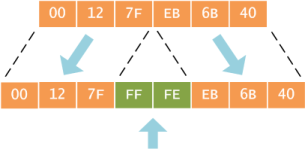
Why 0xFFFE? As explained in the IEEE's Guidelines for EUI-64 Registration Authority, this is a reserved value which equipment manufacturers cannot include in "real" EUI-64 address assignments. In other words, any EUI-64 address having 0xFFFE immediately following its OUI portion can be recognized as having been generated from an EUI-48 (or MAC) address.
The second step is to invert the universal/local (U/L) flag (bit 7) in the OUI portion of the address. Globally unique addresses assigned by the IEEE originally have this bit set to zero, indicating global uniqueness. Likewise, locally created addresses, such as those used for virtual interfaces or a MAC address manually configured by an administrator, will have this bit set to one. The U/L bit is inverted when using an EUI-64 address as an IPv6 interface ID.
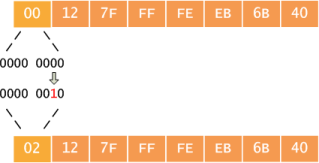
Again, you're probably wondering why this is done. The answer lies buried in section 2.5.1 of RFC 2373:
The motivation for inverting the "u" bit when forming the interface identifier is to make it easy for system administrators to hand configure local scope identifiers when hardware tokens are not available. This is expected to be case for serial links, tunnel end-points, etc. The alternative would have been for these to be of the form 0200:0:0:1, 0200:0:0:2, etc., instead of the much simpler ::1, ::2, etc.
The important part to remember here is that the scope of the address never changes: global addresses are still global and local addresses are still local. Rather, the meaning of the bit is inverted for convenience, so the value of the bit must be inverted as well.
We can see this conversion in action when we assign an IPv6 address to a router interface. First, take note of the interface's MAC address (this is typically the same as its burned-in address, or BIA).
Router# show interface f0/0
FastEthernet0/0 is up, line protocol is down
  Hardware is Gt96k FE, address is 0012.7feb.6b40 (bia 0012.7feb.6b40)
...
After assigning an EUI-64-designated IPv6 address to the interface, we can verify that the interface ID has been drawn from the MAC address in the process described for both the assigned and the link local address:
Router(config)# interface f0/0
Router(config-if)# ipv6 address 2001:db8::/64 eui-64
Router(config-if)# do show ipv6 interface f0/0
FastEthernet0/0 is up, line protocol is down
  IPv6 is enabled, link-local address is FE80::212:7FFF:FEEB:6B40 [TEN]
  No Virtual link-local address(es):
  Global unicast address(es):
2001:DB8::212:7FFF:FEEB:6B40, subnet is 2001:DB8::/64 [EUI/TEN]
...
Comments
August 4, 2008 at 12:59 p.m. UTC
Just in one word that is Superb
August 4, 2008 at 5:59 p.m. UTC
Very solid write-up. As always, thanks much.
August 4, 2008 at 8:12 p.m. UTC
There is a privacy issue with this method: You can identify the computer (and with that probably the user as well) wherever it connects. To address those privacy concerns, RFC 3041 was written, which got obsoleted by RFC 4941 (Privacy Extensions for Stateless Address Autoconfiguration in IPv6)
ftp://ftp.rfc-editor.org/in-notes/rfc4941.txt
May 11, 2009 at 8:33 p.m. UTC
TREMENDOUS JOB OF EXPLAINING THIS NEW TOPIC THAT PERPLEXES EVERYONE !!! This is an excellent explanation. You should work for cisco !!!!!!!
June 10, 2009 at 4:31 p.m. UTC
Thanks a lot.
June 21, 2009 at 5:00 a.m. UTC
This is the good explanation that i read for IPV6 address presentations. It is easy and explains to the point.
July 1, 2009 at 9:10 a.m. UTC
Very good explanation. Thanks a lot
August 27, 2009 at 10:51 a.m. UTC
Thanks for very good and easy to understand explanation! The world become much more beautiful ;)
September 8, 2009 at 9:26 a.m. UTC
Explained better than the CCIE Internetwork Expert!!!
Nice work!!
October 19, 2009 at 3:50 p.m. UTC
Clear and concise explanation, this is great!!
November 8, 2009 at 2:56 a.m. UTC
This is a very clear, sharp, on the target explanation. Like it. Please keep up the good job.
thank you.
November 21, 2009 at 9:15 p.m. UTC
qbonita paginaa!! aprendi!! UL :p
November 26, 2009 at 12:46 p.m. UTC
Great article. I just wonder what if I have a MAC address beginning with somethings else than 00. Let's say AC:13:87:AF:B1:C7 ?
What do I have to do with the first byte?
December 3, 2009 at 5:10 p.m. UTC
Awesome.
December 18, 2009 at 4:32 p.m. UTC
Nice illustration..
December 27, 2009 at 3:05 a.m. UTC
re: first byte If I read this right, you invert that bit regardless. This can be acheived by xor'ing the first byte with 0x02.
January 18, 2010 at 3:35 p.m. UTC
I appredciate the explantion in simple terms. My query is what happens in serial links for which there is not MAC address. What will the EUI-64 interface identifier be ?
January 22, 2010 at 8:42 a.m. UTC
You know, this is the SECOND time I've used packetlife! You're bookmarked now!! (Really diggin' those big posters!). Your explaination of EUI-64 from MAC is awesome... I get it!! Thanks a bunch!!
March 5, 2010 at 11:41 a.m. UTC
Hey,
If anyone was wondering how the U/L bit is set to indicate global scope (the 7th bit from the InterfaceID portion is turned to 1)
First field from InterfaceID "0012" has 16bits so we know the 7th bit is there Each value being 4 bit long , 00 in hex = 0000 0000 in binary and when we turn 7th bit to 1 it will look like this: 0000 0010 which means 02 in hex So our first field from InterfaceID after we set the 7th bit will be 0212
or just add 0x02 as kjotte is saying but i didn't find an example with the actual calculation anywhere so i thougt to provide one ;-)
March 13, 2010 at 2:13 p.m. UTC
Better than Internetwork expert and nuggets - well done and thanks
May 17, 2010 at 11:56 p.m. UTC
not to be a pest but it confused me being new to ipv6 - it appears the address you made at the end is incorrect. That first E should be an F. No?
Great Stuff - you are bookmarked with other great bloggers I have found so far.
May 19, 2010 at 3:18 p.m. UTC
@Mike: No. It helps to read the article, particularly the paragraph which begins, "Why 0xFFFE?" ;)
May 19, 2010 at 3:26 p.m. UTC
WOW - I read that as all F's. Sorry - must of been late.
My bad!!!
November 3, 2010 at 6:53 p.m. UTC
Wondering about the /64 in the CLI statement "ipv6 address 2001:db8::/64 eui-64". In the Packet Tracer lab I have been doing to learn how to configure RIPng, Cisco has me use the following command: ipv6 address 2001:410:2:10::/65 eui-64
It seems to work, but I am having a hard time understanding exactly what the difference is between the /64 and /65 designation.
Thanks in advance for responding,
Elmer
November 3, 2010 at 7:57 p.m. UTC
@pottse: The /65 is most likely a typo. Autoconfigured EUI-64 addresses only work with /64 prefixes (as they're 64 bits in length).
April 30, 2011 at 8:16 a.m. UTC
Thankyou so much, perfect explanation!!!
May 28, 2011 at 4:09 p.m. UTC
The link you provide (http://standards.ieee.org/develop/regauth/tut/eui64.pdf) shows fffe and ffff in separated examples, can you elaborate on that?
June 1, 2011 at 2:45 p.m. UTC
Nice explanation. Very clear and concise.
July 19, 2011 at 3:28 p.m. UTC
Very good explanation. One question though, I am wondering about the following part,
Router(config)# interface f0/0
Router(config-if)# ipv6 address 2001:db8::/64 eui-64
Router(config-if)# do show ipv6 interface f0/0
FastEthernet0/0 is up, line protocol is down
  IPv6 is enabled, link-local address is FE80::212:7FFF:FEEB:6B40 [TEN]
  No Virtual link-local address(es):
  Global unicast address(es):
2001:DB8::212:7FFF:FEEB:6B40, subnet is 2001:DB8::/64 [EUI/TEN]
...
How did we get this IP address FE80::212:7FFF:FEEB:6B40?? I mean the initial 3 hex numbers, i.e. "FE8". I got the rest starting from 0212......
Also, what is the significance of Global Unicast Address (2001:DB8::212:7FFF:FEEB:6B40) and why it is different from link local address?
Which one is the interface IP for f0/0?
Please reply. Thanks in advance !
September 15, 2011 at 5:11 p.m. UTC
@Syed
Your answer lies here:
Router(config-if)# ipv6 address 2001:db8::/64 eui-64
This command sets the address of the interface to 2001:db8::/64, the parameter "eui-64" at the end of this command tells the router to generate the last 64 bits using EUI-64.
As to your other questions. Per IPv6 protocol, each interface MUST have a locally scoped IPv6 address (called a Link Local Address, or LLA). IANA has reserved FE80::/10 for this very purposes -- this network exists on EACH IPv6 link, all over the world, but is not allowed to be routed. Hence, when you enabled IPv6 on fe0/0 (by configuring an IPv6 address), your router automatically generated the (required) Link Local Address.
A Link Local Address is only valid on a particular link. Your router (using its Link Local Address) can speak to other machines on the same network (using their LLA), but it can't use its LLA address to speak across/beyond another router. To do that, it must use another type of address: Global Unicast address.
In short, a Link Local Address can only be used for local network communication, while a Global Unicast address can be used anywhere on the IPv6 Internet (to include the local network).
Hope this helps.
October 27, 2011 at 1:37 p.m. UTC
hi thanks a million i really like the way you've explained the EUI-64 :)
November 17, 2011 at 7:13 p.m. UTC
Router(config)#interface serial 0/0/0
Router(config-if)#ipv6 address 2001:db8:1:1::/64 eui-64
EUI-64 generate last 64-bit from MAC address BUT...
if I use this command on serial interface, since Serial interface doesn't has MAC address. Where it's came from??
December 14, 2011 at 2:11 a.m. UTC
Thanks!!!! It's what I was looking for!!!!
December 28, 2011 at 11:26 p.m. UTC
I am looking for example of connection two routers by ospfv3 with IPv6
March 28, 2012 at 1:44 p.m. UTC
Answer to Erdal
Cisco router takes lowest available MAC address for serial links.
June 28, 2012 at 12:35 p.m. UTC
This explanation on EUI-64 addresses was exactly what the doctor ordered. Thank you. Concise wording and great images.
November 27, 2012 at 9:11 p.m. UTC
Hi,
many many thanks for this post of yours. Its freaking awesome.
Regards,
Priyankar
January 23, 2013 at 5:39 p.m. UTC
the following line states the need for generated EUI-64 addresses to be distinct from assigned EUI-64 address.
"In other words, any EUI-64 address having 0xFFFE immediately following its OUI portion can be recognized as having been generated from an EUI-48 (or MAC) address."
What would be the reason for such a distinction? Is there any particular reason?
Thanks in advance,
Animesh.
April 4, 2013 at 5:04 p.m. UTC
I have a major doubt.
I am clear on converting EUI48 to EUI64. With EUI-48 in mind, IEEE has kept the bits 0 and 1 of the first byte of the OUI always zero.
Now, you are saying the logical meaning of bit 1 in EUI64 is the opposite of the corresponding bit's meaning in EUI48. If that is the case, we should follow the same guideline of flipping this bit in creating fresh EUI-64s as well, and not just translating an EUI-48 to EUI-64. (For instance IEEE 802.15.4 uses EUI64). In essence, if the address is globally unique, the first byte of the EUI64 would be the first byte of OUI bitwise OR-ed with 0x02.
However, the IEEE guideline document on EUI64 (http://standards.ieee.org/develop/regauth/tut/eui64.pdf) says nothing of the sort. What's up with that?
April 8, 2013 at 2:41 p.m. UTC
thank god for you man.
April 11, 2013 at 6:21 p.m. UTC
Hi, the EUI-64 just work with MAC is leading by 00?
like it: 00:64:a3:25:bb:ab.
if my MAC Address is 11:64:a3:25:bb:ab?
the result is: 16:64:a3:25:bb:ab?
thank you!!!
April 13, 2013 at 6:01 p.m. UTC
while going through the topic "EUI-64 Interface ID Assignment" i was like "what is this thing"...thanks to you now its all clear syllable by syllable.
Great job.
June 18, 2013 at 2:44 p.m. UTC
Great article, easy to read. I now understand EUI 64! Thanks!
July 12, 2013 at 9:09 a.m. UTC
very good article
November 9, 2014 at 1:11 p.m. UTC
You explained this very confusing subject so clearly. Thank you!
August 3, 2015 at 6:03 p.m. UTC
Two comments/questions:
-
I thought I read that MAC and EUI-48 were not the same thing and so when converting EUI-48 to EUI-64, the standard was to insert $FF,$FE and if converting from MAC you insert $FF, $FF instead. I got this information from the wiki: https://en.wikipedia.org/wiki/MAC_address
-
How do older switches work when they see IPV6 or IPV4 frames inside a EUI-64 Ethernet Frame? Do clients use EUI-48 and if so, how do they auto-negotiate or figure this out?
September 26, 2015 at 1:42 p.m. UTC
Excellent post. Like a lot.
October 8, 2016 at 4:10 p.m. UTC
What does [EUI/TEN] specify here? If IF is down, TEN shows up, when IF is up, TEN disappears. Thanks for the explanation.