

The premiere source of truth powering network automation. Open and extensible, trusted by thousands.

NetBox is now available as a managed cloud solution! Stop worrying about your tooling and get back to building networks.
UDLD
By stretch | Monday, March 7, 2011 at 3:49 a.m. UTC
Unidirectional Link Detection (UDLD) is a Cisco-proprietary layer two protocol devised to automatically detect the loss of bidirectional communication on a link. It is often mentioned in discussion of spanning tree, but has no direct relation to IEEE 802.1D. UDLD can be run on both fiber optic and twisted-pair copper links. Although UDLD is a proprietary protocol, its operation and packet format are defined in RFC 5171.
The benefit of enabling UDLD on fiber interfaces is obvious. Fiber employs light to carry data, which does not require a looped path to complete a circuit as does an electrical medium like twisted-pair Ethernet (wherein each pair in the cable is a physical circuit). As such, it is possible for the link to fail in only one direction.
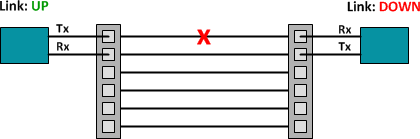
UDLD is intended to detect such a condition. UDLD can also be just as useful on copper links traversing intermediate "dumb" devices, such as media converters.

In the above example, the endpoint at left cannot tell that the distant media converter has failed, as its link to the local media converter remains up (of course, this behavior is dependent on the media converter). UDLD is able to detect the far end failure by the lack of incoming UDLD advertisements from the neighboring device.
Configuration
By default, UDLD is disabled on all interfaces. We can enable UDLD globally on the device, or individually on specific interfaces with the command udld port. This enables UDLD in normal mode.
Switch(config)# interface f0/13
Switch(config-if)# udld port
It would be prohibitively difficult to coordinate the configuration of UDLD on both ends of a link at the same time, so when UDLD is first enabled and does not detect a neighbor the link state is considered unknown, which is not necessarily an error condition.
Switch# show udld f0/13

Interface Fa0/13
---
Port enable administrative configuration setting: Enabled
Port enable operational state: Enabled
Current bidirectional state: Unknown
Current operational state: Advertisement
Message interval: 7
Time out interval: 5
No neighbor cache information stored
After enabling UDLD on the connected interface of the other switch, we can see that the local switch has detected its neighbor and updated the link's status to bidirectional.
Switch# show udld f0/13

Interface Fa0/13
---
Port enable administrative configuration setting: Enabled
Port enable operational state: Enabled
Current bidirectional state: Bidirectional
Current operational state: Advertisement - Single neighbor detected
Message interval: 15
Time out interval: 5

    Entry 1
    ---
    Expiration time: 40
    Device ID: 1
    Current neighbor state: Bidirectional
    Device name: CAT0746Z0WN
    Port ID: Fa0/16
    Neighbor echo 1 device: CAT1032NJ69
    Neighbor echo 1 port: Fa0/13

    Message interval: 15
    Time out interval: 5
    CDP Device name: S2
UDLD is capable of tracking multiple neighbors per interface, but this isn't typically necessary in the real world.
We can simulate an error on the far end of the link to see how UDLD responds. Using the default values for the advertisement timer (15 seconds) and hold timer (5 seconds), UDLD can take up to 20 seconds to respond to an error.
Switch# debug udld events
UDLD events debugging is on
Switch#
00:18:07: allNeighborsAgedOutEvent during link up. (Fa0/13)
00:18:07: Phase set from ADV to LUP because all neighbors aged out (Fa0/13)
00:18:07: prev = 0 entry = 3790AEC next = 0 exp_time = 0 (Fa0/13)
00:18:07: udsb->cache = 0x2F80128 (Fa0/13)
00:18:07: timeout timer = 7 (Fa0/13)
00:18:08: timeout timer = 6 (Fa0/13)
00:18:09: timeout timer = 5 (Fa0/13)
00:18:10: timeout timer = 4 (Fa0/13)
00:18:11: timeout timer = 3 (Fa0/13)
00:18:12: timeout timer = 2 (Fa0/13)
00:18:13: timeout timer = 1 (Fa0/13)
00:18:14: timeout timer = 0 (Fa0/13)
00:18:14: Phase set to udld_advertisement from phase udld_link_up. (Fa0/13)
00:18:14: Phase set to udld_advertisement after timer_expired.  (Fa0/13)
Switch# show udld f0/13

Interface Fa0/13
---
Port enable administrative configuration setting: Enabled
Port enable operational state: Enabled
Current bidirectional state: Unknown
Current operational state: Advertisement
Message interval: 7
Time out interval: 5
No neighbor cache information stored
As evidenced by the debugging output above, upon detecting the loss of a neighbor, UDLD will send seven additional advertisements (one per second). If still no reply is received, the link's bidirectional status transitions to unknown.
Of course, that isn't terribly helpful: the interface is still considered operational by upper-layer protocols and the switch may still be attempting to send traffic to the distant end. As an alternative to normal mode, we can configure UDLD in aggressive mode. Aggressive mode differs in that, if a link is detected as being unidirectional, the interface is placed into the error-disabled state and ceases sending traffic. This state is much more visible to administrators as a problem.
To enable UDLD in aggressive mode, simply append the argument aggressive to the earlier configuration command. When enabling aggressive mode, it should be enabled on both ends of the link.
Switch(config)# interface f0/13
Switch(config-if)# udld port aggressive
We can verify that UDLD is now operating in aggressive mode:
Switch# show udld f0/13

Interface Fa0/13
---
Port enable administrative configuration setting: Enabled / in aggressive mode
Port enable operational state: Enabled / in aggressive mode
Current bidirectional state: Bidirectional
Current operational state: Advertisement - Single neighbor detected
Message interval: 7
Time out interval: 5

    Entry 1
    ---
    Expiration time: 43
    Device ID: 1
    Current neighbor state: Bidirectional
    Device name: CAT0746Z0WN
    Port ID: Fa0/16
    Neighbor echo 1 device: CAT1032NJ69
    Neighbor echo 1 port: Fa0/13

    Message interval: 15
    Time out interval: 5
    CDP Device name: S2
After again simulating a failure at the far end, we can see that now UDLD responds by placing the local interface into the error-disabled state.
Switch# show udld f0/13

Interface Fa0/13
---
Port enable administrative configuration setting: Enabled / in aggressive mode
Port enable operational state: Enabled / in aggressive mode
Current bidirectional state: Unknown
Current operational state: Disabled port
Message interval: 7
Time out interval: 5
No neighbor cache information stored
Switch# show interfaces f0/13
FastEthernet0/13 is down, line protocol is down (err-disabled)
  Hardware is Fast Ethernet, address is 0018.ba98.688f (bia 0018.ba98.688f)
  MTU 1500 bytes, BW 10000 Kbit, DLY 1000 usec,
     reliability 255/255, txload 1/255, rxload 1/255
  Encapsulation ARPA, loopback not set
  Keepalive set (10 sec)
...
After resolving the error condition, we can restore the interface to normal operation either by administratively taking it down and then back up (shutdown, no shutdown), or by issuing the global command udld reset to automatically restore all interfaces placed in the error-disabled state by a UDLD failure.
Switch# udld reset
1 ports shutdown by UDLD were reset.
Finally, you can check out this packet capture to see what UDLD looks like on the wire.
Posted in Switching
Comments
March 7, 2011 at 9:48 a.m. UTC
Nice article, thumbs up!
March 7, 2011 at 12:15 p.m. UTC
If you're looking for UDLD interoperability other vendors, Juniper has a KB with a lateral (and neat) workaround: Use LACP in a single member LAG.
http://kb.juniper.net/InfoCenter/index?page=content&id=KB13314
March 7, 2011 at 1:54 p.m. UTC
UDLD “Aggressive” inteoperates with UDLD “Normal” on the other side of a link. This type of configuration means that just one side of the link will be errdisabled once “Unidirectional” condition has been detected.
Link: http://blog.ine.com/2008/07/05/udld-modes-of-operation/
March 7, 2011 at 4:04 p.m. UTC
@My_Bits: Although the two modes will inter-operate, a unidirectional link would result in a different error condition on either end. Running the same mode on both ends ensures consistent behavior and is recommended by Cisco (see "Configuration Guidelines").
March 7, 2011 at 7:01 p.m. UTC
Great explanation. It really helped me understand UDLD better. It also peeked my interest in it.
March 8, 2011 at 4:09 a.m. UTC
That was a solid piece. A subject that has come up before. Your explanation has helped me.
March 8, 2011 at 7:00 a.m. UTC
Another great post Jeremy.
May want to look at recovery from the errdisable to happen automatically.
errdisable recovery cause udld
errdisable recovery interval 30
Helps for remote devices, though a routing protocol would be preferred.
March 8, 2011 at 11:50 a.m. UTC
short and precise. Thanks!!
March 8, 2011 at 12:58 p.m. UTC
Is UDLD suitable to detect a failure in MetroE circuits? We frequently have issues where a circuit is down but still shows up since they are connected to intermediate switches.
March 9, 2011 at 12:56 a.m. UTC
Hi Stretch,
Could you explain de differences between UDLD and spanning-tree loop guard, it seem to be very similar and use for the same purpose.
Sorry if the wording is not very good but I'm from Venezuela and my English is not very good.
March 10, 2011 at 10:24 p.m. UTC
@Stretch -or- @anyone
Maybe I'm missing something here - but when I plug two switches together with a duplex fiber cable and simulate a "cut" single fiber buy pulling one of the two fibers out of the GBIC the links goes down. So one Tx/Rx pair is connected and the other Tx/Rx pair is not connected and the Gi0/x interfaces show down. Like your first picture in the post. Like I said - maybe I'm missing something here - but where does UDLD fit in? ..... So "The benefit of enabling UDLD on fiber interfaces is obvious" is not obvious to me at this point.
Any further explanation would be helpful ....
March 11, 2011 at 7:03 p.m. UTC
Hi Gadget, but isn't device able to detect that no cable is inserted? At least when I put an empty GBIC, I get message that module was inserted but nothing more. You may need to cut the cable to get the effect, possibly.
March 14, 2011 at 2:55 p.m. UTC
Alex S - Yes that is my point/question. When I use a GBIC I'm using two fibers to make it work. One fiber for Tx and one fiber for Rx. When I unplug just one of the two fibers the link goes from UP to DOWN. Unplugging (and maybe not) is just the same as taking the single fiber and cutting it - no more light source). When the link goes DOWN then Spanning Tree does its thing - no need to detect a unidirectional link. Am I still wrong on this?
March 16, 2011 at 3:24 p.m. UTC
@seandickson UDLD likely will not work with vendor-supplied MetroE circuits; however, it depends on how they deliver the service to your gear. Generally speaking, if they are placing a Cisco ME series Ethernet switch at your site, you'll probably have problems passing UDLD to your remote side. If they are using true transport gear (Adtran, Ciena, Adva, etc) its at least possible. In most cases BFD is a more scalable and predictable solution for sub-rate MetroE circuits. Again, this very much depends on how your service provider delivers the circuit.
@gsulbaran UDLD is for discovery of uni-directional Layer 1 problems. It does nothing to protect against loops; only that the physical layer is functioning as expected between two connected nodes.
@gadget UDLD is helpful if you have a WAN path that does not pass link-state in a failure. This is common with some DWDM platforms and can also be observed with some SONET muxes.
@general / all Brocade's NetIron line of gear can also do UDLD though they default to the "aggressive" behavior of Cisco devices. Their other boxes might do it as well, but I don't run them so I can't provide much insight. Current configuration allows changing the interval and timers (very similar to BFD) as low as 300ms to discover failures.
March 28, 2011 at 7:55 a.m. UTC
This was gr8 and simple explanation ..... gr8 work !!
October 22, 2011 at 2:24 a.m. UTC
Very nice. Thanks for doing this.
October 22, 2011 at 2:35 a.m. UTC
I have been looking for information on why an interface with Cisco udld enabled (aggressive or normal) when connected to another vendors udld implementation (proprietary as well) doesn’t always trigger a down link detect. All vendors of course recommend to not run udld across links to other vendors equipment, but i have only seen it trigger an errdisable event at one site. And it only brought down 1 of the 2 uplinks from the access switch to the distribution layer casuing spanning tree to failover to the alternate link. Disabled udld on the Cisco port and all was well.
Unfortunately i haven’t been able to come up an explanation to sink ones teeth into. I do know that each vendor's implementation is proprietary so they don’t play well together, and best practice is to disable on both sides of the link. But i do not know why when it is enabled on both sides of a link between unlike link partners that it only “sometimes” brings a link down as opposed to “always”. Any ideas?
December 19, 2011 at 2:23 a.m. UTC
Hello, how did you simulate the udld configured port to stop transmitting hello's? did you just shut down the port?
December 29, 2011 at 5:30 p.m. UTC
thanks ,, for sharing . that was helpful and well presented....
January 23, 2012 at 8:31 p.m. UTC
Very good commends made by brad_fleming, really helpful in term of understanding the differences between UDLD and BFD. In which case, our company is choosing BFD as a pref for link failure detections. thx.
Ricky
NZ
August 23, 2012 at 10:30 a.m. UTC
@gsulbaran
To elaborate on a previous comment, UDLD is a Layer 2 unidirectional detection protocol. Obviously it does depend on Layer 1 also, even though it is a Layer 2 protocol.
UDLD functions on a per physical port basis (i.e., on each etherchannel member) whereas loopguard is an extension of STP and therefore only sees logical ports (i.e., an entire EC as a single logical port).
Also, UDLD detects unidirectional L2 conditions at linkup, while loopguard does not. Hence the best practices recommend to use them both.
HTH,
Marco
November 7, 2012 at 7:21 p.m. UTC
very nice & helpful to me.Thanx a lot for doing this
July 24, 2013 at 4:49 a.m. UTC
Good article Jeremy.
January 11, 2014 at 7:22 p.m. UTC
Useful article. I also found out that UDLD puts the port in the err-disable when receiving a UDLD frame containing no ID and port of local switch. This behavior does not depend on the UDLD mode. To simulate a unidirectional link I used VACL (deny mac 0100.0ccc.cccc) on one side. This is noteworthy because many articles on cisco.com argue that UDLD in normal mode does not translate port in err-disable state.
Sw8#show udld fa1/0/40

Interface Fa1/0/40
---
Port enable administrative configuration setting: Enabled
Port enable operational state: Enabled
Current bidirectional state: Unidirectional
Current operational state: Disabled port
Message interval: 7
Time out interval: 5
No neighbor cache information stored
Sw8#
*Mar  1 02:25:18.489: %UDLD-4-UDLD_PORT_DISABLED: UDLD disabled interface Fa1/0/40, unidirectional link detected
*Mar  1 02:25:18.489: %PM-4-ERR_DISABLE: udld error detected on Fa1/0/40, putting Fa1/0/40 in err-disable state
*Mar  1 02:25:18.506: %LINEPROTO-5-UPDOWN: Line protocol on Interface Vlan1, changed state to down
*Mar  1 02:25:19.496: %LINEPROTO-5-UPDOWN: Line protocol on Interface FastEthernet1/0/40, changed state to down
*Mar  1 02:25:20.503: %LINK-3-UPDOWN: Interface FastEthernet1/0/40, changed state to down
Sw8#
October 27, 2014 at 2:41 p.m. UTC
You have to set both sides of the link to speed no negotiate in order to lab a uni-directional link event. Once you set this you can pull one of the fiber strands out and see ULDD in action.
July 1, 2015 at 4:12 p.m. UTC
good
July 1, 2015 at 4:12 p.m. UTC
excllent
December 6, 2015 at 3:40 p.m. UTC
Could you explain this sentence please ? "Fiber employs light to carry data, which does not require a looped path to complete a circuit as does an electrical medium like twisted-pair Ethernet (wherein each pair in the cable is a physical circuit)" ?
May 29, 2016 at 6:37 p.m. UTC
Good Article.
Following should be for 'aggressive UDLD' not normal UDLD? Isn't it?
"As evidenced by the debugging output above, upon detecting the loss of a neighbor, UDLD will send seven additional advertisements (one per second). If still no reply is received, the link's bidirectional status transitions to unknown."