

The premiere source of truth powering network automation. Open and extensible, trusted by thousands.

NetBox is now available as a managed cloud solution! Stop worrying about your tooling and get back to building networks.
Private VLANs on Trunks and SVIs
By stretch | Thursday, October 28, 2010 at 1:41 a.m. UTC
This article examines the function of private VLANs across 802.1Q trunk links (not to be confused with configuring private VLAN trunk ports, which are supported only on the Catalyst 4500 and 6500 series) and how they can be mapped to SVIs for multilayer switching. For a review of private VLAN fundamentals, check out Basic Private VLAN Configuration. We'll be using the example topology below as a reference.
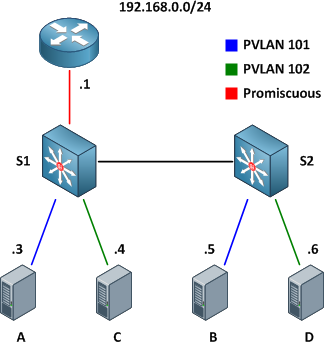
Our private VLAN configuration on S1 and S2 looks like this (if you're following along in a lab, note that the community VLANs 101 and 102 must be created before being associated with the primary VLAN 100):
vlan 100
  private-vlan primary
  private-vlan association 101-102
!
vlan 101
  private-vlan community
!
vlan 102
  private-vlan community
Here are the physical interface configurations per switch for your reference:
S1
interface FastEthernet0/1
 switchport private-vlan mapping 100 101-102
 switchport mode private-vlan promiscuous
!
interface FastEthernet0/3
 switchport private-vlan host-association 100 101
 switchport mode private-vlan host
!
interface FastEthernet0/5
 switchport private-vlan host-association 100 102
 switchport mode private-vlan host
!
interface FastEthernet0/13
 switchport trunk encapsulation dot1q
 switchport mode trunk
S2
interface GigabitEthernet0/4
 switchport private-vlan host-association 100 101
 switchport mode private-vlan host
!
interface GigabitEthernet0/6
 switchport private-vlan host-association 100 102
 switchport mode private-vlan host
!
interface GigabitEthernet0/13
 switchport trunk encapsulation dot1q
 switchport mode trunk
Note that there is nothing special about the trunk configuration; both ends are configured as typical 802.1Q trunk interfaces.
Trunking
With the configurations above applied, the router is able to communicate with all hosts, and all hosts are able to communicate with the router and with the other host in their respective community private VLANs (e.g. host A can reach the router and host B, but not host C or D).
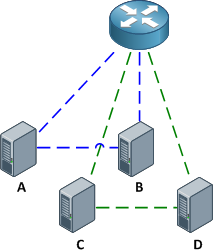
Of course, good network engineers aren't satisfied simply knowing that something works: we want to know how it works. This functionality is actually achieved by bending some rules about VLAN assignments. Traditionally, you expect return traffic originating within a VLAN to come back over the trunk tagged with that same VLAN ID. This is not always the case with private VLANs.
When the router sends a frame to one of the hosts on S2, the frame is tagged as belonging to the primary VLAN 100 when it traverses the trunk, because the router is attached to a promiscuous port. Frames originating from the hosts, however, are tagged with their appropriate secondary VLAN IDs. A frame from host B back to the router, for example, is tagged as VLAN 101 when traversing the trunk link.
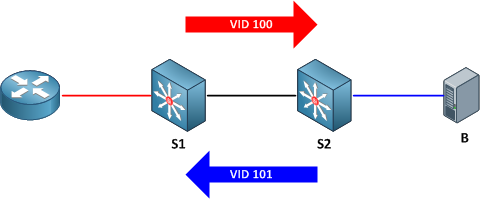
To summarize:
- Frames originating from a promiscuous port are tagged with the primary VLAN ID
- Frames originating from a host port are tagged with the secondary (isolated or community) VLAN ID
And of course, here's a packet capture to help drive the idea home.
SVIs
What if we wanted to remove the router from our topology and do all inter-VLAN routing locally on our multilayer switch S1? No problem, we just need to create the primary VLAN SVI (switched virtual interface, also commonly referred to as a VLAN interface) and apply to it a mapping for our secondary VLANs. First we'll shut down the interface connected to the router and enable multilayer switching.
S1(config)# interface f0/1
S1(config-if)# shutdown
S1(config-if)# exit
S1(config)# ip routing
Next, we'll create the SVI for VLAN 100, assign it the IP address which was previously assigned to the router, and map our secondary VLANs.
S1(config)# interface vlan100
S1(config-if)# ip address 192.168.0.1 255.255.255.0
S1(config-if)# private-vlan mapping 101-102
S1(config-if)#
%PV-6-PV_MSG: Created a private vlan mapping, Primary 100, Secondary 101
%PV-6-PV_MSG: Created a private vlan mapping, Primary 100, Secondary 102
S1 now functions in place of the external router; all hosts can reach its routed Vlan100 interface but are still restricted to communicating with hosts in their secondary VLAN.
Comments
October 28, 2010 at 3:11 a.m. UTC
Excellent Article Stretch. Great job driving home the concept of SVIs and their role in PVLAN.
One discussion that i was having earlier with the good folks at OSL was "Intra and Inter PVLAN traffic filtering" . To do intra-PVLAN filtering , the methods that i can think of is to apply ACLs on the Promiscuous router / SVI.
For inter-PVLAN filtering ( i know this goes against the concept of PVLANs in the first place ) , i would think of the Promiscuous trunk port that you mentioned early in this blogpost.
Your thoughts on this?
Cheers!
October 28, 2010 at 7:22 p.m. UTC
good stuff, finally it hits home what that mapping and association of the vlans is all about, thanks...
October 28, 2010 at 7:48 p.m. UTC
Really good article, i was reading about pvlans just about yesterday. What about a private vlan trunk? I think that some theory on that would be really appreciated (at least, by me :D ). Is it possible to have some dumps of pvlan trunks too?
Thanks!
Cheers!!
October 29, 2010 at 12:03 a.m. UTC
Private VLAN ports on some Catalyst 6000 blades have restrictions. In http://www.cisco.com/en/US/docs/switches/lan/catalyst6500/ios/12.2SXF/native/configuration/guide/pvlans.html#wp1143064:
"These restrictions apply when you configure groups of 24 ports as secondary ports:
"In all releases, this 24-port restriction applies to the WS-X6548-GE-TX and WS-X6148-GE-TX 10/100/1000 Mb Ethernet switching modules.
"Within groups of 24 ports (1-24, 25-48), do not configure ports as isolated ports or community VLAN ports when one port within the group of 24 ports is any of these: -A trunk port -A SPAN destination port -A promiscuous private VLAN port -In releases where CSCsb44185 is resolved, a port that has been configured with the switchport mode dynamic auto or switchport mode dynamic desirable command.
"If one port within the group of 24 ports is one of these ports listed and has the above properties, any isolated or community VLAN configuration for other ports within the 24 ports is inactive. To reactivate the ports, remove the isolated or community VLAN port configuration and enter the shutdown and no shutdown commands."
I ran into this limit while upgrading a working Catalyst 6513 from 12.2(17)SX to 12.2(18)SX for a vulnerability. After the upgrade, many private VLAN ports showed no link. Backing out to the previous version restored service.
I had ports configured as 'switchport' without a 'switchport mode access' or other 'switchport mode' line. Without a specific swichport mode, the default on my platform was 'switchport mode dynamic' (http://www.cisco.com/en/US/docs/switches/lan/catalyst6500/ios/12.1E/native/command/reference/S1.html#wp1183873).
The dynamic mode means the port can also behave as a trunk, and the possible trunk mode is incompatible with other ports configured as private VLAN ports. This is a restriction in all releases of 12.2SX, but I never could find why this restriction wasn't enforced on my platform running 12.2(17)SX. The fix was explicitly defining a switchport mode on each port or disabling the port before attempting the upgrade again.
September 21, 2011 at 12:49 p.m. UTC
Awesome article! Before reading this article I understood how private vlans worked but wasn't quite sure how the frames were tagged when traversing a trunk, and now I know!
I scoured the internet and this was the only clear illustration I could find on how the tagging worked. The packet capture was a great bonus as well. I love to see the decodes in action. Thanks again!
November 28, 2011 at 7:48 a.m. UTC
Hi all,
In respect of your statement which says that Private VLAN Promiscuous Trunks are supported only on the Catalyst 4500 and 6500 series... Is seems that it is not true and Private VLAN Promiscuous Trunks are supported only on 4xxx series switches.
http://tools.cisco.com/ITDIT/CFN/jsp/by-feature.jsp
Correct me if I'm wrong.
Gtsd
June 14, 2012 at 8:01 p.m. UTC
Great article. I am not sure, would you let me know that in Switch 1 promiscuous port Fa0/1 is layer 3 routed port with ip add 192.168.101 /24.
August 15, 2012 at 2:01 a.m. UTC
Awesome, Jeremy! Thank you!
November 18, 2012 at 1:37 p.m. UTC
Thanks a lot, very nice explanation!
January 9, 2013 at 12:02 a.m. UTC
Thank you a lot, it's quite simple and perfect explanation. o/
October 10, 2013 at 9:51 a.m. UTC
Well done on demystifying the land of Mordor that was in the FLG and OCG books. I don't think I've ever seen it described so concisely and clearly. you should send this to them and get your name down for the next CBT Nuggets / Ciscopress book.
And I love the CAPTHCA question.
January 6, 2014 at 4:26 p.m. UTC
Cisco should pay you, big bucks.
I just read the Private Vlan Chapter from the CCNP oficial book, and it wasn't very clear. Read you posts:
- Basic Private VLAN Configuration
- Private VLANs on Trunks and SVIs
and it was like someone turned on a light.
And also they didn't show how it works/how they implemented, and I don't like it. I want to know how it works, because when the shit hits the fan you are going to need it, so that you can troubleshoot it.
Big Fan off you posts and cheat sheets. Keep up the good work.
Best Regards, José Oliveira
April 4, 2014 at 10:56 a.m. UTC
This was better explained than the CCIE Blog on Cisco website. Thank you!
September 28, 2014 at 6:00 a.m. UTC
Hi all,
Interesting read, I was looking for pvlan examples like this, thanks for the examples.
I would like to take the example a little further and ask the community if this scenario is possible. Rather than having the S1 connecting to a router, how about S1 connect to ASA-1 and S2 connect to an ASA-2, the ASA firewalls are connected to each other running in a failover active/standby mode, ASA-1 is active.
Is it possible to configure S2 to have primary vlan 100 too, so if ASA-1 dies, S2 can send traffic to ASA-2?
!example of S1 & S2 config S1# interface FastEthernet0/1 (connects to ASA-2) switchport private-vlan mapping 100 101-102 switchport mode private-vlan promiscuous
S2# interface FastEthernet0/1 (connects to ASA-2) switchport private-vlan mapping 100 101-102 switchport mode private-vlan promiscuous
October 2, 2014 at 3:08 p.m. UTC
Great article. In labbing this, I discovered an interesting symptom when using an SVI. If you don't enable ip routing on the switch, you'll be able to ping back and forth with a promiscuous port but you will not be able to ping a device on a community/isolated port, nor will devices on those ports be able to ping the SVI. Your instructions say to enable ip routing but I forgot to enter the command while labbing from memory and it took me a few minutes to figure out what was going on.
March 9, 2016 at 9:56 a.m. UTC
what about if there is portchannel between Cat4500 and Cat3750,I think private VLANs are not supported on Cat37/35/29xx on portchannel.Thoug it is supported on Cat4500X/Cat6500 on portchannel.
April 18, 2016 at 1:15 p.m. UTC
If there would be a transit switch between S1 and S2, just acting as an intermediate switch and not connecting any routers or hosts, would it work if only VLANs 100-103 were allowed on the trunks with no PVLAN configuration at all?
October 4, 2016 at 10:40 a.m. UTC
Hi Jeremy,
Thanks for this, it really helped me a lot in understanding PVLAN using promiscuous access ports and SVI's. I do have one question. If the Switch connecting to the users is an L2 switch, what steps do I need to take in order for that switch to have an IP address for management? Do I extend the PVLAN SVI to the L2 switch as well and configure the private-vlan mapping in there as well? Does this mean I need to have an L3 switch capable for the user ports as well?
SW1 - L3 SWITCH
ip routing
interface vlan 100
ip add 192.168.100.1 255.255.255.0
private-vlan mapping 101-102
no shut
interface f0/1
description # TO SW2
sw trunk encap dot1q
sw mode trunk
vlan 100
private-vlan primary
private-vlan assocation 101-102
vlan 101
private-vlan community
vlan 102
private-vlan community
interface loopback0
description # MANAGEMENT IP
ip add 192.168.254.1 255.255.255.255
ip route 192.168.254.2 255.255.255.255 192.168.100.2
SW2 - L2 SWITCH
interface vlan 100 #???
ip add 192.168.100.2 255.255.255.0
private-vlan mapping 101-102
interface f0/1
description # TO SW1
sw trunk encap dot
sw mode trunk
interface f0/2 description # TO PC1
sw mode private-vlan host
sw private-vlan host-association 100 101
interface f0/3
description # TO PC2
sw mode private-vlan host
sw private-vlan host-association 100 102
ip routing
ip route 0.0.0.0 0.0.0.0 192.168.100.1
interface loopback 0
ip add 192.168.254.2 255.255.255.255
October 5, 2016 at 4:15 p.m. UTC
Great article thanks you so much.