

The premiere source of truth powering network automation. Open and extensible, trusted by thousands.

NetBox is now available as a managed cloud solution! Stop worrying about your tooling and get back to building networks.
Basic Private VLAN Configuration
By stretch | Monday, August 30, 2010 at 12:53 a.m. UTC
Now that the community lab has been equipped with a Catalyst 3560, I have finally been able to write about private VLANs (which are supported only on Catalyst 3560 and higher switches). This article discusses the concept of private VLANs and includes a basic configuration example, with more complex configurations deferred for future articles.
Private VLANs were developed to provide the ability to isolate end hosts at layer two. To understand the motivation behind this feature, consider a colocation environment in which the network operator must connect servers belonging to different customers to the Internet. These servers must all be able to reach their first-hop router, but for security reasons, servers belonging to one customer must not be able to communicate with servers belonging to another. An obvious design solution for these requirements is to place each customer's servers in a separate VLAN, which also requires the assignment of a separate IP subnet per customer (even if they have only one server).
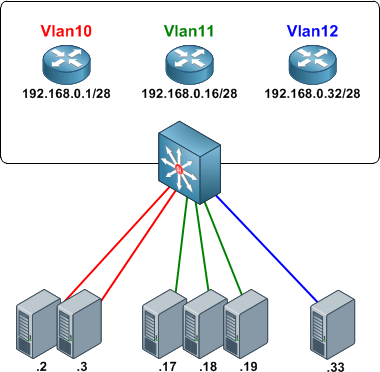
This approach wastes both VLAN IDs and IP address space. Private VLANs were introduced as a more elegant alternative, allowing multiple devices to reside in the same IP subnet, yet remain isolated from one another at layer two.
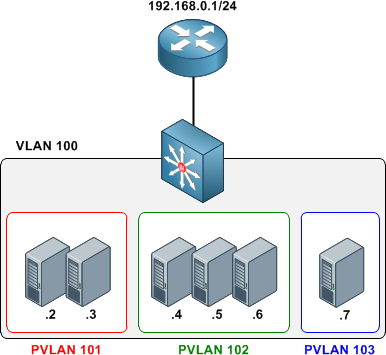
A private VLAN is defined as a pairing of a primary VLAN with a secondary VLAN. Primary VLANs are the normal VLANs we all know and love. Secondary VLANs use the same VLAN ID range and are defined in the same manner as primary VLANs, but are specially designated to operate as secondary VLANs in one of two modes:
- Isolated - The end points of all ports assigned to an isolated private VLAN cannot communicate with one another, nor with host ports in any other private VLANs.
- Community - End points attached to community ports can communicate with one another, but not with ports in other private VLANs.
An access port assigned to a private VLAN operates in one of two modes:
- Host - The port inherits its behavior from the type of private VLAN it is assigned to.
- Promiscuous - The port can communicate with any other private VLAN port in the same primary VLAN.
Configuring Private VLANs
We'll configure an isolated private VLAN to allow two servers owned by different customers in the same IP subnet to communicate with their first-hop router, but not with one another.
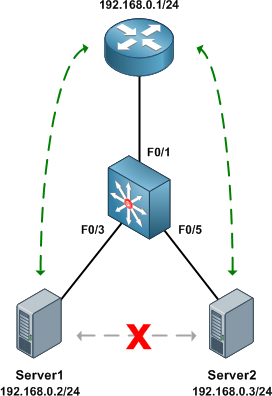
Before getting started with private VLAN configuration, ensure that VTP has been set to transparent mode. There are numerous reasons for running VTP in transparent mode beyond the scope of this article, and to enable private VLANs it's explicitly required.
Switch(config)# vtp mode transparent
Setting device to VTP TRANSPARENT mode.
As with normal VLANs, private VLANs must be created before they can be used. Upon creation, we must also define a type (isolated, community, or primary) for each. We'll create our secondary VLANs first, then our primary VLAN. The secondary private VLAN is mapped under the configuration of the primary private VLAN.
Switch(config)# vlan 101
Switch(config-vlan)# private-vlan isolated
Switch(config-vlan)# vlan 100
Switch(config-vlan)# private-vlan primary
Switch(config-vlan)# private-vlan association 101
Our completed VLAN configuration looks like this:
vlan 100
  private-vlan primary
  private-vlan association 101
!
vlan 101
  private-vlan isolated
Next, we designate our private VLAN interfaces. Our uplink port to the router will be set to promiscuous mode, with the primary VLAN mapped to the secondary VLAN.
Switch(config)# interface f0/1
Switch(config-if)# switchport mode private-vlan promiscuous
Switch(config-if)# switchport private-vlan mapping 100 101
Our two server ports will be configured in host mode:
Switch(config)# interface f0/3
Switch(config-if)# switchport mode private-vlan host
Switch(config-if)# switchport private-vlan host-association 100 101
Switch(config-if)# interface f0/5
Switch(config-if)# switchport mode private-vlan host
Switch(config-if)# switchport private-vlan host-association 100 101
At this point our private VLAN configuration is complete. We can verify private VLAN interface assignments with the command show vlan private-vlan:
Switch# show vlan private-vlan

Primary Secondary Type              Ports
------- --------- ----------------- ------------------------------------------
100     101       isolated          Fa0/1, Fa0/3, Fa0/5
Switch# show interface status

Port      Name               Status       Vlan       Duplex  Speed Type
Fa0/1                        connected    100        a-full  a-100 10/100BaseTX
Fa0/2                        notconnect   1            auto   auto 10/100BaseTX
Fa0/3                        connected    100,101    a-full  a-100 10/100BaseTX
Fa0/4                        notconnect   1            auto   auto 10/100BaseTX
Fa0/5                        connected    100,101    a-full  a-100 10/100BaseTX
Fa0/6                        notconnect   1            auto   auto 10/100BaseTX
Fa0/7                        notconnect   1            auto   auto 10/100BaseTX
...
The command show interface switchport is also useful for examining private VLAN details per interface.
Finally, we can verify that the router can communicate with both servers, but the servers cannot communicate directly with one another.
Router# ping 192.168.0.2

Type escape sequence to abort.
Sending 5, 100-byte ICMP Echos to 192.168.0.2, timeout is 2 seconds:
!!!!!
Success rate is 100 percent (5/5), round-trip min/avg/max = 1/2/4 ms
Router# ping 192.168.0.3

Type escape sequence to abort.
Sending 5, 100-byte ICMP Echos to 192.168.0.3, timeout is 2 seconds:
!!!!!
Success rate is 100 percent (5/5), round-trip min/avg/max = 1/1/4 ms
Server1# ping 192.168.0.3

Type escape sequence to abort.
Sending 5, 100-byte ICMP Echos to 192.168.0.3, timeout is 2 seconds:
.....
Success rate is 0 percent (0/5)
Further Reading
- Configuring Private VLANs - Catalyst 3560 configuration guide
- RFC 5517 - Cisco Systems' Private VLANs: Scalable Security in a Multi-Client Environment
Posted in Switching
Comments
August 30, 2010 at 9:31 a.m. UTC
I've read about private vlans at cisco recently. I must admit I like it but hmmm.... there will be some complications if u get the topology too complex. I see this as OSPF like. vlan in a vlan God damn it's very flexible.
August 30, 2010 at 10:40 a.m. UTC
I always wondered what the pvlan mode was used to - promisc/host - now I know. It also gets very interesting because there is a third mode - trunk, which is supported on some 49xx metro switches afaik.
August 30, 2010 at 11:55 a.m. UTC
One gotcha related to PVLAN is to look for "ip local proxy arp"....just in case :-)
HTH...
Deepak Arora
http://deepakarora1984.blogspot.com/
August 30, 2010 at 5:44 p.m. UTC
Umm, the subnet mask in the first picture looks... weird. In order to have different subnets, shouldn't those be /28s?
August 30, 2010 at 5:53 p.m. UTC
@Gabriel: Whoops, my mistake; they should indeed be /28 masks in the first example. Sometimes I subtract when I should add. Fixed it now, thanks for the heads up!
September 2, 2010 at 11:54 p.m. UTC
Hi,
I think the first example still has a problem. Router 1 has an IP of 192.168.0.1 /28, which is fine, with hosts being .2 and .3
However, Router 2's address should be 192.168.0.17 (.16 is the network ID), and the hosts should be .18, .19, and .20.
Router 3's address should be 192.168.0.33 (.32 is the network ID), and the host should be .34
...correct me if I'm wrong...
September 5, 2010 at 9:12 a.m. UTC
Skeebers, you are right. R2's and R3's IP addresses are incorrect, they are NetworkID's.
September 5, 2010 at 2:59 p.m. UTC
@Skeebers If he follows the same convention (GW being first usable) then yes you are correct.
September 9, 2010 at 10:51 a.m. UTC
@Stretch, In the paragraph of Next, we designate....mapped to the seconary VLAN. I believe the word "seconary" should be "secondary".
September 13, 2010 at 5:02 a.m. UTC
I actually thought private VLAN would be a good implementation instead of passive-interface. Usually when you connect EIGRP neighbors with switches, they will be error messages saying they are not on the same subnet. Using private (isolated) VLAN not only separates the routers and connect them to a central router, but effectively separate different routers. On the other hand, if you wish to exchange information other than routing information, you can use community VLAN to control they talking with each other.
September 26, 2010 at 11:04 p.m. UTC
This would be a very handy feature at a college campus to prevent student machines spreading infections amongst each other. Does anyone know if HP ProCurve equipment is capable of this, or if not if it's likely to feature soon?
October 22, 2010 at 6:00 p.m. UTC
I was studying pvlan for my CCNP and this article really helped me... i really appreciate your work Stretch!
October 31, 2010 at 3:46 a.m. UTC
@Paul: Not sure whether HP ProCurve devices support PVLAN but one thing you might want to watch out for in using PVLAN to stop student machines (I'm assuming college-owned lab workstations here) from talking to each other is your Desktop teams image-deployment/software-deployment solution. At the University where I work our Desktop team use an application that has a feature that allows devices that are mapped in the same zone (essentially the same subnet/VLAN) to get software/images from each other, rather than always having to query the central server. This has some benefit for the network in that potentially heavy traffic flows (imaging) are partially contained within a VLAN rather than always traversing the entire network.
How do I know this? I raised the idea of PVLANs at a Change Meeting where, thankfully, the TL for the Desktop team was present :)
January 6, 2011 at 6:17 a.m. UTC
hi,
befoe i don't know about private VLAN . now i got it . thanks
June 15, 2011 at 2:48 p.m. UTC
What if there is no uplink port to a router, and we use a vlan interface as the gateway for hosts. Can you configure the SVI as promiscuous?
September 14, 2011 at 4:18 p.m. UTC
In a wireless mesh network can a private vlan be used to provide enhanced protection for the wired network. In this scenario the mesh AP's would exist in the private vlan while the wlan controllers would exist on the other side of a firewall (inside) on the wired network. The mesh AP's (both RAP's and MAP's) could only see the outside interface of the firewall??
November 10, 2011 at 11:54 a.m. UTC
Is it possible to allow some type of traffic between community vlans ?
December 21, 2011 at 5:22 p.m. UTC
before i know about private VLAN but on that time, i was some confused . now i got it . thanxxxxxxxxxxxxxxxx dear
January 11, 2012 at 2:36 a.m. UTC
Hi Jeremy,
Is there a difference configuring private vlan on 3560 and 3560G?? I could not make pvlan to work on 3560G on your lab and strange thing i note while configuring pvlan is that after completing configuration the cdp neighbour output from switch gets blank!! and when you send a test ping all host reply whether they are community or isolated! and when you issue show int gi0/2 switchport, output returned is Operational Mode: down! I have failed to make it work on this Gig switch !
While its the opposite on 3560-TS and pvlan works as expected!
Any thoughts would be highly appreciated!
some outputs for your review..
SW2(config)#do show int gi0/4 sw Name: Gi0/4 Switchport: Enabled Administrative Mode: private-vlan host Operational Mode: down Administrative Trunking Encapsulation: negotiate Negotiation of Trunking: Off Access Mode VLAN: 1 (default) Trunking Native Mode VLAN: 1 (default) Administrative Native VLAN tagging: enabled Voice VLAN: none Administrative private-vlan host-association: 10 (VLAN0010) 30 (VLAN0030) Administrative private-vlan mapping: none Administrative private-vlan trunk native VLAN: none Administrative private-vlan trunk Native VLAN tagging: enabled Administrative private-vlan trunk encapsulation: dot1q Administrative private-vlan trunk normal VLANs: none Administrative private-vlan trunk associations: none Administrative private-vlan trunk mappings: none Operational private-vlan: none Trunking VLANs Enabled: ALL Pruning VLANs Enabled: 2-1001 Capture Mode Disabled Capture VLANs Allowed: ALL
Protected: false Unknown unicast blocked: disabled Unknown multicast blocked: disabled Appliance trust: none
SW2(config)#do show vlan priv
Primary Secondary Type Ports
10 20 community Gi0/2 10 30 isolated Gi0/2, Gi0/4, Gi0/6
OR
Primary Secondary Type Ports
10 20 community Gi0/2, Gi0/4 10 30 isolated Gi0/2, Gi0/6
Tried both and they don't work!
Amir
January 11, 2012 at 2:45 a.m. UTC
This is the configuration that worked on 3560-TS, R1,R3 and R5 used as hosts.
vlan 100
private-vlan primary
private-vlan association 200,300
!
vlan 200
private-vlan community
!
vlan 300
private-vlan isolated
!
!
!
!
interface FastEthernet0/1
switchport private-vlan mapping 100 200,300
switchport mode private-vlan promiscuous
!
interface FastEthernet0/2
!
interface FastEthernet0/3
switchport private-vlan host-association 100 200
switchport mode private-vlan host
!
interface FastEthernet0/4
!
interface FastEthernet0/5
switchport private-vlan host-association 100 300
switchport mode private-vlan host
Ping responses
R1#ping 11.0.0.255 rep 1
Type escape sequence to abort. Sending 1, 100-byte ICMP Echos to 11.0.0.255, timeout is 2 seconds:
Reply to request 0 from 11.0.0.5, 4 ms Reply to request 0 from 11.0.0.3, 4 ms R1#
R3#ping 11.0.0.255 rep 1
Type escape sequence to abort. Sending 1, 100-byte ICMP Echos to 11.0.0.255, timeout is 2 seconds:
Reply to request 0 from 11.0.0.1, 1 ms R3#
R5#ping 11.0.0.255 rep 1
Type escape sequence to abort. Sending 1, 100-byte ICMP Echos to 11.0.0.255, timeout is 2 seconds:
Reply to request 0 from 11.0.0.1, 4 ms R5#
==================================================================
While this is the configuration that kept failing on 3560G R2,R4 and R6 used as hosts.
vlan 10 private-vlan primary private-vlan association 20,30 ! vlan 20 private-vlan community ! vlan 30 private-vlan isolated ! ! ! ! interface GigabitEthernet0/1 ! interface GigabitEthernet0/2 switchport private-vlan mapping 10 20,30 switchport mode private-vlan promiscuous ! interface GigabitEthernet0/3 ! interface GigabitEthernet0/4 switchport private-vlan host-association 10 20 switchport mode private-vlan host ! interface GigabitEthernet0/5 ! interface GigabitEthernet0/6 switchport private-vlan host-association 10 30 switchport mode private-vlan host
ping responses
R2#ping 10.0.0.255 rep 1
Type escape sequence to abort. Sending 1, 100-byte ICMP Echos to 10.0.0.255, timeout is 2 seconds:
Reply to request 0 from 10.0.0.4, 1 ms Reply to request 0 from 10.0.0.6, 1 ms R2#
R4#ping 10.0.0.255 rep 1
Type escape sequence to abort. Sending 1, 100-byte ICMP Echos to 10.0.0.255, timeout is 2 seconds:
Reply to request 0 from 10.0.0.6, 1 ms Reply to request 0 from 10.0.0.2, 4 ms R4#
R6#ping 10.0.0.255 rep 1
Type escape sequence to abort. Sending 1, 100-byte ICMP Echos to 10.0.0.255, timeout is 2 seconds:
Reply to request 0 from 10.0.0.4, 4 ms Reply to request 0 from 10.0.0.2, 4 ms R6#
January 12, 2012 at 5:17 a.m. UTC
Good one Jeremy. Your posts are always simpler, concise and easy to understand and grasp concepts. you are doing a great job for the networking community.
Please keep doing the good work.
February 7, 2012 at 11:17 a.m. UTC
Hi Jeremy,
Any thoughts on 2nd last post?
Regards Amir
July 9, 2012 at 6:45 p.m. UTC
Amir,
What is the version of IOS you are running on you 3750??
Prior to 12.2.(25) you cannot run private vlan on IPBASE image switch, only the ipservice can run pvlan.
After 12.2.(25) noproblem running private vlan on IPBASE
February 12, 2013 at 2:49 a.m. UTC
Nice job with this one Stretch!
December 16, 2013 at 2:16 a.m. UTC
excellent, great work!!
January 20, 2014 at 4:30 a.m. UTC
Do we have any examples on two-way community PVLAN usage?
April 4, 2016 at 11:32 p.m. UTC
Great article Jeremy. It provides timeless value as i stumbled on this over 5 years later! I understand that isolated ports can't communicate with each other directly, but I wasn't clear if they can communicate to each other through the promiscuous or router port. Did you have to put an ACL on the router? What exactly prevented Server1 from pinging other servers?
Thanks!
October 5, 2016 at 4:18 p.m. UTC
Thanks for this post