

The premiere source of truth powering network automation. Open and extensible, trusted by thousands.

NetBox is now available as a managed cloud solution! Stop worrying about your tooling and get back to building networks.
Verbose ACL logging
By stretch | Thursday, January 8, 2009 at 12:00 a.m. UTC
Cisco IOS provides the capability to log matches against access list expressions by appending the log or log-input keyword to a statement. By enabling ACL logging we can harness a great deal more detail than simple packet counters provide. For example, consider the following topology:
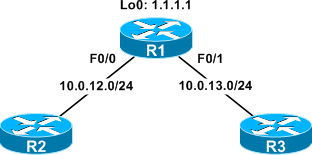
An ACL has been created to block SSH traffic on R1, and applied inbound on the FastEthernet0/0 and FastEthernet0/1 interfaces:
Extended IP access list Block_SSH
    10 deny tcp any any eq 22
    20 permit ip any any
When an administrator attempts to SSH to R1 from one of the other routers, the TCP connection is rejected by R1 and its ACL counter increased appropriately:
R2# ssh 1.1.1.1
% Destination unreachable; gateway or host down
R1# show ip access-lists
Extended IP access list Block_SSH
    10 deny tcp any any eq 22 (3 matches)
    20 permit ip any any (24 matches)
The stock ACL counters give us a good idea of how much traffic is being allowed or rejected, but not where that traffic is coming from (or going to). We can alter the first entry in our Block_SSH ACL and append the log keyword to log matches.
R1(config)# ip access-list extended Block_SSH
R1(config-ext-nacl)# no 10
R1(config-ext-nacl)# 10 deny tcp any any eq 22 log
R1(config)# ^Z
R1# show ip access-lists
Extended IP access list Block_SSH
    10 deny tcp any any eq 22 log
    20 permit ip any any (444 matches)
Now SSH traffic will continue to be blocked and the ACL counters to increase, but the router will also generate a log message indicating when the match occurred, where the packet came from, and where the packet was headed:
%SEC-6-IPACCESSLOGP: list Block_SSH denied tcp 10.0.12.2(28467) -> 1.1.1.1(22), 1 packet
This is certainly handy, but what if we expand our topology to include a LAN (192.168.0.0/24) attached to both R1 and R2?
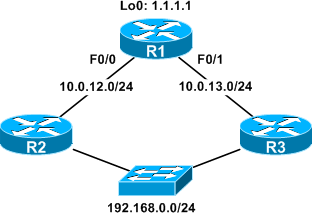
Imagine R2 and R3 are also supposed to be blocking SSH traffic, but one of them has had its ACL mistakenly erased. If a user from the LAN attempts to SSH to R1 via the unsecured router, the traffic will still be blocked at R1, but the log message won't help us determine where the leak is:
%SEC-6-IPACCESSLOGP: list Block_SSH denied tcp 192.168.0.42(30316) -> 1.1.1.1(22), 1 packet
To provide even more detail in our ACL log entries, we can replace the log keyword with log-input. log-input includes all the detail provided by log plus some handy layer two information.
R1(config)# ip access-list extended Block_SSH
R1(config-ext-nacl)# no 10
R1(config-ext-nacl)# 10 deny tcp any any eq 22 log-input
R1(config-ext-nacl)# ^Z
R1# show ip access-lists
Extended IP access list Block_SSH
    10 deny tcp any any eq 22 log-input
    20 permit ip any any (1683 matches)
Here's what the log records when the same SSH attempt from the LAN is repeated:
%SEC-6-IPACCESSLOGP: list Block_SSH denied tcp 192.168.0.42(15111) (FastEthernet0/1
 c203.73ae.0001) -> 1.1.1.1(22), 1 packet
Now we can easily determine both the incoming interface (FastEthernet0/1) and the source MAC address from the prior hop (c203.73ae.0001). Note that this MAC belongs to R3, not the origin host. These attributes clearly point to R3 as the unsecured router, and we can now move to secure it.
Posted in Security
Comments
January 8, 2009 at 12:30 a.m. UTC
Hi,
Great work !!!
offtopic
Did you know why in OSPF appears DR 0.0.0.0 and BDR 0.0.0.0.
January 8, 2009 at 4:46 a.m. UTC
Logging ACL hits can easily become a self-DoS in high-traffic situations due to the CPU consumed to generate the syslog output. Rate-limiting is available, but then one loses granularity.
NetFlow telemetry export/collection/analysis is generally a much better way to gain visibility into network behaviors, classify attack traffic, et. al.
January 8, 2009 at 7:34 a.m. UTC
Nice. I always use the log command. Have not used the log-input command though.
Once I had a problem with NAT on a 800 series router where I used the log command and NAT would not work. When I wrote the ACL without log again, it worked.
January 8, 2009 at 8:59 a.m. UTC
Very useful.
January 8, 2009 at 7:20 p.m. UTC
Thanks for that post.
Very useful
February 4, 2009 at 10:56 a.m. UTC
I have the same problem with NAT when "log" in ACL was used - router 2811, full IOS image. But I have not found explanation for this behavior yet. Does anyone have experience with this problem?
Once I had a problem with NAT on a 800 series router where I used the log command and NAT would not work. When I wrote the ACL without log again, it worked.
January 30, 2013 at 9:13 p.m. UTC
Useful information. I learnt something new today and I thank you for that.
September 25, 2013 at 6:01 p.m. UTC
The "log" command did not work when you applied it to an access list used with NAT, because IOS at the time of this posted article did not support the "log" command for use with NAT.
From Cisco documentation:
Q. Does Cisco IOS NAT support ACLs with a "log" keyword?
A. When you configure Cisco IOS NAT for dynamic NAT translation, an ACL is used to identify packets that can be translated. The current NAT architecture does not support ACLs with a "log" keyword.
reference: http://www.cisco.com/en/US/tech/tk648/tk361/technologies_q_and_a_item09186a00800e523b.shtml