

The premiere source of truth powering network automation. Open and extensible, trusted by thousands.

NetBox is now available as a managed cloud solution! Stop worrying about your tooling and get back to building networks.
MTU manipulation
By stretch | Wednesday, November 5, 2008 at 2:26 a.m. UTC
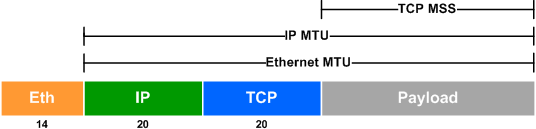
The Maximum Transmission Unit (MTU) is the maximum length of data that can be transmitted by a protocol in one instance. For example, the MTU of Ethernet (by default 1500) is the largest number of bytes that can be carried by an Ethernet frame (excluding the header and trailer). MTUs are found at various layers of the OSI model, and can often be tweaked to more efficiently transport large volumes of data.
Ethernet
The default Ethernet MTU is 1500 bytes, not including the header or trailer. Sometimes a slightly higher MTU is preferable to accommodate Q-in-Q tunneling or other encapsulation. The MTU can be raised on Cisco IOS with the system mtu command under global configuration:
Switch(config)# system mtu ?
  <1500-1998>  MTU size in bytes
  jumbo        Set Jumbo MTU value for GigabitEthernet or TenGigabitEthernet
           interfaces
The maximum MTU is dependent on the hardware platform, but the IEEE 802.3 standards require a minimum MTU of 1500 bytes. Additionally, a jumbo MTU for 1 Gbps and 10 Gbps interfaces can be allowed up to 9000 bytes. Changing either of these values will require a device power cycle.
Switch(config)# system mtu 1508
Changes to the system MTU will not take effect until the next reload is done
Switch(config)# system mtu jumbo 9000
Changes to the system jumbo MTU will not take effect until the next reload is done
Switch# show system mtu

System MTU size is 1500 bytes
On next reload, System MTU will be 1508 bytes

System Jumbo MTU size is 1500 bytes
On next reload, System Jumbo MTU will be 9000 bytes
IP
As with Ethernet frames, the MTU can be adjusted for IP packets. However, the IP MTU is configured per interface rather than system-wide, with the ip mtu command:
Router(config)# interface f0/0
Router(config-if)# ip mtu ?
  <68-1500>  MTU (bytes)
Notice that the maximum IP MTU is capped at the Ethernet MTU, because it is being applied to an Ethernet interface. The configured IP MTU determines how large a packet to be transmitted out the interface may be. IP packets larger than the MTU are discarded, and may prompt the router to send a Fragmentation Needed ICMP packet back to the source to facilitate path MTU discovery.
It's also worth noting that while the Ethernet and IP MTUs effectively refer to the same section of an IP/Ethernet packet, they can be configured independently. For example, assume we want to shrink the IP MTU of an interface to 1200 bytes:
Router(config)# interface f0/0
Router(config-if)# ip mtu 1200
The IP MTU has been modified from its default of 1500:
Router# show ip interface f0/0
FastEthernet0/0 is up, line protocol is up
  Internet address is 10.0.0.1/24
  Broadcast address is 255.255.255.255
  Address determined by setup command
  MTU is 1200 bytes
...
However, the interface's Ethernet MTU remains unchanged:
Router# show interface f0/0
FastEthernet0/0 is up, line protocol is up
  Hardware is Gt96k FE, address is c200.5867.0000 (bia c200.5867.0000)
  Internet address is 10.0.0.1/24
  MTU 1500 bytes, BW 10000 Kbit, DLY 1000 usec,
 reliability 255/255, txload 1/255, rxload 1/255
TCP
There are two contexts in which the TCP Maximum Segment Size (MSS) can be configured: transient traffic and terminating traffic.
Transient Traffic
When a TCP client initiates a connection to a server, it includes its MSS as an option in the first (SYN) packet. On an Ethernet interface, this value is typically 1460 (1500 byte Ethernet MTU - 20 byte IP header - 20 byte TCP header).
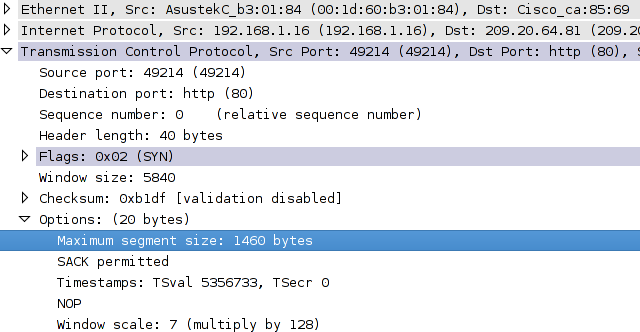
However links beyond the host often have a lower effective MSS and full-size packets from the client may be dropped. To inspect and alter the MSS option included in TCP SYN packets passing through the router, use the ip tcp adjust-mss command on the interface:
Router(config)# interface f0/0
Router(config-if)# ip tcp adjust-mss ?
    Maximum segment size in bytes
Terminating Traffic
Terminating traffic refers to TCP packets which originate from or are destined for the local router (for example, SSH or BGP). In this context, the router itself is considered the TCP client and/or server. The local MSS can be configured with the ip tcp mss command under global configuration:
Router(config)# ip tcp mss ?
  <68-10000>  MSS
Posted in Design
Comments
November 5, 2008 at 3:46 a.m. UTC
I had some ongoing issue with a certain application and its very much related to MTU/MSS sizes. After some research as a bandaid solution i applied ip tcp mss-adj 1300 on the lan interface which fixed the issue.
I really can't differenciate much between MSS and MTU and how it's affectiong sites which sits behind some old firewall.
November 5, 2008 at 7:48 a.m. UTC
Is "ip tcp adjust-mss" applied to incoming packet only?
November 5, 2008 at 7:51 a.m. UTC
MSS is IP packet size without IP header and next header (for exm. TCP). So max IP packet is 1500 (MTU), segment size is 1500B - 20B(ip) -20B(TCP) = 1460.
November 5, 2008 at 9:36 a.m. UTC
MSS is the maximum amount of data inside a tcp segment not including the headers. This MSS is established during the tcp connection establishment. Since TCP is a bidirectional protocol, the lowest of the two values (on each host) is agreed upon.
This is different then IP MTU that is unidirectional (each direction can have a different MTU). IP MTU also includes the headers. The negotiation of the MTU size is often broke by firewalls when misconfigured to block all icmp.
Concerning the IP TCP ADJUST-MSS command, it works in both directions to spoof a host down to that level. If a router receives or sends a segment through an interface with that command, the mss will be adjusted down to that point. If the MSS in the segment is already smaller, it is left untouched. This is most commonly used on PPPoE.
November 5, 2008 at 10:36 a.m. UTC
Nice work, Stretch! Congratulations once again for the great explanation. Furthermore you can mention something about the windows size and his reflection to TCP session. Moreover, It would be great to explain the latency influence as well. I mean, how the latency is reflected to the TCP session in between two TCP communication stations (lets say that we have two TCP speakers and 1Mbps T1 line in between. What would be in theory the maximum TCP throughput per session) and so on.
I'm just giving a suggestion of course :)
Cheers!
November 6, 2008 at 10:20 p.m. UTC
It's time for my first comment on this clean and clever blog.
I'll just mention in addition to PPPoE that adjust-mss is also used when using GRE tunnels or IPSec. Some protocols set the DontFragment bit (ie. SMB/CIFS) and don't really like packet drops ;)
Keep producing interesting posts and nice cheatsheets ;)
Cheers
November 12, 2008 at 3:23 a.m. UTC
A question, would you ever change the IP MTU to a lower value then the interface MTU in a real world scenario?
Thank you for a very good post.
November 14, 2008 at 5:56 p.m. UTC
You may have to create a lower MTU if the packet has to be encapsulated which would in effect add to the total size of the packet.
Since the MTU only accounts for the size of the IP/TCP headers and data the encapsulated headers are missed and possibly causing the packet size to exceed the MTU
Lowering the MTU size could offset the additional bytes added from the encapsulation causing the data to be transmitted without the need for fragmentation
November 16, 2008 at 9:54 p.m. UTC
Thanks Josh. I undestand the concept behind MTU. My questions was IP MTU vs Ethernet MTU, since they refer to the same section of the IP packet and include the payload and IP header. Would you ever have size of Interface MTU different then IP MTU?
December 18, 2008 at 10:09 p.m. UTC
sending a ping -l to different remote websites/servers reflects different RTT.What is the best way to twick the windowsize ?(for example pinging the exchange server returned 30msec while pinging a remote website returned 150 msec)
January 29, 2009 at 5:54 a.m. UTC
Different IP MTU/Ethernet MTU,yes it'll used when you're using EoMPLS.In EoMPLS, to prevent fragmentation from occurring. You must reduce IP MTU cuz of overhead from MPLS header of 4 bytes. a PC sends IP packet of 1500 bytes (20 bytes for IP header, 20 for TCP, leaves 1460 for real data payload). You have 18 bytes (6 src mac, 6 dst mac, 2 byte type, 2 CRC) for ethernet frame header. Total ethernet header is 1518 + 4 byte MPLS. An access switch port, max Ethernet MTU is 1518 with headers. 1522 bytes is allowed IF you have a .1Q port. So if its not a trunk port, then it the Eth port will drop higher than 1518 bytes. If u're trying to pass EoMPLS packets thru a switch's port, it will drop if MTU isnt lowered at the source. So thats a scenario when you would option 1: modify Ethernet MTU to 1504 (plus 18 bytes L2 frame header, which is invisible but its there) and keep IP MTU at 1500 or option 2: reduce the IP MTU to 1496 to accommodate for at least 1 MPLS label over an Ethernet network.
July 19, 2009 at 10:21 a.m. UTC
Good article. Now the difference system mtu vs ip mtu vs mtu is clear.
Thanks.
August 9, 2009 at 10:45 a.m. UTC
Hi,
Danny , thx for the explenation. Nevertheless i have a couple of questions :
I'm a bit surprised how come the EThernet MTU and the IP MTU refer to the same section of the Frame packet
If they do refer to the same section. it doesn't make any sense to have different values
thx
October 20, 2009 at 1:06 p.m. UTC
Hi, I want to talk a little bit about fragmentation. Something that is not quite clear to me: When the host receives ICMP message "packet too big, fragmentation needed" (type3 code 4), does it reduce the TCP MSS or the actual MTU of the interface? What is the right way? It seems that it shall be the MSS, but i saw implementations where the actual MTU is reduced... Thanks.
November 27, 2011 at 8:27 p.m. UTC
Thank you!
April 6, 2012 at 12:24 p.m. UTC
Hi,
I am network engineer in ISP, we are using tunnel for the customer, but in most cases customer have a complaint that the MTU 1500 is not working, and on lower MTU is working e.g MTU 1484.
I have also used the ip df 0 method but issue same,
ROUTER(config-if)ip policy route-map clear-df
So what is the perfect solution to fix it.
November 19, 2012 at 5:20 p.m. UTC
hi. as I've got, you said the IP MTU is the whole IP packet (IP header plus payload); but with refer to thhis link (http://ieoc.com/forums/p/7630/31454.aspx#31454), the IP mtu is equal to 1500 byte bt default, but considered to be the size of the IP Payload without any header. am I correct? tnx.
November 25, 2014 at 4:07 p.m. UTC
IP MTU refers to what you set on your Router interface.
Ethernet MTU refers to what the hardware supports. Ethernet has a built in MTU of 1500, that is why the value doesn't change. It is based on the physical capability of the wire.
That is also why they are two different things. Pretty much 99% of the time, the values will be the same. But if you ever need to adjust the MTU, you would be adjusting the IP MTU. You can't change the Ethernet MTU unless you re-cable.
Here is proof:
R3(config)#interface FastEthernet0/0
R3(config-if)#mtu 1111
% Interface FastEthernet0/0 does not support user settable mtu.
R3(config-if)#ip mtu 777
R3(config-if)#
R3# show ip int fa0/0 FastEthernet0/0 is up, line protocol is up MTU is 777 bytes---output truncated---R3# show int f0/0 FastEthernet0/0 is up, line protocol is up MTU 1500 bytes, BW 10000 Kbit/sec, DLY 1000 usec
November 30, 2015 at 8:03 a.m. UTC
Thanks , Great Abstract
July 12, 2016 at 9:45 a.m. UTC
This article is really nice. It also helped me brushing up the concept for my own blog. Thanks!
If you allow, here is a link to my own article on the same topic:
http://blogbt.net/index.php/2016/06/the-rationale-behind-ip-mtu-tcp-mss/
September 30, 2016 at 1:09 p.m. UTC
Hello, Thanks for the nice article. Regarding command "ip tcp adjust-mss" - it looks like it doesn't work for transit traffic in case CEF is enabled. It can be applied, but no effect is seen.