

The premiere source of truth powering network automation. Open and extensible, trusted by thousands.

NetBox is now available as a managed cloud solution! Stop worrying about your tooling and get back to building networks.
Storm control
By stretch | Thursday, November 27, 2008 at 1:42 a.m. UTC
Cisco Catalyst switches provide a feature termed "storm control," which allows an administrator to suppress excessive inbound unicast, multicast, or broadcast traffic on layer two interfaces. This can be handy to protect against broadcast storms resulting from spanning tree misconfiguration, or even unicast storms created by malfunction host NICs.
On each interface, a maximum threshold can be configured in bits or packets per second, or as a percentage of the interface bandwidth. If incoming traffic of the specified type exceeds its threshold during a polling interval (one second), traffic is blocked until the incoming rate drops below the configured falling interval. Consider the following traffic graph:
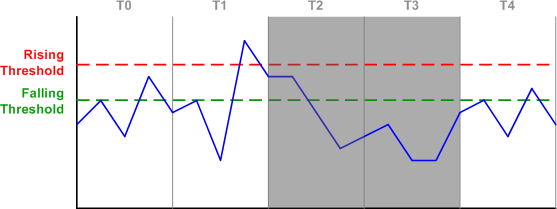
In interval T0, inbound traffic is accepted as its rate never exceeds the rising threshold. In T1, the rising threshold is exceeded, and the switch makes a note to block incoming traffic for the next interval. In T2, traffic is blocked, but the switch continues to monitor the incoming rate. Although the rate has fallen below the rising threshold, it still exceeds the falling threshold, so the switch will continue to block traffic for the next interval.
During T3, traffic stays below the falling interval, so the switch removes the blocking for T4. Although traffic in T4 exceeds the falling threshold again, traffic will not be blocked for the next interval as the rising threshold hasn't been exceeded.
Configuring storm control on an interface is simple. At a minimum you'll need to specify a traffic type (unicast, multicast, or broadcast) and a rising threshold:
Switch(config-if)# storm-control broadcast level bps 1m 500k
In the above example, we have configured storm control for broadcast traffic with a 1 Mbps rising threshold and a 500 Kbps falling threshold. Note that specifying a falling threshold is optional; if omitted, the falling threshold will default to the value of the rising threshold (effectively removing it).
show storm-control displays interfaces configured with storm control and the state of each:
Switch# show storm-control
Interface  Filter State   Upper        Lower        Current
---------  -------------  -----------  -----------  ----------
Fa0/5      Forwarding         1m bps     500k bps        0 bps
Observe how the output changes when the upper (rising) threshold for broadcast traffic is exceeded:
Switch# show storm-control
Interface  Filter State   Upper        Lower        Current
---------  -------------  -----------  -----------  ----------
Fa0/5      Blocking           1m bps     500k bps    2.08m bps
Additionally, the switch will generate a log message notifying administrators of the detected storm:
%STORM_CONTROL-3-FILTERED: A Broadcast storm detected on Fa0/5. A packet filter action
has been applied on the interface.
When the incoming rate drops below the lower (falling) threshold, the interface filter returns to forwarding:
Switch# show storm-control
Interface  Filter State   Upper        Lower        Current
---------  -------------  -----------  -----------  ----------
Fa0/5      Forwarding         1m bps     500k bps   48.81k bps
Lastly, the storm-control action trap command can be used under interface configuration to send SNMP traps in the event of a storm rather than the default behavior of blocking incoming traffic.
Posted in Switching
Comments
November 27, 2008 at 1:22 p.m. UTC
just in the right time; we've just had an issue caused by a faulty NIC which forced all WAN links to flap among others, indicating how vulnerable could an enterprise be when features like this are ignored..
November 27, 2008 at 4:47 p.m. UTC
Another excellent example of the powers at layer 2.
Thanks Stretch!
November 27, 2008 at 8:57 p.m. UTC
Hi Jeremy,
which method or tool do you use for testing the storm-control broadcast? Any information/hint for me?
Thanks Norbert Boehm
November 27, 2008 at 9:02 p.m. UTC
@Norbert: I like iperf for stress testing. In fact, I used it to test the configuration shown in this article. You can create a static ARP mapping some IP to FF:FF:FF:FF:FF:FF to test broadcasts at layer two.
November 28, 2008 at 2:15 a.m. UTC
Super informative bro!..thanks
December 5, 2008 at 11:40 a.m. UTC
Is there any guidance on sensible values to use for the thresholds?
December 9, 2008 at 7:11 p.m. UTC
Coming from a large network, I can tell you that the hardest part is finding a sensible value that works in your enterprise for broadcast and multicast storm control. I have found the best bet is to start with a low number and work your way up, also look at traffic patterns and captures on that switch, which is also helpful in determining a faulty nic, or misconfigured MLB multicast device,
December 12, 2008 at 7:37 p.m. UTC
The time graph is a great illustration, I liked this post.
June 1, 2009 at 7:11 p.m. UTC
hey gr8 topic...cheers bro...
December 1, 2009 at 7:23 a.m. UTC
Storm-control can process both ingree and egress traffic???
February 3, 2010 at 10:25 a.m. UTC
hi guys,
vijay - as I know, it works only for ingress. if your traffic is comming from core, this won't help you.
Paul - did you find any post with sensible values ??
thnx
April 6, 2010 at 9:43 p.m. UTC
Try psense 1.2.3, with CARP + LoadBalance (Failover Mode), and a rule permit any/any from LAN to WAN. You will get a pretty broadcast storm to test...
Be carefull a TenGigabit network can be also vulnerable with this snowball...
October 31, 2011 at 6:02 p.m. UTC
"storm-control action trap" doesn't change default behaviour and blocking does happen when storm is detected. all it does is adding notification using SNMP traps that storm is in progress.
February 8, 2012 at 7:01 p.m. UTC
Am I reading this correctly? If is set the "storm-control broadcast level 30.00" without the additional "falling threshold" parameter the command is pretty much useless. Is this correct?
thank you.
December 5, 2012 at 11:37 a.m. UTC
How did you find out the "polling interval" is 1 second? thx
December 8, 2012 at 3:18 p.m. UTC
OK, I found reference to 1-second interval in cat6500 docs:
http://www.cisco.com/en/US/docs/switches/lan/catalyst6500/ios/12.2SX/configuration/guide/storm.html
July 15, 2013 at 12:13 p.m. UTC
An excellent post on storm broadcast
January 13, 2014 at 12:02 p.m. UTC
in the case where the storm control action is set to trap, but when the threshold is exceed, instead of of the trap to alert the administrator of the storm that has been detected, the switch behaves as if the action set is shutdown. What would you say caused this behavior?
November 19, 2014 at 7:22 p.m. UTC
One question , where should i configure that on wich interface ? i understand the concept . But should i configure this on every port ?
February 5, 2015 at 11:36 a.m. UTC
thank you very much.
February 9, 2015 at 3:28 a.m. UTC
Hi Guys
Question; we are having broadcast storm where a nurse call messaging system keeps looking for the IP phones which are turned off and generate traffic. Can we use storm-control command? Would it Drop right Broadcasts if bad broadcasts are blocking the port on phone system port?
March 9, 2015 at 1:24 p.m. UTC
Nice comment, very clear!
June 30, 2015 at 4:41 a.m. UTC
Thank You!! It is very clear and useful!!
October 5, 2015 at 8:22 p.m. UTC
Is there a way to enable storm-control but as a watch only...so you can see what is normal traffic to use as a baseline.
January 18, 2016 at 5:03 a.m. UTC
This example really helped. I was able to monitor the Unicast Storm-control, by connecting to PCs together between a switch and sending a 1.5GB movie file across the link. At times it would be transmitting at 15MB per second, but when I set the uprised threshold to 5MBps & Lower to 3Mbps.... I was able to see it work well.
May 4, 2016 at 1:53 p.m. UTC
You forgot to mention that stormcontrol in bps is only supported on 3850 & IOS XR devices. Catalyst 6500 and Nexus 5000, it is still a percentage with 2 decimals of the interface bandwidth, rendering it nearly useless. On a 10GE, 0.01% is still 100 Mbps of broadcasts....