

The premiere source of truth powering network automation. Open and extensible, trusted by thousands.

NetBox is now available as a managed cloud solution! Stop worrying about your tooling and get back to building networks.
OSPF network types
By stretch | Thursday, June 19, 2008 at 3:38 a.m. UTC
Having worked almost exclusively with Ethernet transport my whole career, it took me a while to really grasp the concept of non-broadcast networks. Dynamic routing protocols, particularly OSPF, demand familiarity with all sorts of layer two topologies, so I knew I had to better educate myself on the matter. Fortunately, working with Dynamips and virtual frame relay networks provided the experience I needed to feel comfortable implementing all the different OSPF network types.
OSPF addresses three classes of network (as listed in section 1.2 of RFC 2328): point-to-point, broadcast, and non-broadcast.
Point-to-Point

This is by far the simplest network type, and serves as a convenient anchor from which to advance the discussion. A point-to-point network is, as its name aptly describes, a link between exactly two points (or routers). A packet sent from on of the routers will always have exactly one recipient on the local link.
Broadcast
Obviously, point-to-point links don't scale well. A much more efficient manner of connecting a large number of devices is to implement a multiaccess segment; that is, a segment which can be accessed by multiple end points. An Ethernet segment is an example of such a network.
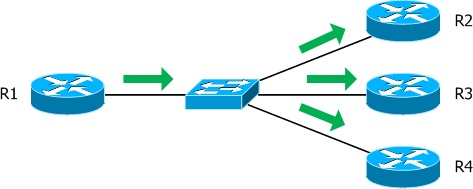
Ethernet networks support broadcasts; a single packet transmitted by a device can be multiplied by the medium (in this case an Ethernet switch) so that every other end point receives a copy. This is advantageous not only in bandwidth savings, but also in facilitating automatic neighbor discovery.
In the example pictured above, R1 can multicast (a broadcast intended only for certain recipients) an OSPF hello message to the link, knowing that all other OSPF routers connected to the link will receive it and reply with their own multicast message. Consequently, neighbors can quickly identify each other and form adjacencies without knowing addresses beforehand. Isn't that convenient?
OSPF routers on a multiaccess segment will elect a designated router (DR) and backup designated router (BDR) with which all non-designated routers will form an adjacency. This is to ensure that the number of adjacencies maintained does not grow too large; a segment containing ten routers would require 45 adjacencies to form a mesh, but only 17 when a DR and BDR are in place.
Non-Broadcast
Unfortunately, not all multiaccess technologies support broadcast transmissions. Frame relay and ATM are probably the most common examples of non-broadcast transport, requiring individual permanent virtual circuits (PVCs) to be configured between end points.
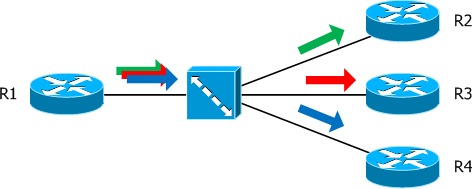
Notice in the frame relay topology pictured above, R1 must craft and transmit an individual packet for every destination he wants to reach. Aside from being horribly inefficient with regard to bandwidth, this limitation requires the router to know the addresses of his neighbors before he can communicate to them.
OSPF can operate in one of two modes across a non-broadcast network: non-broadcast multi-access (NBMA) or point-to-multipoint. Each of these topologies tackles the absence of broadcast capability from a different direction.
Non-Broadcast Multi-Access (NBMA)
An NBMA segment emulates the function of a broadcast network. Every router on the segment must be configured with the IP address of each of its neighbors. OSPF hello packets are then individually transmitted as unicast packets to each adjacent neighbor.
As in a true broadcast network, a DR and BDR are elected to limit the number of adjacencies formed.
Point-to-Multipoint
A point-to-multipoint configuration approaches the non-broadcast limitation in a different manner. Rather than trying to emulate broadcast capability, it seeks to organize the PVCs into a collection of point-to-point networks. Hello packets must still be replicated and transmitted individually to each neighbor, but the multipoint approach offers two distinct advantages: no DR/BDR is needed, and the emulated point-to-point links can occupy a common subnet.
All routers attached to a non-broadcast network must be manually configured to recognize it as a point-to-multipoint segment:
Router(config-if)# ip ospf network point-to-multipoint [non-broadcast]
The non-broadcast parameter can be appended to the OSPF network type to force unicasting of packets rather than relying on multicast. This might be necessary when dynamic circuits are in use.
Update: Ready for more? Check out the follow-up article on OSPF area types!
Posted in Routing
Comments
April 25, 2009 at 5:35 p.m. UTC
this is really helpful.
thanks mate
November 30, 2009 at 10:55 a.m. UTC
Thank you. Which one is the most applicable in IP/MPLS Infrastuctures?
All the Best, Momo.
January 7, 2010 at 8:55 a.m. UTC
I was recently plagued by OSPF neighbors on the Hub router were flapping on a Frame-relay+OSPF setup.
These debug messages were appearing:
OSPF: Cannot see ourself in hello from X.X.X.X on Serial1/0, state INIT
After much debugging and frustration i realised that the "broadcast" parameter was missing from the Hub's "frame map ip " statements, which means that the Multicast'd HELLO packets from Hub to Spoke(s) wasn't arriving at the spokes and that the HELLO from the spoke(s) to hub didn't contain the Hub Router-ID in the "seen" list, causing a new adjacency to be formed and the existing one to be torn down.
OSPF basics: When OSPF Neighbours send Hello's, they include a list Router-IDs "seen" on that specific interface, before moving to 2WAY
October 12, 2011 at 2:19 p.m. UTC
Thank you very much...really very helpful.. clear all misunderstandings...
March 1, 2012 at 5:48 p.m. UTC
very helpful
April 12, 2012 at 10:02 a.m. UTC
Very halpful
Thank u bhaiya !
May 31, 2012 at 12:44 p.m. UTC
Great post! Exactly what I was searching for!
Regards!
Markus
August 23, 2012 at 11:10 p.m. UTC
Thanks stretch this gives a clear idea bout ospf network types. You saved my day.
September 6, 2012 at 4:29 p.m. UTC
Hey,
I think this might be slightly wrong,
"...a network of five routers would require 20 adjacencies to form a mesh, but only 7 when a DR and BDR are in place."
I am just after drawing it out and surely it is 7 when DB and BDR are elected, but full mesh between 5 routers requires only 10 links, and not 20???
Unless I'm doing something wrong ???
Thanks
September 7, 2012 at 12:55 a.m. UTC
@Arthur: You're right. I've modified the example to better illustrate the difference. Thanks for catching that!
A segment containing ten routers would require 45 adjacencies to form a mesh, but only 17 when a DR and BDR are in place
September 26, 2012 at 12:32 p.m. UTC
really prooved helpful
October 30, 2012 at 6:42 a.m. UTC
Awesome work. Thanks !
November 20, 2012 at 3:39 a.m. UTC
Jeremy,
This is a very simple and straight forward explanation of the OSPF network types. Thank you. This cleared a few doubts in my head.
Regards,
Mayur
April 20, 2013 at 8:58 p.m. UTC
Very clear explanation. I've been grappling with the difference for long time. This really saved my day.
regards
raji
January 7, 2014 at 2:49 p.m. UTC
Very good. Thanks.
January 29, 2014 at 6:59 a.m. UTC
Thank you so much, i was wandering here and there for clear explanation on ospf network types, finally got the crystal clear, short and sweet explanation.
good job
December 21, 2014 at 3:57 a.m. UTC
This statement is incorrect: "Hello packets must still be replicated and transmitted individually to each neighbor".
When using the OSPF point-to-multipoint network type neighbors are automatically discovered via multicast hellos to 224.0.0.5.
January 11, 2015 at 10:31 a.m. UTC
thanks man for the explanation..this part often confuses me.
June 10, 2015 at 7:49 a.m. UTC
How would you explain the fact adjacency comes to FULL state if: R1 connected with p2p interface to R2 with broadcast iface? And no matter that adj is FULL, R1 cant reach R2 with its topology info, since it seems to not look into received LSA type 2.
Is it against RFC or not?
July 23, 2015 at 4:40 p.m. UTC
I was asked in an interview that how does a new ospf router even come to know what type of ospf network it is?? Can anybody answer.
December 31, 2015 at 2:51 p.m. UTC
Best explanation I have found on this. Excellent.
May 6, 2016 at 5:58 a.m. UTC
Jermy, I can't explain how much I have learnt from packetlife.
August 11, 2016 at 5:58 a.m. UTC
I am a regular visitor of your blog and learnt a lot from the cheat sheets and key notes available on your blog. Hope, you will continue to update the same. Thanks a lot brother.
August 25, 2016 at 6:16 a.m. UTC
Very information and explain very well in simple way Well done, very good job has done. Really thankful to you