

The premiere source of truth powering network automation. Open and extensible, trusted by thousands.

NetBox is now available as a managed cloud solution! Stop worrying about your tooling and get back to building networks.
Dynamic Multipoint VPN (DMVPN)
By stretch | Wednesday, July 23, 2008 at 3:44 a.m. UTC
Paul Lavelle wrote in recently to share his experience building a DMVPN lab. He suggested it would make a good blog topic and I agreed. If you're not quite comfortable with GRE tunneling yet, have a look over Visualizing tunnels before continuing.
DMVPN Operation
A Dynamic Multipoint VPN is an evolved iteration of hub and spoke tunneling (note that DMVPN itself is not a protocol, but merely a design concept). A generic hub and spoke topology implements static tunnels (using GRE or IPsec, typically) between a centrally located hub router and its spokes, which generally attach branch offices. Each new spoke requires additional configuration on the hub router, and traffic between spokes must be detoured through the hub to exit one tunnel and enter another. While this may be an acceptable solution on a small scale, it easily grows unwieldy as spokes multiply in number.
DMVPN offers an elegant solution to this problem: multipoint GRE tunneling. Recall that a GRE tunnel encapsulates IP packets with a GRE header and a new IP header for transport across an untrusted network. Point-to-point GRE tunnels have exactly two endpoints, and each tunnel on a router requires a separate virtual interface with its own independent configuration. Conversely, a multipoint GRE tunnel allows for more than two endpoints, and is treated as a non-broadcast multiaccess (NBMA) network.
Our lab:
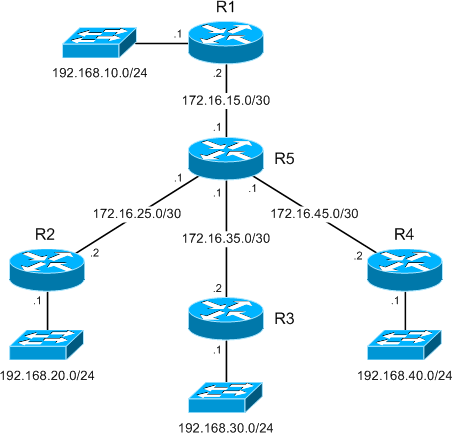
Formation of multipoint GRE tunnels:
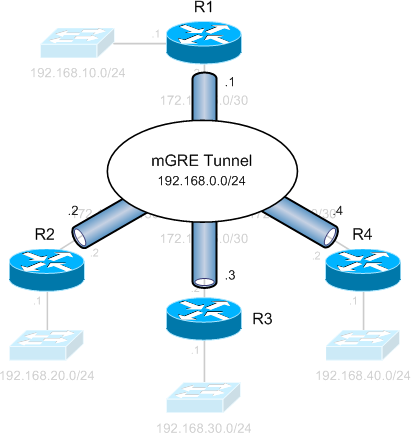
While a legacy hub and spoke setup would require three separate tunnels spanning from R1 to each of the spoke routers, we see that multipoint GRE allows all four routers to have a single tunnel interface in the same IP subnet (192.168.0.0/24). This NBMA configuration is enabled by Next Hop Resolution Protocol, which allows multipoint tunnels to be built dynamically.
Next Hop Resolution Protocol (NHRP)
NHRP (defined in RFC 2332) is the catalyst which facilitates dynamic tunnel establishment, providing tunnel-to-physical interface address resolution. NHRP clients (spoke routers) issue requests to the next hop server (hub router) to obtain the physical address of another spoke router.
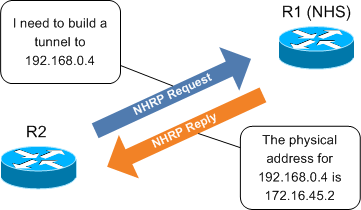
It is interesting to note that, in our scenario, designation as the NHS is the only attribute which distinguishes R1 as the hub router.
DMVPN Configuration
Let's start by examining the configuration of R1:
interface FastEthernet0/0
 ip address 172.16.15.2 255.255.255.252
!
interface Tunnel0
 ip address 192.168.0.1 255.255.255.0
 ip nhrp map multicast dynamic
 ip nhrp network-id 1
 tunnel source 172.16.15.2
 tunnel mode gre multipoint
The first thing you're likely to notice is that the tunnel does not have an explicit destination specified. This is because multipoint tunnels are built dynamically from the DMVPN spokes to the hub router; the hub router doesn't need to be preconfigured with spoke addresses. Also note that the tunnel mode has been designated as multipoint GRE. ip nhrp network-id 1 uniquely identifies the DMVPN network; tunnels will not form between routers with differing network IDs. ip nhrp multicast dynamic enables forwarding of multicast traffic across the tunnel to dynamic spokes (required by most routing protocols).
The configuration of spoke routers is very similar to that of the hub. The configuration presented here is taken from R2.
interface FastEthernet0/0
 ip address 172.16.25.2 255.255.255.252
!
interface Tunnel0
 ip address 192.168.0.2 255.255.255.0
 ip nhrp map 192.168.0.1 172.16.15.2
 ip nhrp map multicast 172.16.15.2
 ip nhrp network-id 1
 ip nhrp nhs 192.168.0.1
 tunnel source 172.16.25.2
 tunnel mode gre multipoint
You'll notice two new commands in addition to those found on the hub. ip nhrp nhs 192.168.0.1 designates R1 as the NHS (the only functionality unique to the hub router), and ip nhrp map 192.168.0.1 172.16.15.2 statically maps the NHS address to R1's physical address. The ip nhrp multicast command also differs slightly from its application on the hub in that multicast traffic is only being allowed from spokes to the hub, not from spoke to spoke.
After completing the tunnel configuration on each router, we can verify that DMVPN sessions have been established between the hub and each spoke:
R1# show dmvpn
Legend: Attrb --> S - Static, D - Dynamic, I - Incomplete
    N - NATed, L - Local, X - No Socket
    # Ent --> Number of NHRP entries with same NBMA peer

Tunnel0, Type:Hub, NHRP Peers:3,
 # Ent  Peer NBMA Addr Peer Tunnel Add State  UpDn Tm Attrb
 ----- --------------- --------------- ----- -------- -----
 1     172.16.25.2     192.168.0.2    UP 00:57:47 D
 1     172.16.35.2     192.168.0.3    UP 00:45:56 D
 1     172.16.45.2     192.168.0.4    UP 00:45:46 D
Dynamic Tunneling
While DMVPN certainly provides a tidy configuration, its brilliance lies in its ability to dynamically establish spoke-to-spoke tunnels. In a legacy hub and spoke design, a packet destined from R2 to R4 would need to be routed through R1, to exit the R2 tunnel and be reencapsulated to enter the R4 tunnel. Clearly a better path lies directly via R5, and DMVPN allows us to take advantage of this.
Check out this packet capture of traffic from R2 to R4. Traffic initially follows the path through R1 as described above, while a dynamic tunnel is built from R2 to R4 using NHRP. After the new tunnel has been established, traffic flows across it, bypassing R1 completely. We can see a new tunnel has been established after traffic destined for R4 has been detected:
R2# show dmvpn
...

Tunnel0, Type:Spoke, NHRP Peers:1,
 # Ent  Peer NBMA Addr Peer Tunnel Add State  UpDn Tm Attrb
 ----- --------------- --------------- ----- -------- -----
 1     172.16.15.2     192.168.0.1    UP 01:08:02 S

R2# ping 192.168.0.4

Type escape sequence to abort.
Sending 5, 100-byte ICMP Echos to 192.168.0.4, timeout is 2 seconds:
!!!!!
Success rate is 100 percent (5/5), round-trip min/avg/max = 28/37/56 ms

R2# show dmvpn
...

Tunnel0, Type:Spoke, NHRP Peers:2,
 # Ent  Peer NBMA Addr Peer Tunnel Add State  UpDn Tm Attrb
 ----- --------------- --------------- ----- -------- -----
 1     172.16.15.2     192.168.0.1    UP 01:08:27 S
 1     172.16.45.2     192.168.0.4    UP 00:00:03 D
Notice that the tunnel to R4 has been flagged as dynamic, in contrast to the static tunnel to the hub/NHS.
Adding Crypto
Up to this point the tunnels have been configured as cleartext for the sake of simplicity, but in the real world we probably want to include IPsec encryption to protect tunnels traversing an untrusted path. Fortunately, this is as simple as applying an IPsec protection policy to the tunnel interface on each router. (For a brief review of IPsec configuration, check out IPsec quick and dirty.) A bare IPsec profile using a pre-shared ISAKMP key is included below for demonstration.
crypto isakmp policy 10
 authentication pre-share
crypto isakmp key P4ssw0rd address 172.16.0.0 255.255.0.0
!
crypto ipsec transform-set MyTransformSet esp-aes esp-sha-hmac
!
crypto ipsec profile MyProfile
 set transform-set MyTransformSet
!
interface Tunnel0
 tunnel protection ipsec profile MyProfile
After bumping the tunnel interfaces, we can see the DMVPN sessions have been rebuilt, this time sporting some slick military-grade encryption.
R1# show dmvpn
...

Tunnel0, Type:Hub, NHRP Peers:3,
 # Ent  Peer NBMA Addr Peer Tunnel Add State  UpDn Tm Attrb
 ----- --------------- --------------- ----- -------- -----
 1     172.16.25.2     192.168.0.2    UP 00:02:28 D
 1     172.16.35.2     192.168.0.3    UP 00:02:26 D
 1     172.16.45.2     192.168.0.4    UP 00:02:25 D

R1# show crypto isakmp sa
IPv4 Crypto ISAKMP SA
dst             src             state          conn-id slot status
172.16.15.2     172.16.35.2     QM_IDLE           1002    0 ACTIVE
172.16.15.2     172.16.25.2     QM_IDLE           1001    0 ACTIVE
172.16.15.2     172.16.45.2     QM_IDLE           1003    0 ACTIVE
Comments
July 23, 2008 at 11:11 a.m. UTC
great writeup, we have been using DMVPN as a backup to our MPLS WAN for about a year now, we have 23 sites, two of them acting as hubs, and it works great. We use business grade cable Internet as the transit.
July 23, 2008 at 6:10 p.m. UTC
How about extending that using VRF-aware hubs?
July 23, 2008 at 10:58 p.m. UTC
Nice.
This explains dmvpn in a way I can understand. The whole site is perfect for as all the examples and cheatsheets have taught me a lot.
Thanks, keep up the great work
Wayne
July 25, 2008 at 9:38 p.m. UTC
Great article. Very inspiring.
August 11, 2008 at 3:45 a.m. UTC
I notice that you were able to get this to work with your ispec settings set to tunnel mode? In our implementation we had to set the mode to transport for the tunnel interfaces to come up. Any comments?
August 18, 2008 at 7:13 a.m. UTC
Cool article. short and effective.
September 25, 2008 at 12:35 p.m. UTC
Hi My boss asked me to test the Cisco DMVPN tecnhologies in a little lab. How many routers and type of routers are necessary to buid this test lab ?
As I undestood, DMVPN is not as secure for Internet connexions. Is this wrong or not ? Or course, GRE is not secure but in DMVPN, GRE tunnels are encapsulated in IPSEC ones.
I think the main profit of DMVPN is to be independant of large manual PSK provisionning tools. Static PSK are not secure even inside private MPLS clouds.
Best Regards Eric
September 27, 2008 at 5:01 a.m. UTC
Which IOS version(s) did you use this on? In my lab I can set up the DMVPN itself and pass traffic over it, but the "show dmvpn" command isn't there. (Sorry, I don't know the IOS versions off the top of my head.)
September 27, 2008 at 5:13 a.m. UTC
@Peter: 12.4(9)T1, which is lucky for me, as the command was apparently introduced just recently in 12.4(9)T.
February 12, 2009 at 12:24 a.m. UTC
Great Article, Thanks
June 24, 2009 at 12:55 p.m. UTC
Fantastic, spent hours trying to get my dmvpn config up using the cisco examples, you just simplified it all and give some great explanations of whats going on ive learnt alot from this article and now have DMVPN over Ipsec Running on our network
Cheers Stretch :D
August 3, 2009 at 8:10 p.m. UTC
This is great! I need to know how we can do DMVPN with two ASA5520 as a HUB-n-Spoke. Can you please sent me the configuration for these.
Thanks
Sie
August 24, 2009 at 3:03 a.m. UTC
Hi Sie. Unfortunately the ASA does not support DMVPN configuration at the moment.
Regards.
October 29, 2010 at 6:05 a.m. UTC
.. updated a customer DMVPN Router today - IOS 12.4(13r)T->12.4(25d) and noticed the missing "show dmvpn" too. WT*!?
DMVPN capability of the ASA would be cool - maybe start with a "spoke only feature" - could be licensed seperately - so customers could use the beautiful 5505 for their small 6-man outpost
Robert
[great blog by the way - my colleagues love your cheat sheets!]
October 31, 2010 at 8:44 p.m. UTC
Hi man i was afraid of DMVPN, i downloaded a lot of documentation but, u show it so clear, i made the lab with the gns3 and all work so good.. thanx a lot man, u saved my life (well.. not literary but almost hehe) Greetings from Spain
December 7, 2010 at 5:40 a.m. UTC
Hi Man, Thanks for such a simple explanation. Going to be very useful for me. -Jana
February 17, 2011 at 12:47 p.m. UTC
Hi Jeremy,
I was looking for someone deal with DMVPN..
I configure DMVPN as backup line for ponit to point line..
My DMVPN configuration is ok. I configure track as well. All backup works fine.
My problem is when I switch to the DMVPN I can only reach to the central site, not to the internet. For internet if I change the default route, eigrp neighbourship is going down.
I decided to configure policy base routing. But in this senerio policy should wite on branch office LAn interface. Problem is when main line come up..all traffic still routing to the DMVPN tunel..
I am lost in config..How can I route all traffic on DMVPN tunnel, without policy base routing. Thank you in advance
March 24, 2011 at 1:01 p.m. UTC
@Kerime
Floating route ?
May 18, 2011 at 5:32 p.m. UTC
Hi everyone,
This example is so much better than the Cisco docs. Thanks so much!
In any case, I'm trying to configure DMVPN and everything is fine except one thing that I can't figure out. The spokes don't distribute routes to each other. I can't ping the inside networks of one spoke from another spoke. I tried using the ip nhrp map multicast dynamic on the spokes and I'm still not seeing anything from EIGRP for the remote inside network even after the dynamic tunnel comes up.
Any ideas how to get this working or what I may be doing wrong?
Cheers! xlloyd
-=========-
Update: I put a default route on each spoke to point to the hub. This causes the routing to work but the spoke isn't seeing the EIGRP route and so it's not using the dynamic tunnel that's built to communicate. It will still go through the hub even though the dynamic tunnel establishes.
-=========-
Update 2:
Figured it out! Split horizon was preventing the routes from being distributed. The following 2 commands at the hub sorted everything out:
no ip split-horizon eigrp AS_number
no ip next-hop-self eigrp AS_number
September 23, 2011 at 12:20 p.m. UTC
I had an interesting issue configuring this on 3 2620 routers running 12-3(22). I followed your example but couldn't get my tunnel interfaces to come up, tunnel was up, line protocol was down It wasn't until I supplied the "tunnel key" command on all 3 of my tunnel interfaces, that the tunnels came up and traffic was flowing fine. Could this have been an IOS issue?
February 24, 2012 at 10:49 p.m. UTC
Interesting Notes:
I lab'ed this up in GNS the other day and the tutorials / command set works great!
The only problem I ran into is dynamic mGRE tunnel teardown and rebuild when a peer NHS becomes unreachable.
This was fixed by using " ip nhrp registration timeout 20." Which resends registration messages every 20 seconds.
You can also use, depending on the IOS version, "if-state nhrp" interface state control to mark interfaces down and remove static routes, then enable backup routing when the mGRE interfaces fail or tunnel interfaces go down.
Thanks Stretch!
February 27, 2012 at 9:02 p.m. UTC
As always the best understandable explanation on Cisco topics.
Great work, THX.
March 4, 2012 at 5:15 a.m. UTC
Hi,
I wanted to know, how i can implement QOS on mGRE tunnels. Is there a possibility to apply predefined QOS on the tunnel interfaces between the hub and the spokes.
Regards,
Syed Asif Raza
March 7, 2012 at 4:54 p.m. UTC
Very good article, Jeremy. DMVPN has been explained clearly and comprehensibly in this page.
Thanks!
Best regards,
Mateus Gonçalves
Electrical Engineer
May 9, 2012 at 9:28 p.m. UTC
Kudos..it helped me understand DMVPN a lot. Thanks.
July 10, 2012 at 1:56 p.m. UTC
Hi,
I would just like to start of by saying this article is great, it keeps things really simple and is a thousand times betetr than the way Cisco tries to explain it.
However, I do have a question if i wanted all spoke sites to become aware of new spokes automatically could I run a a routing protocol like OSPF outside the tunnel. This way dynamically the addition or removal of spokes could be learnt by other active spokes. Is this possible, so I am effectively talking about running two routing protocols one running through the tunnel and one outside.
Any help would be much appreciated.
Regards,
Kunal
October 23, 2012 at 7:33 p.m. UTC
Hi,
Thanks a lot for this simple and effective article on DMVPN.
October 25, 2012 at 10:58 a.m. UTC
Hi, Excellent explanation .
Assume there are 100s of networks in the router R3. But i need to make a secure traffic only between R1 and 192.168.30.0/24 network on R3. kindly explain how it is possible .
January 15, 2013 at 7:36 a.m. UTC
Excellent & Life(JOB) saving post....
July 30, 2013 at 3:08 p.m. UTC
I also had issues with labbing this in GNS3; The spokes would not dynamically establish themselves with the hub (I could manually map them at the hub and get it to work) until I supplied a tunnel key.
December 4, 2013 at 4:36 a.m. UTC
Great write up. I wish Cisco recruit you to write their technical documentation. You have an ability to teach technology in simple words.
April 24, 2014 at 8:15 p.m. UTC
What is a good clear command (or commands) to have this topology rebuild the tunnels and security associations?
I'm running this in GNS3 and I have to write, save and reload all of the devices anytime I make a change (IE when I added the crypto). Everything comes up when I perform those steps.
June 18, 2014 at 1:09 a.m. UTC
This is great explanation ! Thank you so much Jeremy.
September 12, 2014 at 5:28 p.m. UTC
Just brilliant, wonderfully well explained :) Cheers
January 20, 2015 at 3:13 p.m. UTC
Hi I setup this DMVPN Lab on GNS3. The issue I have faced is LAN netwrok behind routers do not see each other. As mentioned on the comment by Xlloyd, I included no ip split-horizon eigrp AS_Number on my Tunnel configuration but no improvment. Can someone help me on this please?
I also notice a lot of SSYS Log messages in regards to DUAL-5-NBRCHANGE
February 2, 2015 at 7:42 a.m. UTC
Undoubtly a remarkable explanation. I had been very confused with all these encryptions and vpns etc. Finally tonight i was studying abt DMVPN. watched a video of "Sir" KEITH BARKER https://www.youtube.com/watch?v=C_B9k0l6kEs https://www.youtube.com/watch?v=h5dkRImt7To and after Reading your explanation things actually started making sense to me . :D YOU ARE APPRECIATED
February 24, 2015 at 4:11 p.m. UTC
I tried with different ip nhrp network-id on routers but tunnels are up and working fine. I configured a lab with one hub and three spokes with different network ids for all four routers. Please look into it.
Thanks, Jakes
March 12, 2015 at 9:57 a.m. UTC
hi, just a quick question.. does the tunnel interfaces number on the hub and spoke routers has to be the same ?
March 21, 2015 at 9:14 a.m. UTC
hi, I have a 2951 hub and would like to connect it to 5 spokes, each of a 1941 router.
my question is, how do i get to physically link the hub to 5 different spokes physically, when it has only 3 gigabit eth interfaces?
September 21, 2015 at 6:56 p.m. UTC
Brief, tidy and concise. Thank you.
October 15, 2015 at 6:58 p.m. UTC
I partially disagree. A cisco-tac engineer said it could be done but not in the traditional dmvpn sense. Can you do Hub and Spoke VPN on ASA? - Yes Can you do dynamic routing on ASA? - Yes, now with BGP Since BGP is unicast and not multicast like OSPF, and EIGRP;you can establish a bgp peer across lan-lan vpn tunnel even if its hub and spoke. Jeremy, I am trying to lab this out. The crypto map is a bit tricky as per cisco-tac but at the time I was trying to setup BGP over IPsec VPN but it was between ASA and a Cisco ASR using VTI interface. ASA didn't support VTIs, or GRE for that matter but cisco-tac said there was a way configure the crypto-map as VTI encrypts all traffic. Can you help? Do you can give take a stab at this? Let me know, Thanks
March 9, 2016 at 2:44 a.m. UTC
Great and Simple article. Thanks for sharing this.
April 28, 2016 at 5:02 p.m. UTC
awesome work!!! So does DMVPN only work with GRE tunnels. Can i do it with IPSec...if so can i do it on a cisco ASA?????
July 6, 2016 at 6:12 p.m. UTC
Clear and precise, thanks for taking the effort
August 29, 2016 at 4:14 a.m. UTC
Thank you for such a simple explanation!
September 23, 2016 at 11:18 a.m. UTC
Really well explained Thanks