

The premiere source of truth powering network automation. Open and extensible, trusted by thousands.

NetBox is now available as a managed cloud solution! Stop worrying about your tooling and get back to building networks.
Visio tip: illustrating abridged protocol stacks
By stretch | Friday, December 19, 2008 at 4:23 a.m. UTC
When representing protocol stacks in a network diagram, you generally want to show only the bare minimum, especially if you want to maintain scale. For example, including the unidentified payload of Ethernet frame is unwieldy an conveys no notable information:

One of the stock Visio shapes can come in handy here. Open the Flowchart > Basic Flowchart Shapes stencil set and drag a copy of the Document shape onto the work area. This shape can be rotated and resized to provide a smooth tapered effect on our protocol stack:
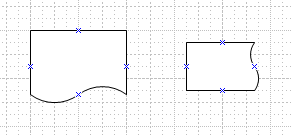

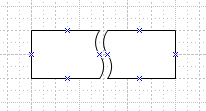
Two copies can also be positioned face to face to create a nice bisection effect:
Posted in Network Diagrams, Visio
Comments
December 23, 2008 at 5:06 p.m. UTC
This is a GREAT TOPIC, tips on proper VISIO network drawings. I know I have a hard time with my team, always all over the place as to what gets on a Visio...
Maybe start the topic or direct me/us to a good place for Visio samples etc...
December 23, 2008 at 5:49 p.m. UTC
@Chris: Well I'm hardly an authority on the "right" way to draw, but I do posts like this on occasion (see the blog archive for more). I also like Visio Guy for random Visio-specific tips.
December 24, 2008 at 3:12 p.m. UTC
Thanks for the feedback. Maybe I should do something about some kind of Network Visio Standard. Hmmmm, me thinkie bout it.
Thanks again, and Merry CHRISTmas.